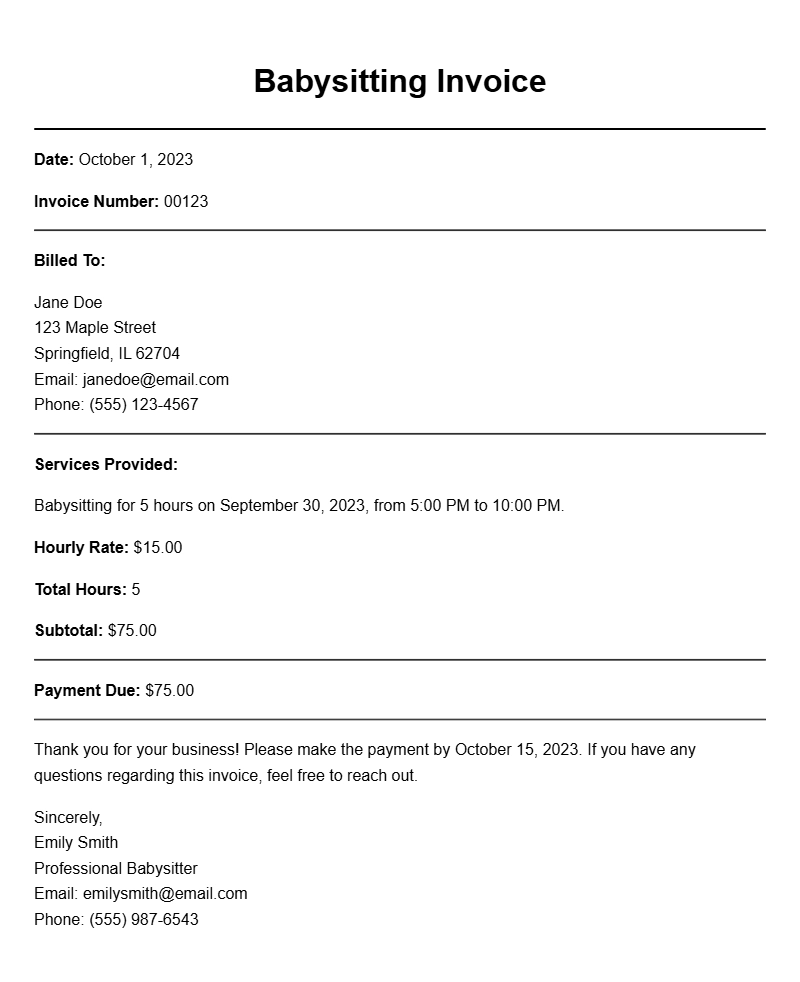
Creating a babysitting invoice can seem daunting, especially if you’re new to babysitting or handling payments. But don’t worry! A well-structured invoice helps you get paid promptly and keeps everything organized. Whether you babysit a few hours a week or manage a busy schedule with multiple families, having a clear invoice can make your life easier.
WHAT IS A BABYSITTING INVOICE?
A babysitting invoice is a document that outlines the services you provided, the amount owed, and any relevant payment details. It serves as a formal request for payment from parents or guardians after you’ve taken care of their children. This document is not only a record of what you’ve done but also helps to ensure transparency between you and the families you work with.
WHEN IS IT USED?
You should use a babysitting invoice after each job or at the end of a billing period. If you babysit regularly for a family, sending a monthly invoice can help both you and the parents keep track of payments. It’s a good practice to provide the invoice soon after the service is rendered to ensure timely payment.
KEY COMPONENTS OF A BABYSITTING INVOICE
- Your Name and Contact Information: Include your full name, phone number, and email address.
- Client’s Name and Contact Information: The parent or guardian’s name and details.
- Date of Service: The specific date(s) you provided babysitting services.
- Hours Worked: Total hours you babysat and any breakdown by day, if necessary.
- Rate: Your hourly rate or flat fee for the service.
- Total Amount Due: The total payment expected.
- Payment Instructions: How you prefer to be paid (cash, check, PayPal, etc.).
STEP-BY-STEP WRITING GUIDE
Follow these steps to create your babysitting invoice:
- Start with your name and contact information at the top of the invoice.
- Next, add the client’s name and their contact details.
- Include the date of service and a breakdown of hours worked.
- Clearly state your hourly rate or total fee.
- Calculate the total amount due.
- Provide payment instructions to ensure you get paid promptly.
REALISTIC EXAMPLES AND TEMPLATES
Here’s a simple template to help you get started:
Your Name
Your Phone Number
Your Email
Client Name
Client Phone Number
Client Email
Date: [Insert Date]
Service Details:
– Babysitting from [Start Time] to [End Time]
– Total Hours: [Total Hours Worked]
Rate: $[Your Hourly Rate] per hour
Total Amount Due: $[Total Amount]
Payment Instructions: Please pay via [Cash/Check/PayPal].
COMMON MISTAKES TO AVOID
- Not including your contact information, which can delay payment.
- Forgetting to specify the payment method, leading to confusion.
- Failing to double-check the total amount before sending the invoice.
TIPS FOR CUSTOMIZATION
Feel free to customize your babysitting invoice based on your style and the needs of your clients. You might want to add a personal touch, like a thank-you note or a reminder of any future bookings. If you regularly babysit for several families, consider using a template to maintain consistency and save time.
When you take the time to create a clear babysitting invoice, you set the tone for professionalism and trust with the families you work with. This simple task can lead to smoother transactions and happier clients.
Sample Documents for Multiple Use Cases