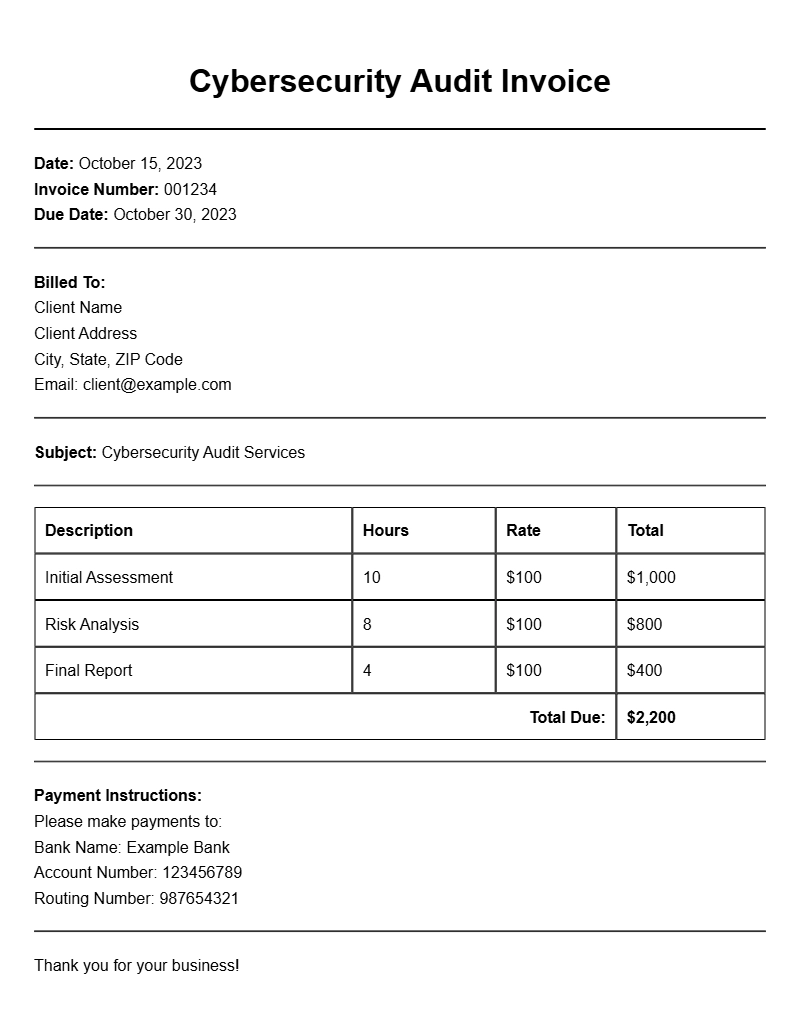
Creating a cybersecurity audit invoice might seem daunting, especially if you’re new to this field. However, having a clear and structured invoice template can simplify the process and ensure you get paid promptly. Let’s break down what a cybersecurity audit invoice is, when to use it, and how to create one that meets your needs.
WHAT IS A CYBERSECURITY AUDIT INVOICE TEMPLATE?
A cybersecurity audit invoice template is a pre-formatted document that outlines the services provided during a cybersecurity audit, along with the associated costs. This invoice serves as a formal request for payment from your client, detailing the work completed and the fees charged. Using a template helps maintain professionalism and ensures you don’t miss any important information.
WHEN IS IT USED?
This type of invoice is typically used after completing a cybersecurity audit for a client. Whether you’ve conducted a vulnerability assessment, compliance check, or a full security review, having an invoice ready allows you to request payment efficiently. Clients appreciate clear, detailed invoices as they help in their accounting processes.
KEY COMPONENTS OF A CYBERSECURITY AUDIT INVOICE
- Your Business Information: Name, address, contact details, and logo.
- Client Information: Name, company, address, and contact details.
- Invoice Number: A unique identifier for tracking.
- Invoice Date: The date the invoice is issued.
- Payment Due Date: When payment is expected.
- Description of Services: A detailed list of services provided during the audit.
- Cost Breakdown: Itemized list of charges, including any taxes or fees.
- Total Amount Due: The total payment requested.
- Payment Instructions: How to pay, including bank details or links to online payment options.
STEP-BY-STEP WRITING GUIDE
- Gather Information: Collect all necessary details about your business and the client.
- Choose a Template: Use a pre-designed template or create one from scratch.
- Fill in Your Information: Add your business name, logo, and contact details at the top.
- Add Client Details: Include the client’s name and contact information below yours.
- Assign an Invoice Number: Create a unique number for this invoice.
- Detail the Services: Write a clear description of what services were provided.
- List Prices: Include the cost for each service and calculate the total amount due.
- Include Payment Terms: Specify how and when payment should be made.
- Review: Check for errors and ensure all information is accurate.
REALISTIC EXAMPLES/TEMPLATES
Here’s a simple snippet to illustrate what your invoice might look like:
Your Company Name
Your Address
Your City, State, Zip
Your Email
Your Phone Number
Client Name
Client Company
Client Address
Client City, State, Zip
Invoice Number: 001
Invoice Date: [Date]
Due Date: [Due Date]
Description of Services:
– Cybersecurity Vulnerability Assessment: $500
– Compliance Audit: $300
Subtotal: $800
Tax (if applicable): $80
Total Amount Due: $880
Payment Instructions: Please make payment via bank transfer to [Bank Details].
COMMON MISTAKES TO AVOID
- Not including all necessary client information, which can delay payment.
- Failing to itemize services, leading to confusion about charges.
- Omitting payment terms, which can lead to late payments.
TIPS FOR CUSTOMIZATION
Personalizing your invoice template can make a significant difference. Consider these tips:
- Add your branding elements, like colors and fonts, to enhance your company’s image.
- Include a thank-you note or a brief message that reinforces your relationship with the client.
- Adapt the template based on the specific services provided to each client, ensuring relevance.
Creating a cybersecurity audit invoice doesn’t have to be a chore. With a solid template and the right information, you can streamline your billing process and focus more on what you do best—providing top-notch cybersecurity services. If you’re interested in other types of invoices, you might find online tutoring invoice samples, dentist invoice samples, or warehouse consultant invoice templates helpful as well.
Practical Document Examples