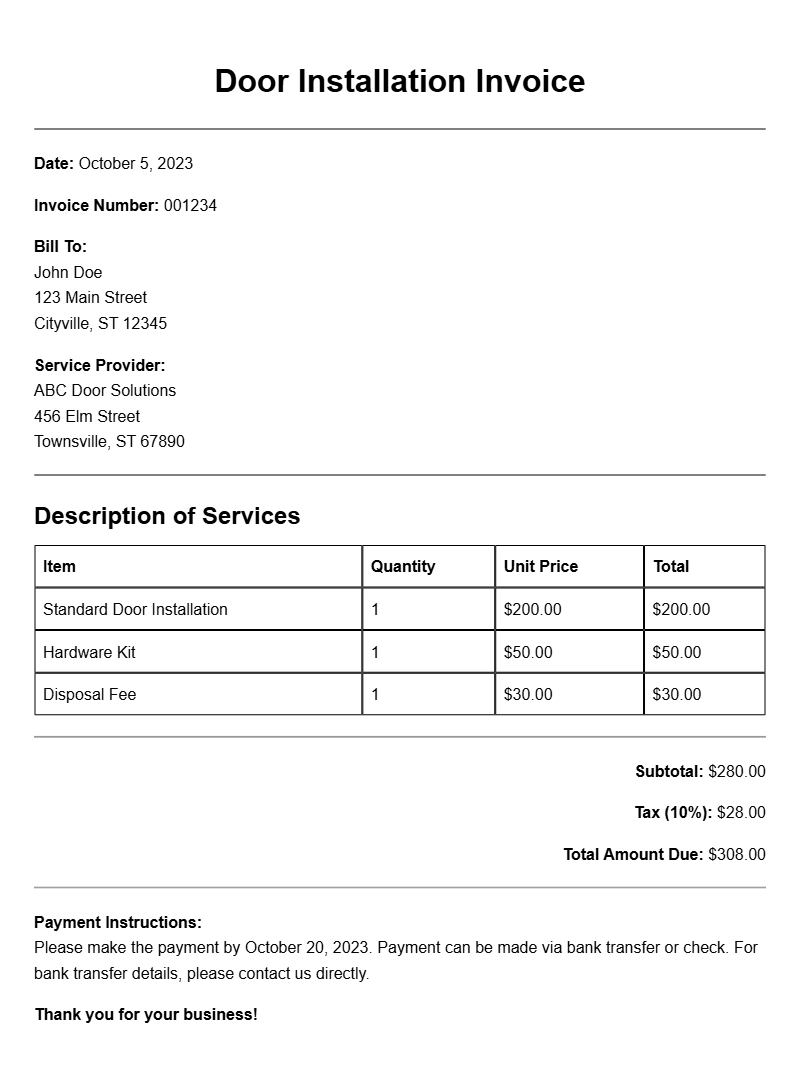
When you’re in the business of installing doors, having a clear and professional invoice is essential. It not only helps you get paid but also reflects your professionalism and attention to detail. If you’re looking for door installation invoice samples, you’ve come to the right place. This guide will walk you through everything you need to know about creating effective invoices for your door installation services.
What is a Door Installation Invoice?
A door installation invoice is a document that outlines the services you provided, the costs involved, and any terms of payment. It serves as a formal request for payment from your client after you’ve completed the work. Beyond just a financial record, it can also serve as proof of the services rendered in case of disputes.
When is it Used?
You’ll use a door installation invoice after you’ve completed a job. Whether it’s a single door installation or part of a larger renovation project, sending an invoice promptly can help ensure you receive payment quickly. It’s a professional way to wrap up a job and maintain good relationships with your clients.
Key Components of a Door Installation Invoice
To create a useful invoice, make sure to include the following sections:
- Your Business Information: Name, address, phone number, and email.
- Client Information: Name and contact details of the client.
- Invoice Number: A unique identifier for tracking purposes.
- Date of Issue: The date the invoice is generated.
- Services Provided: A detailed list of the door installation services rendered.
- Costs: Itemized charges for each service and any materials used.
- Payment Terms: Due date and accepted payment methods.
Step-by-Step Writing Guide
Creating an invoice might seem daunting, but it doesn’t have to be. Here’s a simple step-by-step guide:
- Gather Client Information: Collect all necessary details about your client.
- Create Your Header: Include your business name and contact information at the top.
- Add Client Details: Right below your header, include your client’s information.
- List Services: Clearly outline each service you performed, including installation details.
- Itemize Costs: Break down the costs for each service and any materials used.
- Specify Payment Terms: Clearly state when the payment is due and how it can be made.
- Review and Send: Double-check for accuracy before sending it to your client.
Realistic Examples/Templates
Here’s a simple template you can adapt for your needs:
Your Business Name
Your Address
Your City, State, Zip
Your Phone Number
Your Email
Invoice #12345
Date: January 1, 2023
Bill To:
Client Name
Client Address
Client City, State, Zip
Services Provided:
– Installation of front door: $200
– Installation of back door: $150
– Materials (hinges, knobs): $50
Total Amount Due: $400
Payment Terms:
Due by: January 15, 2023
Payment methods: Check, Credit Card, PayPal
Common Mistakes to Avoid
When creating your invoices, watch out for these pitfalls:
- Omitting Important Information: Ensure all necessary details are included to prevent confusion.
- Errors in Pricing: Double-check your calculations to avoid undercharging or overcharging.
- Unclear Payment Terms: Be specific about when and how payments should be made.
Tips for Customization
Make your invoice stand out by personalizing it:
- Add your logo for branding.
- Use a consistent color scheme that matches your business identity.
- Include a thank-you note or follow-up message to express appreciation for their business.
Creating an effective door installation invoice doesn’t have to be complicated. With a clear structure and attention to detail, you can ensure your invoices look professional and facilitate timely payments. For more templates, check out resources for painter invoices, architect invoices, or event planner invoices to give you even more ideas. Get started crafting your invoice today!
Editable Document Format Examples