If you run a business, you know that staying organized is key to success. One critical aspect of this is managing your invoices. Printing service invoice templates can simplify this process, allowing you to create professional invoices quickly and efficiently. This article breaks down what these templates are, when to use them, and how to customize them for your specific needs.
What Are Printing Service Invoice Templates?
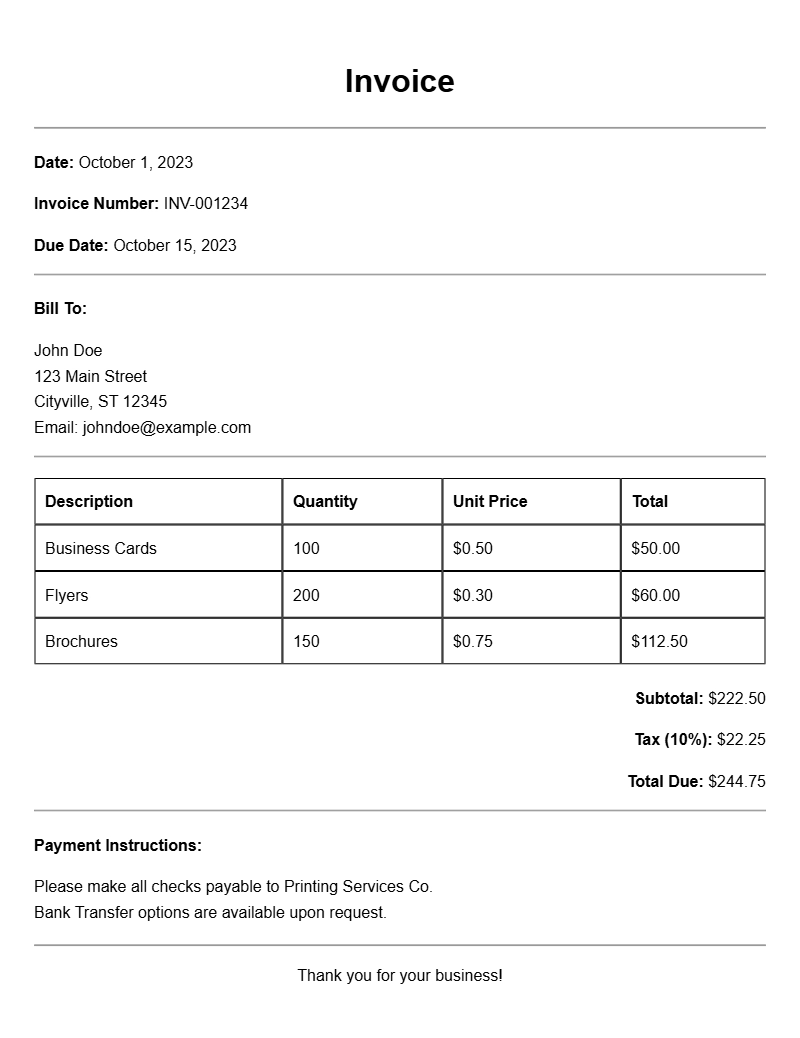
Printing service invoice templates are pre-designed documents that help businesses bill their clients for printing services. These templates typically include sections for your company information, client details, a description of the services rendered, and payment terms. They not only save time but also ensure that you maintain a consistent and professional appearance in your financial dealings.
When to Use Printing Service Invoice Templates
You’ll find these templates useful after completing a printing job. Whether you’re a freelance graphic designer, a small printing shop, or a large printing company, invoicing clients promptly is crucial for cash flow. Using a template can help you avoid errors and keep everything organized, making it easier for clients to understand what they’re being billed for.
Key Components of a Printing Service Invoice
When creating your invoice, be sure to include these essential sections:
- Your Business Information: Name, address, phone number, and email.
- Client Information: Name and contact details of the client.
- Invoice Number: A unique identifier for tracking purposes.
- Date of Issue: When the invoice is created.
- Description of Services: Details of printing services provided, including quantities and rates.
- Total Amount Due: The final amount payable, including taxes if applicable.
- Payment Terms: Due date and accepted payment methods.
Step-by-Step Guide to Writing Your Invoice
- Start with your business name and contact information at the top.
- Include the client’s name and contact information beneath yours.
- Add a unique invoice number and the date of issue.
- List the services rendered in detail, making sure to include the quantity, description, and price for each.
- Calculate the total amount due.
- Include payment terms and methods.
Realistic Examples of Invoice Templates
Here’s a simple example of what your invoice might look like:
Your Business Name
123 Business Lane
City, State, ZIP
Email: yourbusiness@email.com
Phone: (123) 456-7890
Invoice To:
Client Name
456 Client Ave
City, State, ZIP
Invoice Number: 001
Date: [Insert Date]
Description of Services:
– Printing Service 1: 100 copies @ $0.50 each = $50.00
– Printing Service 2: 50 copies @ $1.00 each = $50.00
Total Amount Due: $100.00
Payment Terms: Due within 30 days. Accepted methods: Credit Card, PayPal.
Common Mistakes to Avoid
- Neglecting to include a unique invoice number can lead to confusion.
- Forgetting to specify payment terms might delay payment.
- Not double-checking for typos or errors can hurt your professional image.
Tips for Customization
To make your invoice stand out:
- Add your logo for branding.
- Use a consistent color scheme that matches your business identity.
- Consider including a personalized note thanking the client for their business.
Creating a solid invoice using printing service invoice templates can save time and help you maintain professionalism. Take the time to customize your templates, and you’ll find that this small effort can make a big difference in your billing process. For more specific scenarios, you might also want to check out consultation invoice templates or even bridal shower invoice samples for inspiration.
Sample Documents for Multiple Use Cases