When planning a school event, whether it’s a fundraiser, sports day, or a community meeting, managing finances can quickly become overwhelming. One of the most practical tools for handling these transactions is an invoice. School event invoice templates can simplify this process, making it easier to track expenses and communicate with vendors or sponsors. Let’s explore the ins and outs of using these templates effectively.
WHAT IS A SCHOOL EVENT INVOICE TEMPLATE?
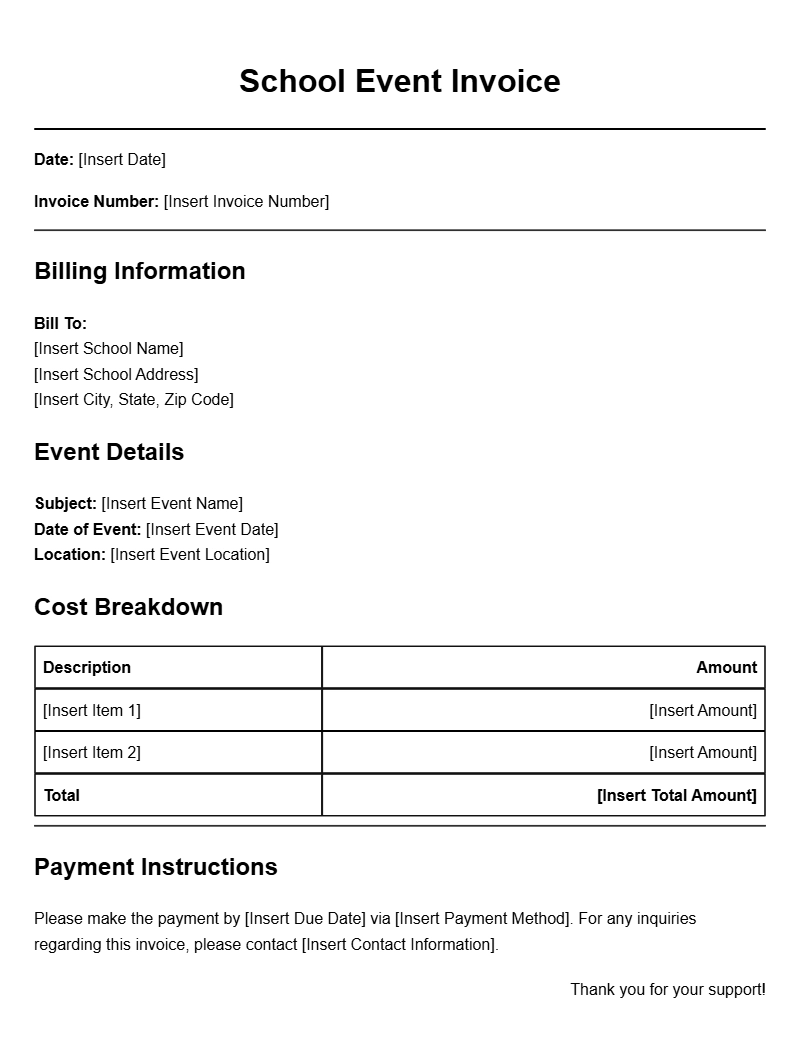
A school event invoice template is a pre-designed document that helps you itemize and request payment for services or goods related to an event. It usually includes sections for listing services provided, costs, payment terms, and contact details. Using a template saves time and ensures you don’t miss any important information.
WHEN IS IT USED?
You’ll find these templates useful in various scenarios, such as:
- Coordinating with vendors for catering, equipment rental, or entertainment.
- Billing sponsors for their contributions to the event.
- Charging attendees for tickets or merchandise.
Having a structured invoice helps maintain clarity on financial transactions, which is essential for effective budgeting and transparency.
KEY COMPONENTS OF A SCHOOL EVENT INVOICE
While templates may vary, most effective school event invoices contain the following sections:
- Header: Includes the school’s name, logo, and contact information.
- Invoice Number: A unique identifier for tracking purposes.
- Date: The date the invoice is issued.
- Recipient Information: The name and contact details of the person or organization being billed.
- Description of Services: A detailed breakdown of what is being billed.
- Total Amount Due: Clearly state the total, including any applicable taxes or fees.
- Payment Terms: Specify when payment is due and acceptable payment methods.
STEP-BY-STEP WRITING GUIDE
Creating your invoice can be straightforward. Here’s how to do it:
- Choose a Template: Start with a basic template that suits your needs. You can find many free options online.
- Fill in Your School Details: Add your school’s name, logo, and contact information at the top.
- Assign an Invoice Number: This helps you keep track of your invoices.
- Include the Date: Make sure to note the date of issue.
- Detail the Services: List all services or items provided, along with their costs.
- Calculate the Total: Add up all charges and include any taxes.
- Set Payment Terms: Clear instructions on how and when to pay.
REALISTIC EXAMPLES/TEMPLATES
Here’s a simple example of what your invoice might look like:
School Event Invoice
———————-
School Name: XYZ Elementary
Address: 123 School Lane, Hometown, ST 12345
Contact: (123) 456-7890
Email: contact@xyzelementary.edu
Invoice Number: 001
Date: October 1, 2023
Bill To:
Mr. John Doe
123 Sponsor Street
Hometown, ST 12345
Description of Services:
– Catering for the Fall Festival: $500
– Equipment Rental: $200
– Entertainment: $300
Total Amount Due: $1000
Payment Terms: Due within 30 days. Acceptable payment methods: Check or bank transfer.
COMMON MISTAKES TO AVOID
When creating invoices, be mindful of these common pitfalls:
- Skipping Details: Always include comprehensive descriptions of services to avoid confusion.
- Not Tracking Invoices: Keep a record of sent invoices to follow up on payments.
- Ignoring Payment Terms: Clearly state payment expectations to facilitate timely payments.
TIPS FOR CUSTOMIZATION
To make your invoice stand out while remaining professional, consider these customization tips:
- Add school colors or fonts for branding.
- Incorporate a personal message or thank you note to strengthen relationships with sponsors or vendors.
- Use online tools to create and send invoices directly, which can streamline the process.
Creating effective school event invoice templates doesn’t have to be a daunting task. With a little attention to detail and some practical tips, you can ensure your invoices are clear, professional, and effective in getting paid. Start customizing your templates today to make your next school event run smoothly.
Sample Documents for Multiple Use Cases