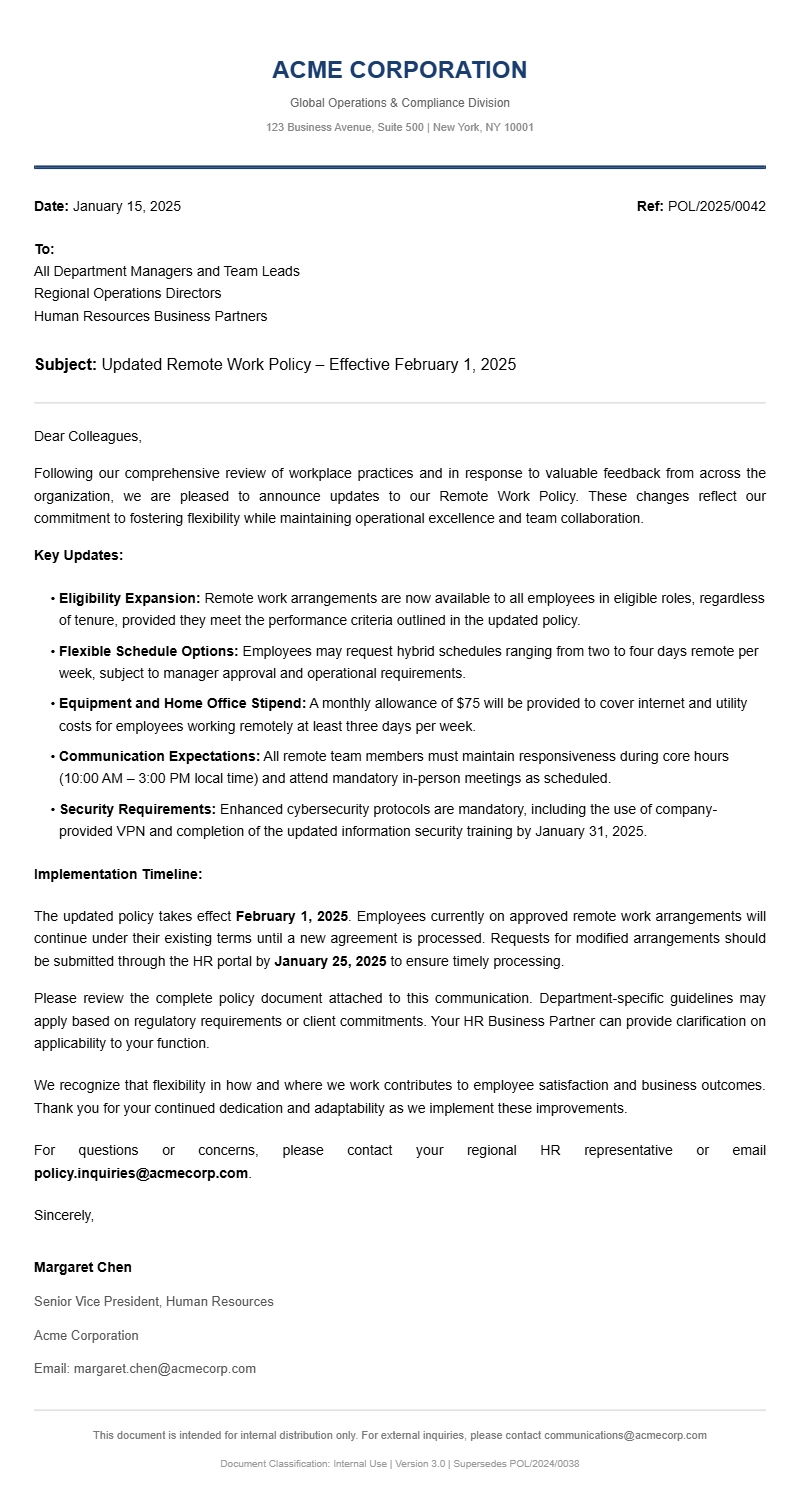
If you manage a team, a department, or any organization that has written policies, you’ve probably needed to tell people about a change at some point. A well‑crafted policy update letter makes that communication clear, respectful, and easy to file for future reference. This guide walks you through what a policy update letter looks like, when to send one, the essential parts to include, and how to tailor a sample to your specific situation.
What Is A Policy Update Letter And When Do You Need One
A policy update letter is a formal notice that informs employees, clients, or stakeholders about a change to an existing policy. It isn’t the policy itself; it’s the short, friendly cover note that points readers to the revised document and explains the “what, why, and when.”
Typical scenarios include:
- Switching to a new remote‑work schedule.
- Adjusting the company’s paid‑time‑off accrual rates.
- Introducing a data‑privacy compliance procedure after a regulatory update.
- Revising a school’s attendance policy after a semester break.
When the change affects daily operations or employee expectations, a dedicated letter keeps everyone on the same page and reduces the number of “what does this mean for me?” questions.
Key Components Of A Policy Update Letter
Even the briefest notice should contain a few standard pieces of information. Missing any of them can leave readers confused or cause compliance gaps.
- Subject line or title – a clear identifier like “Updated Remote Work Policy – Effective March 1, 2026.”
- Opening greeting – personalize with “Dear Team,” or “Dear [Department],” for a warmer tone.
- Brief statement of the change – what is different and why the decision was made.
- Effective date – when the new policy takes effect.
- Summary of key points – bullet list of the most relevant changes, not the entire policy.
- Reference to the full policy document – attach, link, or point to the revised document.
- Contact for questions – a name, email, or internal portal where readers can ask for clarification.
- Signature block – name, title, and department for accountability.
Step‑By‑Step Writing Guide
1. Gather the latest policy details
Before you write, confirm the exact wording of the new rule, the date it becomes enforceable, and any background that explains why the change was made. If you’re unsure, a quick chat with legal, HR, or a senior manager can prevent future misunderstandings.
2. Choose a simple, direct subject line
The subject line is the first thing readers see. Keep it concise: “Policy Update: Revised Expense Reimbursement – Effective Jan 15, 2026.”
3. Write a friendly opening
Avoid stiff phrasing. Something like “Hi everyone, I wanted to let you know about a small but important update to our travel policy.” works better than “Please be advised that the travel policy has been amended.”
4. Explain the “why” briefly
One or two sentences are enough. For example, “We’ve updated the policy to align with the new state tax guidelines and to simplify reimbursement processing.”
5. List the main changes
Use bullet points for quick scanning. Highlight only the items that affect day‑to‑day work. You don’t need to reprint the whole document.
6. Point to the full text
Provide a link, attachment, or location (e.g., “the revised policy is posted on the intranet under Human Resources > Policies”).
7. Add a contact and close
End with an invitation for questions: “If anything is unclear, feel free to reach out to me at [email] or stop by the HR office.”
8. Proofread and test links
Double‑check dates, names, and any attached files. A broken link can undermine the credibility of an otherwise solid communication.
Policy Update Letter Sample (Editable Template)
Below is a ready‑to‑use template you can adapt for most internal policy changes. Replace the bracketed placeholders with your own details.
Simple Policy Update Letter Template
- Subject: Updated Remote Work Policy – Effective March 1, 2026
- Dear Team,
- We have reviewed our remote‑work guidelines and will implement the following changes starting March 1, 2026.
- Key updates
- Employees may work remotely up to three days per week, down from the previous five‑day option.
- All remote days must be logged in the new “Remote Work Tracker” spreadsheet by 10 a.m. the same day.
- Equipment requests for home offices now require manager approval via the new IT portal.
- The full revised policy is attached and also available on the intranet under HR > Policies > Remote Work.
- If you have questions or need clarification, please contact me at janedoe@company.com or stop by the HR office.
- Thank you for your flexibility and cooperation as we adjust to these updates.
- Best regards,
- Jane Doe
- HR Manager, Operations
Policy Update Letter For A Client‑Facing Policy Change
If you need to notify external parties—such as clients about a revised service agreement—a slightly formal tone is appropriate, but you can still keep it friendly.
- Subject: Revised Payment Terms – Effective April 15, 2026
- Dear Valued Client,
- We are updating our payment terms to streamline billing and reduce processing delays.
- What’s changing
- Invoice due date moves from 30 days to 25 days.
- Late payment fee increases from 1 % to 1.5 % per month.
- New online portal for invoice viewing and payment: https://example.com/portal.
- The updated terms are reflected in the attached service agreement and will apply to all invoices issued after April 15, 2026.
- Please review the changes and let us know if you have any concerns by replying to this email.
- Thank you for your continued partnership.
- Sincerely,
- Mark Smith
- Director of Client Services
Common Mistakes To Avoid
- Sending without a clear effective date. Readers need to know when the change kicks in, otherwise they may ignore it until the next payroll cycle.
- Reprinting the entire policy. This overwhelms the reader and buries the key points. Summarize instead and link to the full document.
- Using jargon or legalese. Keep the tone conversational. If you must use technical language, provide a brief plain‑language translation.
- Missing a contact person. Without a go‑to for questions, you’ll get a flood of individual emails that could have been avoided.
- Forgetting to proofread. Typos in dates or names can cause confusion and erode trust in the communication.
Tips For Customizing The Letter
- Match the audience. Employees may appreciate a more personal greeting, while external clients may expect a slightly more formal opening.
- Add a short explanation of the benefit. For instance, “The new expense reimbursement process will reduce paperwork and speed up approvals by 30 %.”
- Use a consistent template across departments. If your organization sends multiple policy updates each year, a reusable format saves time and reinforces brand voice.
- Include visual cues. Even in plain HTML, bolding the effective date and the contact information helps readers locate critical details quickly.
- Test the distribution method. If you’re sending via email, check that attachments are properly encoded and that links open correctly in the recipients’ email clients.
Where To Find Related Letter Templates
If you need other types of formal correspondence, check out these related resources:
- Business apology letter templates for when you need to address a misstep in a professional setting.
- School internship approval letter samples to confirm an intern’s start date and expectations.
- Client onboarding letter templates for welcoming new customers and outlining next steps.
- Salary verification letter samples when an employee needs proof of earnings for a loan or rental application.
- School fee reminder letter templates to politely prompt families about upcoming tuition deadlines.
With the structure and examples above, you can draft a policy update letter that is clear, professional, and ready to send. Customize the tone to fit your organization, double‑check the dates, and you’ll cut down on follow‑up questions while keeping everyone informed.
General Document Template Collection