If you’re looking to land your next role as an executive assistant, having a well-structured resume is essential. It’s the first impression hiring managers get, so choosing the right executive assistant resume template can make a real difference. A clear, tailored resume helps showcase your skills, experience, and professionalism in a way that makes you stand out from the crowd.
What Is an Executive Assistant Resume Template?
An executive assistant resume template is a pre-formatted document designed to help you organize your information effectively. It provides a framework for your skills, work history, and achievements, saving you time and ensuring you include all the necessary sections. These templates are customizable, so you can adapt them to your unique background and the specific job you’re targeting.
When Should You Use an Executive Assistant Resume Template?
These templates are especially useful when you’re starting your job search or updating an existing resume. They work well if you’re transitioning into a new industry or want a fresh layout that highlights your most relevant experience. Whether you’re applying for a senior executive assistant role or a more entry-level position, having a polished template helps present your credentials professionally.
Key Components of an Effective Executive Assistant Resume
- Header with contact info: Your name, phone number, email, and LinkedIn profile.
- Professional summary: A brief paragraph highlighting your experience, key skills, and what you bring to the role.
- Skills section: Focus on tools (like MS Office, calendar management), communication, organization, and problem-solving abilities.
- Work experience: List roles in reverse chronological order with specific accomplishments.
- Education: Degrees, certifications, or relevant training.
- Additional sections: Languages, technical skills, or professional memberships if relevant.
Step-by-Step Guide to Writing Your Executive Assistant Resume
- Choose a suitable template: Select one that matches your style but remains professional.
- Start with a compelling summary: For example, “Organized and proactive executive assistant with 5+ years supporting C-level executives. Skilled in calendar management, travel coordination, and confidential communication.”
- Highlight your skills: Use keywords from the job description. If the role emphasizes project coordination, include that explicitly.
- Detail your work experience: Use bullet points for clarity. For example, “Managed complex calendars for three executives, scheduling meetings across multiple time zones” or “Prepared reports and presentation materials for board meetings.”
- Include measurable achievements: Numbers catch attention. For instance, “Streamlined office procedures, reducing administrative processing time by 20%.”
- Customize for each application: Adjust your summary and skills to match the specific role and company culture.
Sample Executive Assistant Resume Snippets
Here’s a simple example of a professional summary section:
Professional Summary:
Experienced executive assistant with over 6 years supporting senior management in fast-paced environments. Adept at managing schedules, coordinating travel, and preparing confidential reports. Known for exceptional organizational skills and proactive problem-solving.
And a work experience entry:
Executive Assistant | ABC Corporation | June 2020 – Present
- Coordinate daily schedules for C-suite executives, ensuring efficient time management.
- Organize international travel arrangements, including visas, accommodations, and itineraries.
- Prepare and edit reports, presentations, and correspondence, maintaining confidentiality at all times.
- Implemented a new filing system that improved document retrieval time by 30%.
Common Mistakes to Avoid
- Using generic or overly vague descriptions instead of specific achievements.
- Including irrelevant information that doesn’t support your candidacy.
- Failing to tailor your resume for the particular role or company.
- Overloading the document with jargon or keywords without context.
Tips for Customizing Your Resume Template
- Adjust your professional summary to reflect the specific skills and experience the employer values.
- Rearrange skills and experience sections to prioritize what matters most for each application.
- Add or remove sections based on your background—such as language skills or certifications.
- Use the company’s language from the job posting to mirror their priorities.
Once your resume feels polished, review it carefully for typos and formatting inconsistencies. A clean, easy-to-read layout with clear headings and bullet points helps recruiters quickly find key information. If you want to see how your skills compare or need inspiration, exploring templates tailored for roles like teacher resumes or physician assistants can offer ideas for formatting and content.
Using a well-chosen executive assistant resume template makes the process smoother and helps you put your best foot forward. Keep it honest, specific, and tailored, and you’ll increase your chances of catching the hiring manager’s eye.
General Document Template Collection
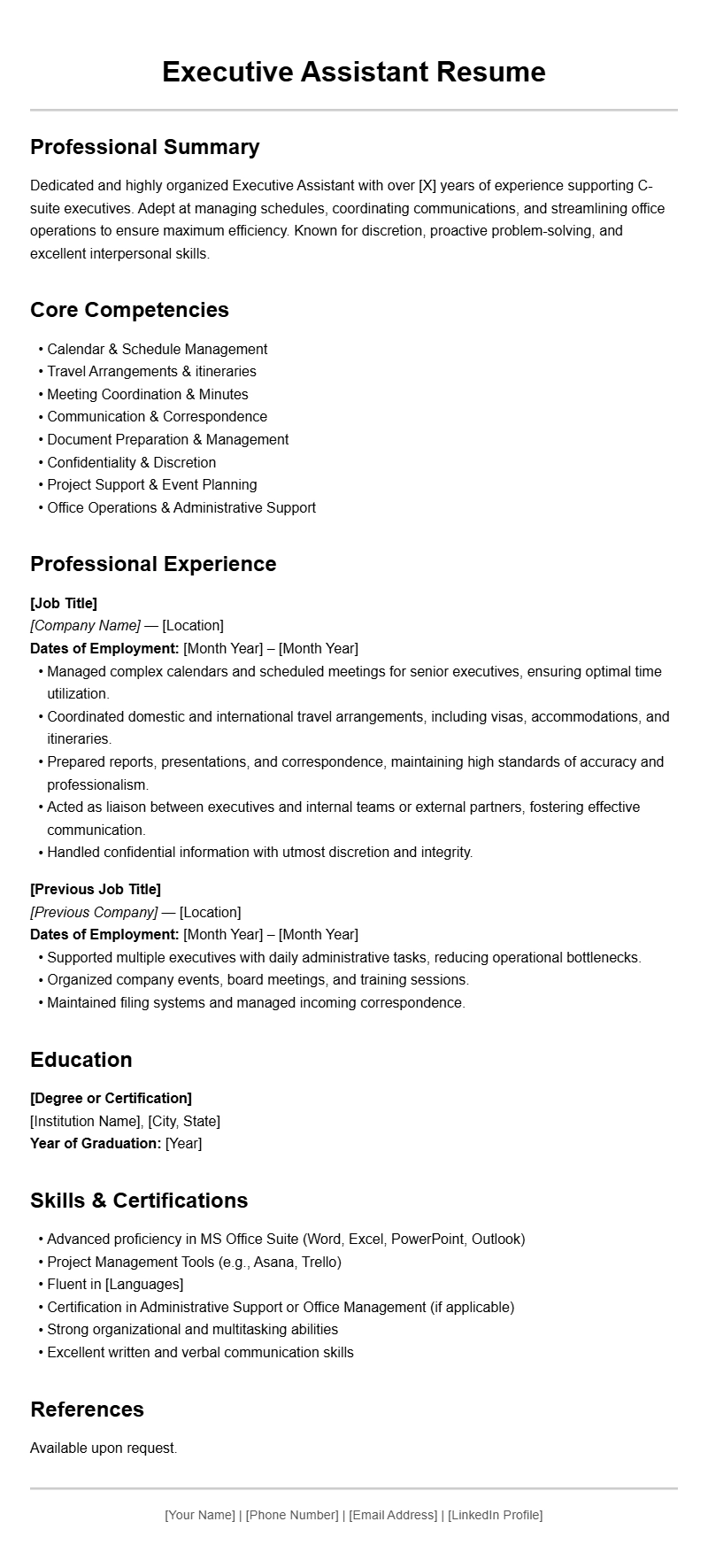
Modern Executive Assistant Resume Template
This professional resume template emphasizes clarity and efficiency, ideal for showcasing your experience as an executive assistant. It begins with a strong summary highlighting organizational skills and key competencies.
Followed by a detailed work experience section, listing roles with bullet points that underline your responsibilities, such as calendar management, travel arrangements, and correspondence handling. Including measurable achievements can set your resume apart.
The skills section should feature both technical skills like scheduling software and soft skills such as communication and discretion. Education and certifications are listed towards the end, emphasizing continuous professional development.
Design tips include using clean fonts, consistent formatting, and ample white space to ensure readability. Tailoring this template to reflect your unique experience will help you stand out in competitive job markets.
Classic Executive Assistant Resume Format
This resume template adopts a traditional layout suited for corporate environments. It opens with a professional summary that succinctly describes your background and what you bring to the role.
The employment history section is organized chronologically, detailing your roles, companies, and tenure, with bullet points highlighting core duties such as document preparation, meeting coordination, and liaison duties.
Additional sections include skills, certifications, and education, formatted neatly to facilitate quick scanning by recruiters. Using a consistent style and formal language ensures a polished appearance.
Including references or a note about available upon request can also be beneficial. This layout caters to applicants with a solid work history seeking a straightforward presentation of their qualifications.
Creative Executive Assistant Resume Layout
If you are applying to a dynamic or innovative company, this creative resume template allows you to showcase your personality while maintaining professionalism. It features a vibrant header with your name and contact info, followed by a summary that emphasizes adaptability and proactive support skills.
The experience section uses visual elements like icons or color highlights to differentiate roles and achievements. Incorporate a skills infographic or bar chart to visually represent your proficiency levels.
Additional sections such as projects or voluntary work can demonstrate initiative and diverse experiences. This template balances creativity with clarity, helping you make a memorable impression.
Entry-Level Executive Assistant Resume Sample
This resume template is tailored for candidates with limited professional experience but strong organizational skills. It starts with a compelling objective statement that aligns your enthusiasm with the company’s needs.
The experience section can include internships, volunteer work, or relevant coursework, formatted as bullet points to highlight transferable skills like time management, communication, and multitasking.
Skills and education are prominently displayed, with certifications or workshops listed to demonstrate your commitment to professional growth. Keep the design simple and clean to focus attention on your potential.
Senior Executive Assistant Resume Sample
This template emphasizes extensive experience and leadership capabilities. It begins with a detailed professional summary, highlighting years of supporting C-level executives and managing complex schedules.
The work experience section features multiple roles with a focus on leadership tasks such as team coordination, process improvement, and strategic support.
Key skills include advanced software proficiency, confidentiality, and crisis management. Certifications like project management or executive training further strengthen your profile.
Design-wise, use a professional tone with clear headings and bullet points to convey your qualifications efficiently. This layout positions you as an experienced and dependable candidate.
Functional Resume for Executive Assistants
This functional resume template focuses on skills and competencies rather than chronological work history, ideal for career changers or those with gaps in employment. It organizes content into skill categories such as communication, organization, technology, and problem-solving.
Each section provides examples of accomplishments and tasks performed, demonstrating your ability to support executives effectively.
Professional experience can be summarized briefly or listed as part of the skills sections. This format allows you to highlight relevant capabilities upfront, making it suitable for diverse career backgrounds.
Targeted Executive Assistant Resume for Corporate Roles
This resume template is tailored for applicants targeting corporate or multinational companies. It includes a strong opening summary that emphasizes adaptability, language skills, and familiarity with global business practices.
Experience is detailed with emphasis on supporting international executives, managing cross-cultural communications, and coordinating global travel logistics.
Skills such as multilingual abilities, proficiency in enterprise software, and cultural sensitivity are highlighted. Certifications related to international business or language proficiency add value.
The design maintains a professional tone with clear sections, ensuring your global readiness is evident at a glance.
Technical Skills Focused Resume for Executive Assistants
This template highlights technical competencies vital for modern executive assistants, such as proficiency with Microsoft Office Suite, project management tools, and communication platforms.
The professional summary underscores your technical expertise and ability to streamline administrative workflows. Work experience sections detail how you’ve implemented new systems or improved processes.
Skills are listed in a dedicated section with proficiency levels, and certifications in specific software or tools are included to reinforce your technical capabilities.
The layout is clean and straightforward, making it easy for hiring managers to assess your technical fit quickly.
Executive Assistant Resume with Focus on Soft Skills
This resume template emphasizes soft skills such as communication, discretion, adaptability, and problem-solving—crucial qualities for high-level support roles. The professional summary highlights these attributes upfront.
The experience section provides concrete examples of how you’ve demonstrated these skills in previous roles, such as managing sensitive information or resolving complex scheduling conflicts.
Additional sections for awards, recognitions, or testimonials can reinforce your interpersonal strengths. The design is elegant and professional, aligning with roles that value personal qualities alongside technical skills.