Creating and sending invoices is a vital part of managing your business finances, and having an accountant invoice template can streamline this process significantly. These templates help ensure you capture all necessary details, making it easier for your clients to understand their charges and for you to keep your records organized. Let’s explore what these templates are, when to use them, and how to design your own.
What is an Accountant Invoice Template?
An accountant invoice template is a pre-formatted document designed to itemize services rendered or products sold, along with payment details. It allows you to present your billing information clearly and professionally, which can enhance your business’s credibility. Whether you’re a freelance accountant, a small business owner, or a service provider, having a tailored invoice template saves time and reduces errors.
When to Use an Accountant Invoice Template
You should use an accountant invoice template every time you need to bill a client for services or products. This includes situations such as:
- After completing a project or service.
- When recurring billing is necessary (like monthly retainers).
- For one-off consultations or services.
Having a consistent template helps maintain professionalism regardless of the billing frequency.
Key Components of an Accountant Invoice
To create an effective invoice, ensure it includes the following components:
- Your Business Information: Name, address, phone number, and email.
- Client Information: Name, address, and contact details of the client.
- Invoice Number: A unique number for tracking purposes.
- Date of Issue: The date when the invoice is generated.
- Due Date: The date by which payment should be made.
- Description of Services: Detailed list of services provided or products sold.
- Payment Terms: Information on accepted payment methods and late fees.
- Total Amount Due: The total cost, including any taxes or fees.
Step-by-Step Guide to Writing an Invoice
Creating your invoice can be straightforward if you follow these steps:
- Open your template in a word processor or spreadsheet software.
- Fill in your business information at the top.
- Insert the client’s details below your information.
- Assign a unique invoice number and add the date of issue.
- List the services provided, including descriptions and costs.
- Add any applicable taxes or discounts.
- Clearly state the total amount due and the payment due date.
- Review for accuracy, then save or export the document as a PDF.
Realistic Examples of Invoice Templates
Here’s a simple invoice template snippet for reference:
Your Business Name
Your Address
Your City, State, Zip
Your Email | Your Phone Number
Client Name
Client Address
Client City, State, Zip
Invoice #: 001
Date: January 1, 2023
Due Date: January 15, 2023
Description | Amount
————————————————
Consulting Services | $500.00
Monthly Retainer | $300.00
————————————————
Total Amount Due: | $800.00
Common Mistakes to Avoid
When creating invoices, be mindful of these common pitfalls:
- Not including a clear due date, which can lead to late payments.
- Forgetting to number your invoices, making tracking difficult.
- Leaving out payment methods, leaving clients unsure of how to pay.
Tips for Customization
Your invoice template should reflect your brand. Here are some customization tips:
- Use your business colors and logo for a professional look.
- Include personalized notes or messages for a personal touch.
- Adjust the layout to suit your needs, ensuring clarity and readability.
By using an accountant invoice template, you can simplify your billing process and present a polished image to your clients. With the right structure and attention to detail, invoicing becomes a breeze, allowing you to focus on what really matters—growing your business.
Document Examples & Template Samples
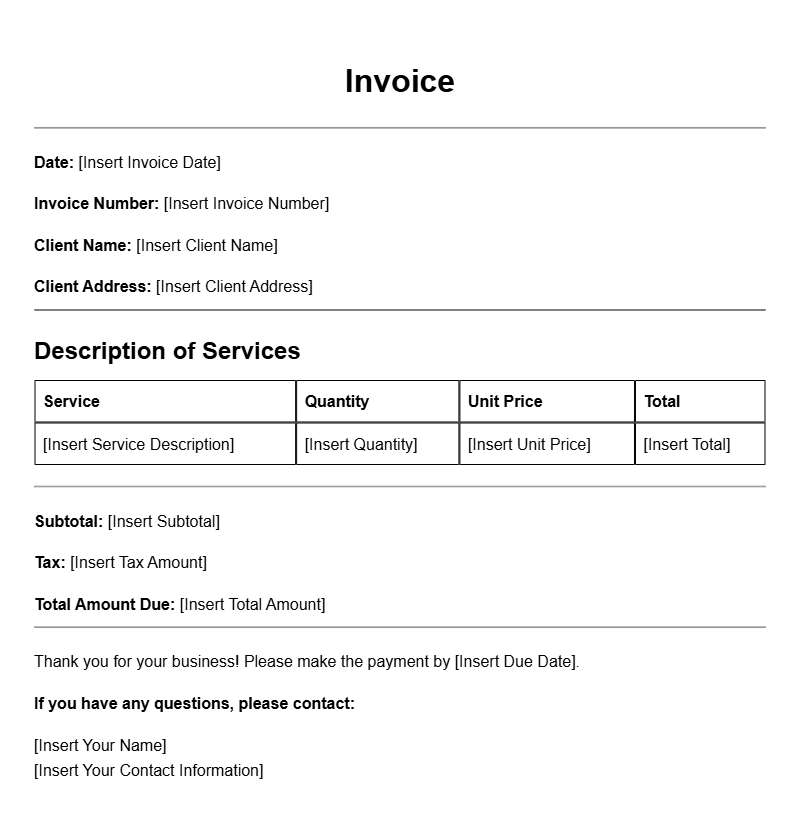
Basic Accountant Invoice Template
Use this simple accountant invoice template for your billing needs. It provides all necessary fields to ensure clarity and professionalism.
Invoice Details:
| Field | Description |
|---|---|
| Invoice Number | 001 |
| Date | 2023-10-01 |
| Due Date | 2023-10-15 |
Client Information:
- Name: John Doe
- Email: johndoe@example.com
- Phone: 123-456-7890
Services Rendered:
- Accounting Consultation – $200
- Tax Preparation – $300
Total Amount Due: $500
Professional Accountant Invoice Template
This professional accountant invoice template is designed for accuracy and organization. Perfect for freelancers and firms alike.
Invoice Summary:
| Item | Amount |
|---|---|
| Consulting Services | $150 |
| Monthly Accounting Fee | $350 |
Client:
Jane Smith
Email: jane.smith@example.com
Phone: 987-654-3210
Total Due: $500
Detailed Accountant Invoice Template
This detailed accountant invoice template provides ample space for all necessary information, ensuring transparency between you and your clients.
Invoice Information:
| Invoice # | Date | Due Date |
|---|---|---|
| 002 | 2023-10-05 | 2023-10-20 |
Bill To:
- Company: ABC Corp
- Contact: Robert Johnson
Services:
- Financial Analysis – $400
- Monthly Reports – $200
Total Due: $600
Simple Invoice Template for Accountants
This simple invoice template is ideal for accountants looking for a straightforward billing solution.
Invoice Details:
| Invoice ID | Date Issued | Payment Due |
|---|---|---|
| 003 | 2023-10-10 | 2023-10-25 |
Client Details:
- Name: Emily Brown
- Email: emily.brown@example.com
Charges:
- Year-End Accounting – $500
- Consultation – $150
Total Due: $650
Comprehensive Accountant Invoice Template
This comprehensive invoice template caters to all your billing needs with detailed breakdowns for services provided.
Invoice Overview:
| Details | Value |
|---|---|
| Invoice Number | 004 |
| Date | 2023-10-15 |
| Due Date | 2023-10-30 |
Client:
- Name: Michael Green
- Company: XYZ Ltd.
Services Provided:
- Tax Filing – $600
- Annual Review – $250
Total Amount Due: $850
Quick Invoice Template for Accountants
This quick invoice template allows accountants to generate invoices swiftly without sacrificing detail.
Invoice Breakdown:
| Invoice # | Date | Payment Due |
|---|---|---|
| 005 | 2023-10-20 | 2023-11-05 |
Client Info:
- Name: Sarah Lee
- Email: sarah.lee@example.com
Services:
- Bookkeeping – $300
- Payroll Processing – $200
Total Due: $500
Elegant Accountant Invoice Template
This elegant invoice template is designed for accountants who want to impress their clients with a refined layout.
Invoice Details:
| Invoice ID | Issued On | Due By |
|---|---|---|
| 006 | 2023-10-25 | 2023-11-10 |
Client:
- Name: David King
- Company: Global Solutions
Services:
- Consultation – $250
- Annual Accounting – $450
Total Due: $700
Customizable Accountant Invoice Template
This customizable invoice template allows accountants to adjust fields according to their specific needs.
Invoice Overview:
| Field | Value |
|---|---|
| Invoice Number | 007 |
| Issue Date | 2023-10-30 |
| Due Date | 2023-11-15 |
Client Information:
- Name: Linda White
- Contact: linda.white@example.com
Service Charges:
- Financial Planning – $500
- Investment Advice – $400
Total Amount Due: $900
Clear Accountant Invoice Template
This clear accountant invoice template is straightforward and easy to understand, making it ideal for all clients.
Invoice Details:
| Invoice ID | Date Issued | Due Date |
|---|---|---|
| 008 | 2023-11-01 | 2023-11-15 |
Client:
- Name: Kevin Brown
- Email: kevin.brown@example.com
Services Provided:
- Quarterly Review – $300
- Tax Strategy – $250
Total Due: $550
Concise Accountant Invoice Template
This concise invoice template is perfect for accountants who prefer a minimalistic approach while maintaining all essential details.
Invoice Summary:
| Invoice # | Date | Due Date |
|---|---|---|
| 009 | 2023-11-05 | 2023-11-20 |
Client Details:
- Name: Rachel Adams
- Phone: 321-654-9870
Service Fees:
- Consultation – $200
- Annual Audit – $450
Total Amount Due: $650