If you’re a business owner, issuing certificates can be a meaningful way to recognize employees, partners, or clients. Whether you’re celebrating milestone achievements or formalizing training completions, having a well-designed certificate template saves time and ensures consistency. This guide walks you through understanding what business owner certificate templates are, how to use them effectively, and tips to customize them for your specific needs.
What Is a Business Owner Certificate Template?
A business owner certificate template is a pre-designed document that you can customize to create official certificates. These templates typically include placeholders for recipient names, dates, signatures, and relevant details about the achievement or recognition. They serve as a starting point, so you don’t have to build a certificate from scratch each time.
When Do You Use Business Owner Certificate Templates?
- Recognizing employee training completion
- Awarding partnership or collaboration acknowledgments
- Celebrating milestones or anniversaries
- Certification of participation in seminars or workshops
- Providing formal recognition for community or charity involvement
For example, if you run a training program for your staff or community partners, a certificate template can streamline issuing official certificates that look professional and consistent.
Key Components of a Certificate Template
- Header: Usually includes your business logo and name.
- Title: Clearly states what the certificate is for, like “Certificate of Achievement.”
- Recipient Name: The person or entity receiving the certificate.
- Description: Explains what the certificate recognizes.
- Date: When the certificate is issued.
- Signature lines: For authorized signatures from your business or organization.
- Seal or Stamp: Optional but adds official credibility.
Step-by-Step Guide to Using Certificate Templates
- Choose a template that matches the tone and style of your business—formal, casual, or creative.
- Download the template in an editable format like Word, Google Docs, or PDF with fillable fields.
- Fill in the recipient’s name, date, and specific achievement details.
- Customize the text if needed—adding a personal note can make the certificate more meaningful.
- Insert your business logo or signature images to personalize the certificate.
- Review for accuracy and professionalism before printing or emailing.
Practical Examples and Editable Snippets
Here’s a simple template snippet you can customize:
Certificate of Achievement
This is to certify that [Recipient Name] has successfully completed the training course on [Course Name] on [Date] .
Presented by [Your Business Name] .
Signature: ____________________
For more certificate ideas, see training participant certificate examples or church member certificates.
Common Mistakes to Avoid
- Using low-resolution images or logos that appear blurry.
- Overcrowding the certificate with too much text or cluttered design.
- Failing to double-check spelling, names, and dates.
- Not aligning signatures or seals properly, making the certificate look unprofessional.
- Overlooking the importance of consistent branding—use your business colors and fonts.
Tips for Customizing Your Certificate Templates
- Use your brand’s color palette to keep the certificate aligned with your business identity.
- Choose fonts that are easy to read but formal enough for official documents.
- Add a border or decorative elements sparingly to enhance appearance without distraction.
- Include a space for handwritten signatures or notes for a personal touch.
- Save your customized template for future use to maintain consistency across certificates.
By taking the time to select and customize the right certificate template, you make the recognition process smoother and more meaningful. Whether recognizing employee achievements or community involvement, well-designed certificates strengthen relationships and showcase your professionalism.
Document Structure & Example Models
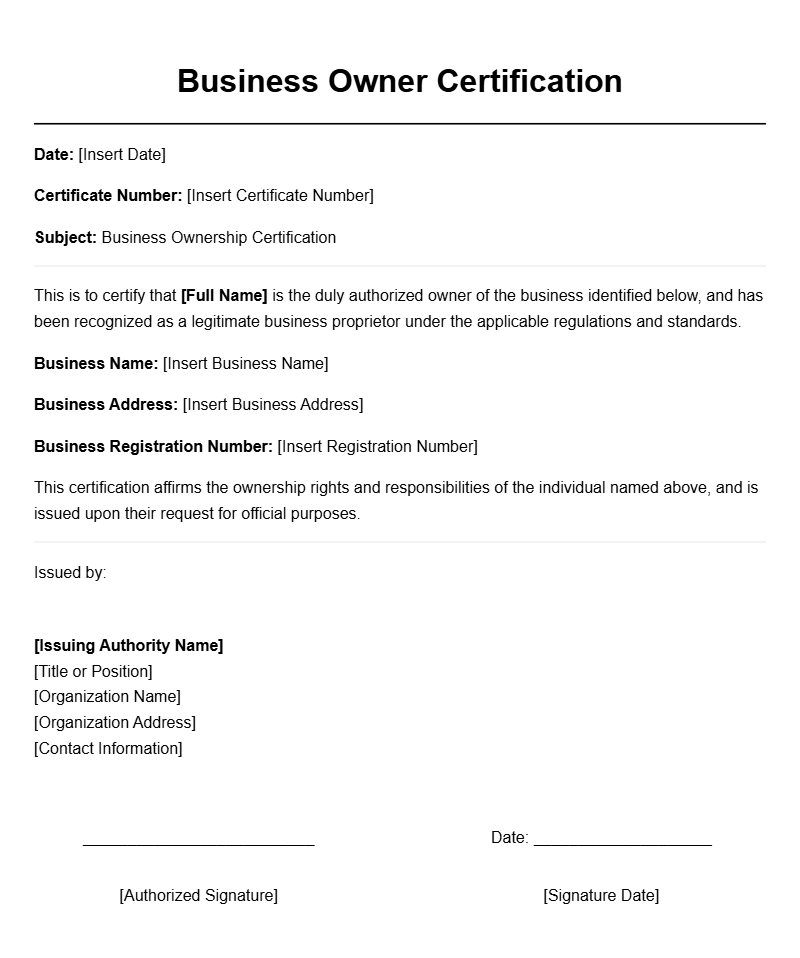
Business Owner Certification of Ownership
This certifies that [Owner’s Full Name] is the sole proprietor of [Business Name], established on [Date]. The company operates in accordance with local laws and holds all necessary licenses to conduct business legally.
The certificate verifies ownership rights and confirms that the individual listed has full authority over the business operations, assets, and liabilities. This document is issued upon request for official use, including banking, licensing, or legal procedures.
Issued on [Date].
Signature: ___________________________
Seal/Stamp: ___________________________
Certificate of Business Ownership
This is to certify that [Business Owner Name] is recognized as the legal owner of [Business Name] since [Date]. The owner has full authority to manage, operate, and make decisions regarding the business entity.
This certificate is issued based on verified records and is valid until revoked or updated. It serves as proof of ownership for financial, legal, or administrative purposes.
Date of Issue: [Date]
Authorized Signature: _______________________
Business Ownership Certification Letter
To Whom It May Concern,
This letter confirms that [Owner’s Name] is the rightful owner of [Business Name]. The business has been under their ownership since [Start Date] and complies with all applicable regulations.
This certification is issued upon request and verifies the owner’s legal claim to the business assets and operations.
Sincerely,
[Signature]
[Name]
[Position]
Business Ownership Certificate Template
This certifies that [Owner’s Name] owns [Business Name], established on [Date]. The ownership has been verified through official records and is recognized by the issuing authority.
This document is intended for official use, including banking, licensing, or legal proceedings, and confirms the legal rights of the owner over the business.
Issued on [Issue Date].
Authorized Signatory: ________________________
Official Business Owner Declaration
I, [Owner’s Name], declare that I am the sole owner of [Business Name]. This declaration affirms my legal ownership and authority to operate the business in accordance with applicable laws.
This document is issued for official verification purposes and is valid until further notice or update.
Date: [Date]
Signature: _________________________
Business Ownership Verification Certificate
This certificate confirms that [Owner’s Name] is the verified owner of [Business Name]. Ownership was established on [Date] and is supported by official registration records.
This document is issued for legal and administrative validation and remains valid until revoked by the issuing authority.
Date of Issue: [Date]
Signature & Seal: ________________________
Certificate of Business Stakeholding
This is to certify that [Owner’s Name] holds a stake in [Business Name] representing [Percentage]% ownership. The stake has been recognized since [Date].
This certificate is issued to verify the ownership percentage for contractual, legal, or investment purposes.
Issued on: [Date]
Authorized Signatory: _____________________
Ownership Affirmation Certificate
This document affirms that [Owner’s Name] is the legal owner of [Business Name]. The ownership details have been verified through official registration and documentation.
This certificate is issued to support the owner’s claim for banking, licensing, or legal verification.
Date of Certification: [Date]
Signature & Seal: _________________________
Business Owner Status Certificate
This is to certify that [Owner’s Name] is recognized as the current owner of [Business Name]. The ownership has been confirmed through official records and is valid as of [Date].
This certificate is intended for use in legal, financial, and administrative contexts to substantiate ownership rights.
Issued by: [Issuing Authority]
Date: [Issue Date]