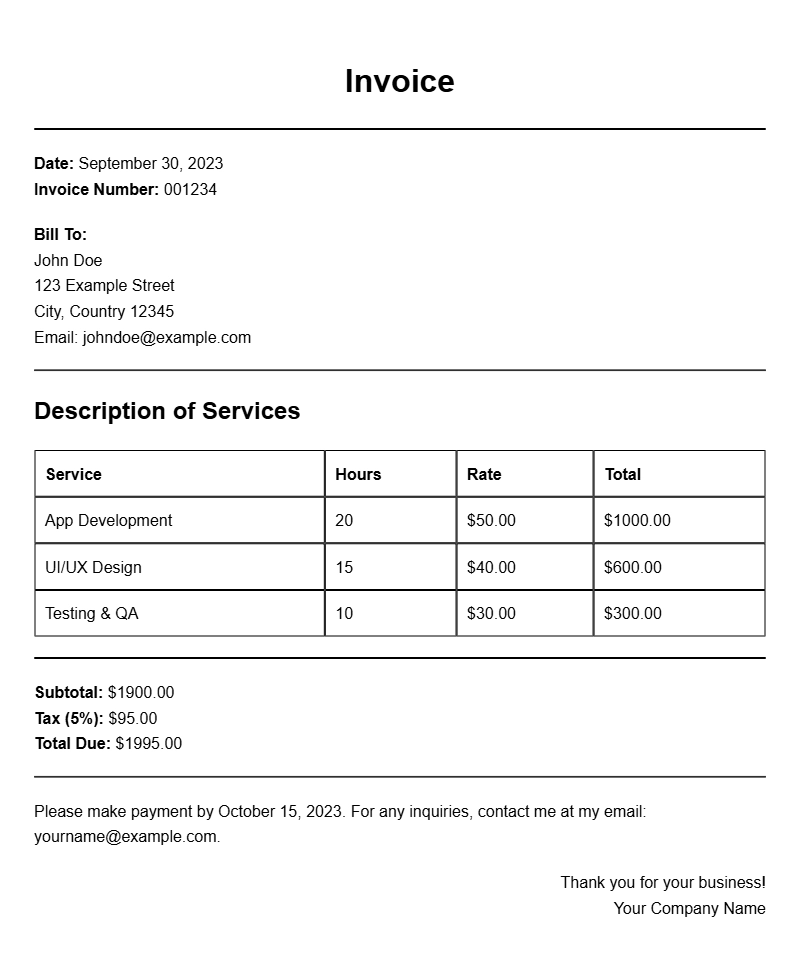
Creating an invoice as an app developer can feel daunting, especially when you’re managing multiple clients and projects. Using app developer invoice templates can streamline the billing process, ensuring you get paid promptly while also maintaining a professional image. This guide will help you understand what an app developer invoice is, when to use one, and how to create a document that meets your needs.
What Is an App Developer Invoice Template?
An app developer invoice template is a pre-designed document that you can fill in with your specific billing details. It typically includes sections for your contact information, client details, a description of the services provided, and the total amount due. Templates make it easy to keep your invoicing consistent and professional, allowing you to focus on your projects rather than paperwork.
When to Use an Invoice Template
You’ll want to use an invoice template every time you complete a project or reach a billing milestone with a client. This includes:
- Completed app development projects
- Monthly retainers for ongoing services
- Hourly billing for freelance work
By sending an invoice promptly after the service is delivered, you create a clearer expectation for payment and help maintain good client relations.
Key Components of an App Developer Invoice
Every effective invoice should include the following sections:
- Your Contact Information: Name, address, email, and phone number.
- Client Information: Client’s name and address.
- Invoice Number: A unique identifier for tracking purposes.
- Date of Issue: When the invoice is sent.
- Due Date: When payment is expected.
- Description of Services: A clear outline of what you provided, including hours worked if applicable.
- Total Amount Due: The final amount, including any taxes or additional fees.
Step-by-Step Guide to Writing Your Invoice
- Choose a Template: Find a template that suits your style. You can create one from scratch or download a free one online.
- Fill in Your Information: Input your contact details at the top of the invoice.
- Add Client Details: Include the client’s name and address to personalize the invoice.
- Assign an Invoice Number: Use a numbering system that makes sense for your business.
- Specify the Services Provided: Be clear and detailed. If you developed an app, list features or stages of development.
- Calculate Total Amount: Ensure you include all fees and taxes.
- Set a Due Date: Clearly state when you expect payment.
- Review and Send: Double-check all details before sending it to your client.
Editable Template Snippet
Here’s a simple template you can customize:
Your Name
Your Address
Your Email
Your Phone Number
Client Name
Client Address
Invoice Number: [#001]
Date: [MM/DD/YYYY]
Due Date: [MM/DD/YYYY]
Description of Services:
– Service 1: App Development – [Hours] hours @ [Rate]
– Service 2: Maintenance – [Flat Rate]
Total Amount Due: $[Total]
Common Mistakes to Avoid
When creating invoices, it’s easy to overlook some details. Here are a few common pitfalls:
- Missing Invoice Numbers: Always number your invoices to keep track of billing.
- Omitting Contact Information: Ensure both you and your client’s details are included.
- Not Specifying Payment Terms: If you accept payment via specific methods, make sure to list them.
Tips for Customization
While templates are helpful, personalizing your invoice can add a professional touch:
- Branding: Use your logo and color scheme to make the invoice distinctly yours.
- Personal Note: A brief thank-you note can enhance client relationships.
- Payment Options: Include different payment methods to offer convenience.
Creating an effective app developer invoice is straightforward with the right template. By including all necessary sections, avoiding common mistakes, and customizing the document to reflect your brand, you can ensure a smooth billing process. Whether you’re just starting or are an experienced developer, investing time in your invoicing can lead to timely payments and satisfied clients.
Editable Document Format Examples