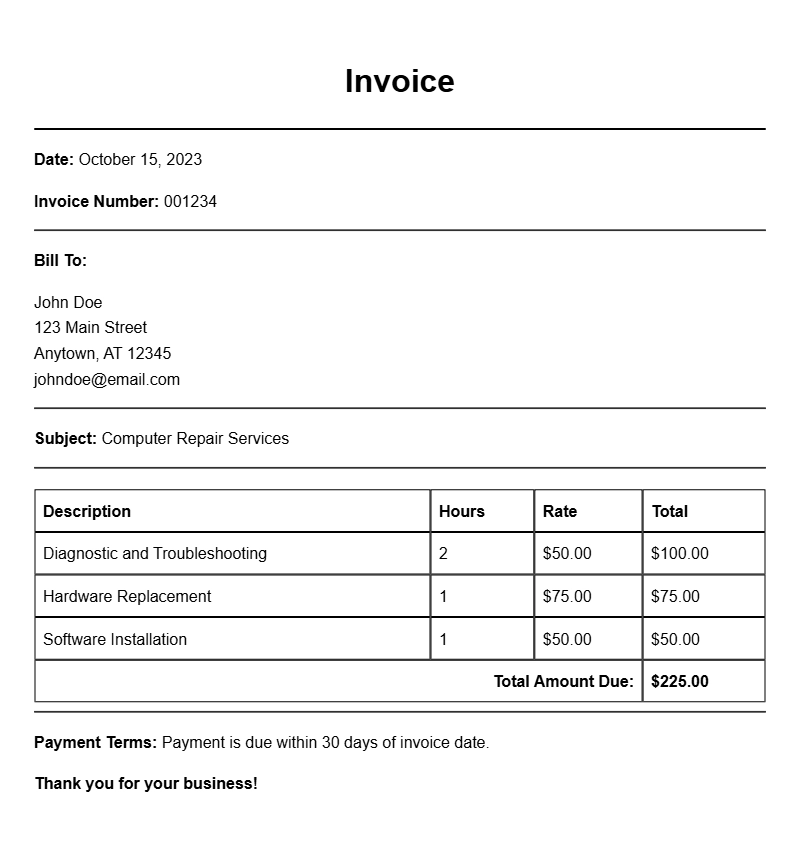
Creating a computer technician invoice is an essential task for anyone in the tech repair business. Whether you’re fixing laptops, desktops, or other electronic devices, a clear and professional invoice not only helps you get paid but also enhances your credibility with clients. This guide will walk you through what a computer technician invoice should include, when to use it, and how to create one that meets your needs.
WHAT IS A COMPUTER TECHNICIAN INVOICE?
A computer technician invoice is a document detailing the services provided, the costs associated, and the terms of payment for tech-related work. It serves as a formal request for payment and helps both you and your client keep track of the services rendered.
WHEN IS IT USED?
Use an invoice every time you complete a job for a client. This includes repairs, installations, troubleshooting, and any other service that requires compensation. Sending an invoice promptly after the service ensures you maintain cash flow and keeps the transaction professional.
KEY COMPONENTS OF A COMPUTER TECHNICIAN INVOICE
- Your Business Information: Include your name, address, phone number, and email.
- Client Information: The name and contact details of the client receiving the invoice.
- Invoice Number: A unique identifier for each invoice helps in tracking payments.
- Date of Issue: The date when the invoice is generated.
- Service Description: A clear description of the services provided, including any parts replaced.
- Costs: Itemized list of services and their corresponding prices.
- Payment Terms: Specify when payment is due and acceptable methods of payment.
STEP-BY-STEP WRITING GUIDE
- Gather Your Information: Collect all details about the service you provided and the client’s information.
- Choose an Invoice Format: You can use templates available online or create your own in a word processor or spreadsheet.
- Fill in the Header: Add your business name, logo, and contact info at the top.
- Add Client Information: Clearly state the client’s name and contact details beneath your information.
- Detail the Services: Create a section where you describe the work done. Be specific about what repairs or services were provided.
- List Prices: Next to each service, include the cost. Make sure to calculate any taxes if applicable.
- Set Payment Terms: Clarify when the payment is due and how the client can pay.
- Review and Send: Double-check your invoice for any errors before sending it to the client.
REALISTIC EXAMPLES/TEMPLATES
Here’s a simple invoice template you can customize:
Your Business Name
123 Tech Lane
Tech City, TC 12345
(123) 456-7890
youremail@example.com
Invoice Number: 001
Date: [Insert Date]
Bill To:
Client Name
456 Client Road
Client Town, CT 54321
Description of Services:
– Laptop screen replacement: $150
– Virus removal: $75
Total Due: $225
Payment Due By: [Insert Due Date]
COMMON MISTAKES TO AVOID
- Not itemizing services: Always break down the charges to avoid confusion.
- Forgetting contact details: Make sure both yours and the client’s information are accurate.
- Ignoring payment terms: Clearly state when and how clients should pay to avoid misunderstandings.
TIPS FOR CUSTOMIZATION
Feel free to adjust the layout, font, and colors of your invoice to match your brand. You might also want to include a thank-you note or a reminder for future services to encourage repeat business.
Creating a computer technician invoice doesn’t have to be complicated. With the right format and essential details, you can ensure your invoices are professional and effective. So, get started on crafting your first invoice and keep your business running smoothly!
Document Structure & Example Models