Creating clear and professional invoices is essential for fence contractors to ensure they get paid promptly. If you’re a fence contractor, you know that a well-structured invoice not only helps in getting your payment but also reflects the professionalism of your business. This guide will walk you through fence contractor invoice templates, helping you understand their importance and how to create one that meets your needs.
WHAT IS A FENCE CONTRACTOR INVOICE TEMPLATE?
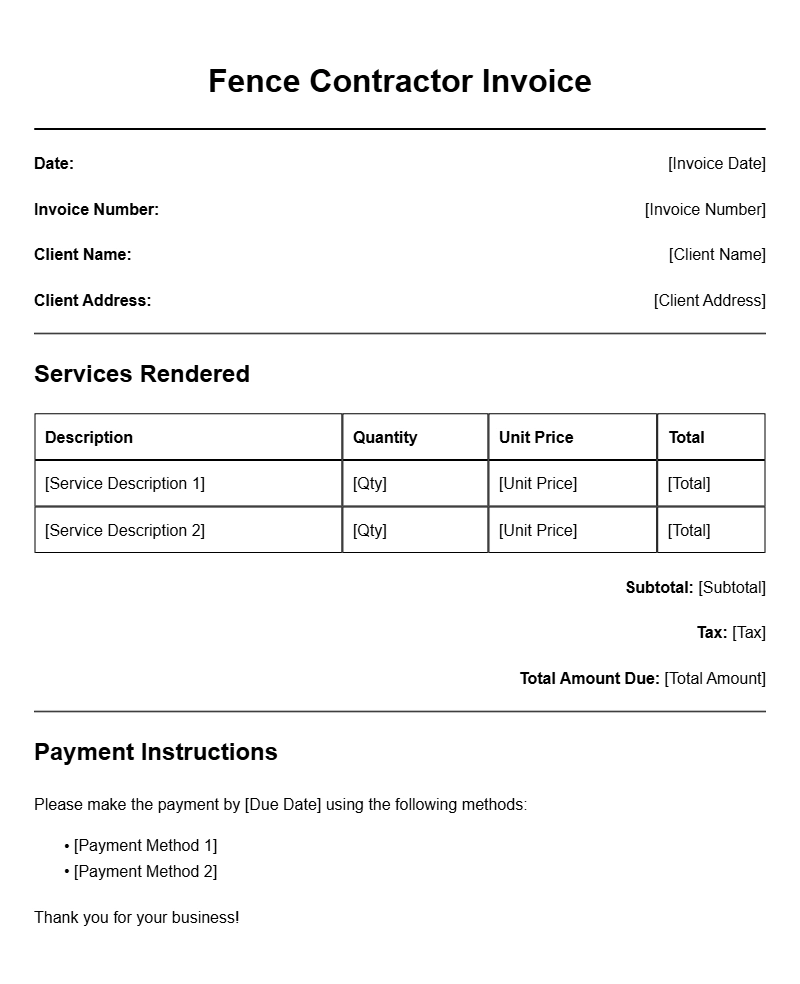
A fence contractor invoice template is a pre-designed document you can customize to bill your clients for your fencing services. It typically includes details such as your business name, contact information, a breakdown of services provided, costs, payment terms, and more. By using a template, you save time and maintain consistency across your invoices.
WHEN IS IT USED?
You’ll use an invoice template after completing a fencing project or at set intervals if you’re working on a longer contract. It serves as an official request for payment and can also be a helpful record for both you and your client. Sending an invoice promptly after project completion ensures timely payment and keeps your cash flow healthy.
KEY COMPONENTS OF A FENCE CONTRACTOR INVOICE
- Your Business Information: Include your company name, address, phone number, and email.
- Client Information: Add your client’s name, address, and contact details.
- Invoice Number: A unique identifier for each invoice helps with tracking.
- Project Details: Describe the services rendered, including materials used and labor hours.
- Costs: Clearly itemize the costs for each service, including labor and materials.
- Payment Terms: Specify when payment is due, any late fees, and accepted payment methods.
- Notes: A section for any additional comments or instructions for the client.
STEP-BY-STEP WRITING GUIDE
Follow these steps to create a professional invoice:
- Choose a Template: Start with a basic invoice template that you can customize. You can find useful ones online that cater specifically to contractors.
- Add Your Information: Fill in your business details at the top of the invoice.
- Client Details: Include the client’s information below yours for easy reference.
- Invoice Number and Date: Assign an invoice number and date the invoice for record-keeping.
- Itemize Services: List each service provided with its corresponding cost. Be as detailed as possible to avoid confusion.
- Calculate Total: Add up the costs and present a clear total amount due.
- Set Payment Terms: Indicate how and when you wish to be paid.
- Review and Send: Double-check for accuracy, then send the invoice via email or physical mail.
REALISTIC EXAMPLES OF INVOICE TEMPLATES
Here’s a simple example of how your invoice might look:
Your Company Name
123 Fence Lane
City, State, Zip
Phone: (123) 456-7890
Email: info@yourcompany.com
Invoice #: 00123
Date: [Insert Date]
Bill To:
Client Name
456 Client Street
City, State, Zip
Description of Services
– Installed wooden fence: $1,500
– Labor (20 hours): $800
– Materials (wood, nails, etc.): $300
Total Due: $2,600
Payment Terms: Due within 30 days. Late fee of 5% after due date.
COMMON MISTAKES TO AVOID
- Not including an invoice number, which can lead to confusion.
- Failing to itemize services, making it hard for clients to understand what they’re being charged for.
- Not specifying payment terms, which can delay payment and lead to misunderstandings.
- Neglecting to proofread, which can result in errors that affect payment.
TIPS FOR CUSTOMIZATION
Make your invoice stand out by customizing it to reflect your brand. Here are some tips:
- Use Your Logo: Place your company logo at the top to enhance branding.
- Color Scheme: Use colors that align with your brand for a cohesive look.
- Personal Touch: Add a thank-you note or a personal message to build customer relationships.
Creating an effective invoice is key to your business’s success. By following this guide, you can streamline your invoicing process and ensure you get paid on time. Remember, a well-crafted invoice reflects your professionalism and commitment to your clients. For more tips on invoicing in various industries, check out our articles on crypto conference invoicing, warehouse cleaning invoicing, and bank consultant invoicing.
Document Examples & Template Samples