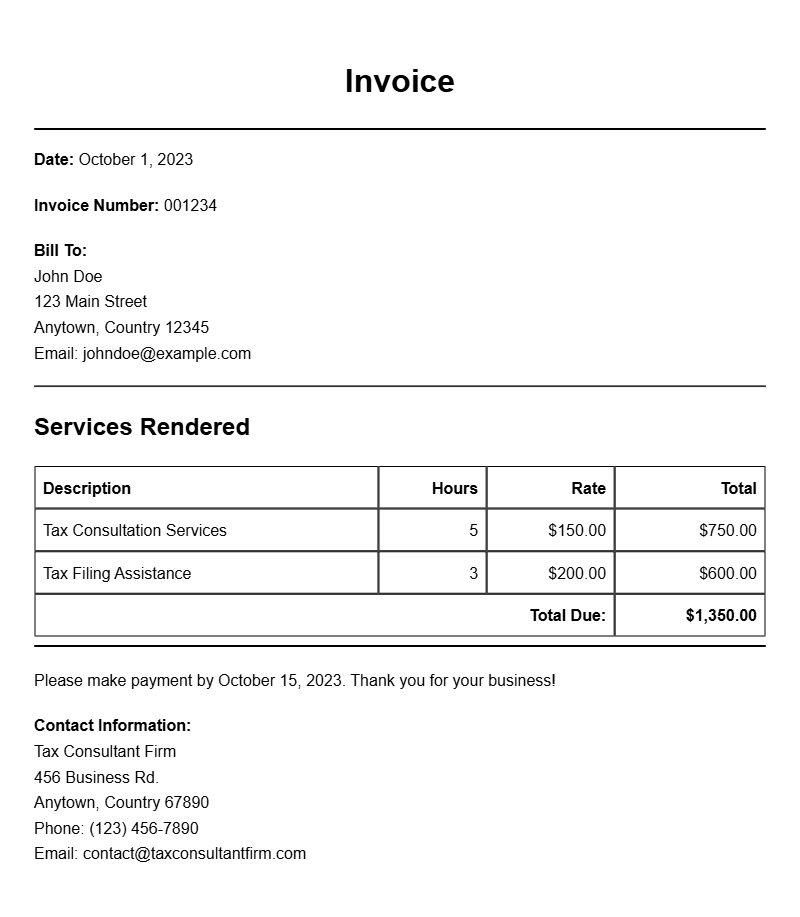
Creating an invoice as a tax consultant can feel like a daunting task, especially if you’re not sure where to start. Whether you’re billing a client for a one-time service or setting up a recurring payment schedule, having a solid invoice template is essential. In this article, we’ll explore what a tax consultant invoice looks like, when to use it, its key components, and provide practical examples and templates to make your invoicing process smoother.
WHAT IS A TAX CONSULTANT INVOICE?
A tax consultant invoice is a document that outlines services performed by a tax professional and requests payment from a client. This invoice serves as both a record of services rendered and a formal request for payment. It’s essential for maintaining clear financial records and ensuring timely payment.
WHEN IS IT USED?
You typically use a tax consultant invoice after providing tax preparation, consulting, or advisory services. Whether you’ve completed a one-time project or have ongoing monthly consultations, this document is what you send to your clients to receive payment for your work.
KEY COMPONENTS OF A TAX CONSULTANT INVOICE
- Contact Information: Your name, business name, address, phone number, and email, as well as the client’s information.
- Invoice Number: A unique identifier for tracking purposes.
- Date of Issue: The date you generate the invoice.
- Service Description: A detailed list of services provided, including hourly rates or flat fees.
- Payment Terms: Specify when payment is due, accepted payment methods, and any late fees.
- Total Amount Due: A clear summary of the total cost for the services rendered.
STEP-BY-STEP WRITING GUIDE
- Gather Information: Collect all necessary details, including your and your client’s contact information.
- Assign an Invoice Number: Create a unique number for future reference.
- List Services: Clearly describe the services you provided, including dates and rates.
- Calculate the Total: Add up the costs and present them clearly.
- Set Payment Terms: Indicate when the payment is due and how it can be made.
- Format the Invoice: Use a clean, professional layout that’s easy to read.
REALISTIC EXAMPLES AND TEMPLATE SNIPPETS
Here’s a simple template you can customize for your use:
Your Name or Business Name
Your Address
City, State, Zip Code
Phone Number
Email Address
Invoice #: 001
Date: [Insert Date]
Billed To:
Client Name
Client Address
City, State, Zip Code
Description of Services
– Tax Preparation for 2022: $200
– Consultation on Tax Strategy: $150
Total Amount Due: $350
Payment Terms: Due upon receipt. Please make checks payable to [Your Name or Business Name].
COMMON MISTAKES TO AVOID
- Not including your business contact information.
- Forgetting to assign a unique invoice number.
- Vague descriptions of services, which can lead to confusion.
- Neglecting to specify payment terms, causing delays in payment.
TIPS FOR CUSTOMIZATION
Make your invoice stand out by adding your logo or using a professional design that reflects your brand. Adjust the layout to ensure clarity. You can also include payment options like credit card payments or online payment links to make it easier for clients to pay.
By following these guidelines and using the provided templates, you can create effective invoices that facilitate smooth transactions. For more specific invoice templates tailored to different events, check out resources like the podcast live event invoice templates or repair technician invoice samples. Start invoicing with confidence today!
Document Examples & Template Samples