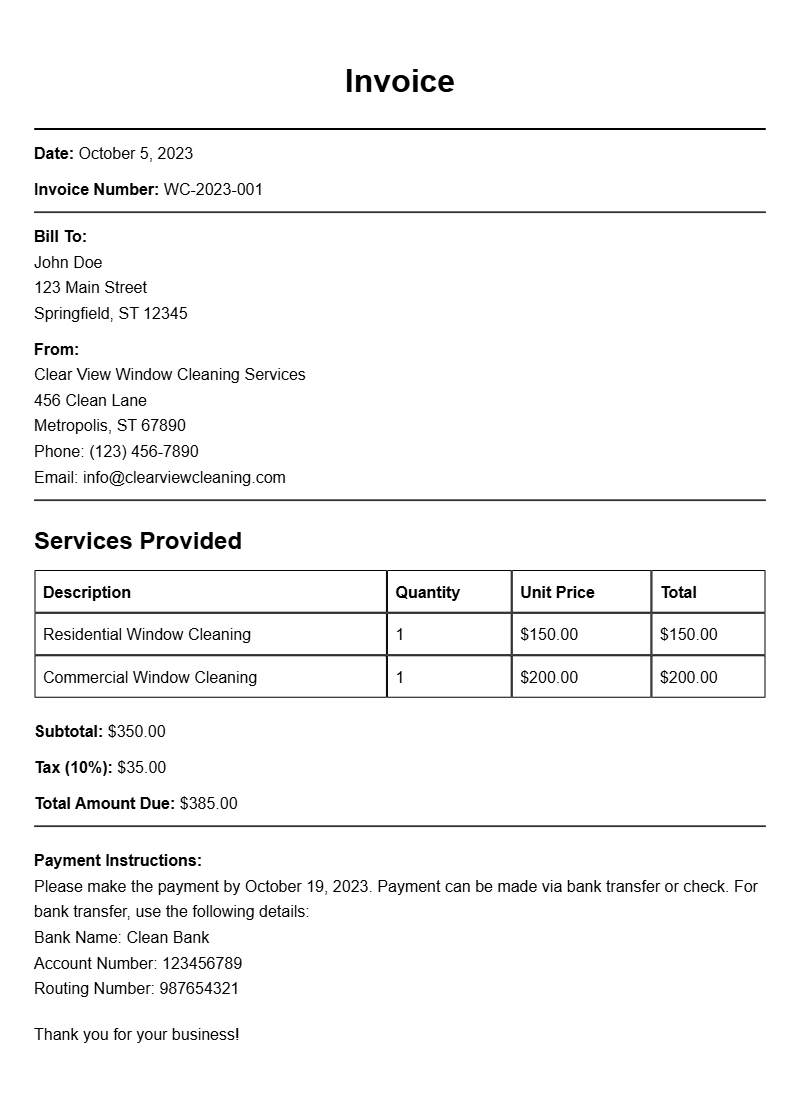
Creating a clear and detailed invoice is an essential part of running a window cleaning business. Whether you’re a solo operator or part of a larger team, having a solid invoice template can help you get paid on time and keep your financial records in order. This guide will walk you through what a window cleaner invoice looks like, when to use it, and how to customize it for your specific needs.
WHAT IS A WINDOW CLEANER INVOICE?
A window cleaner invoice is a document that details the services provided to a client, along with the associated costs. It serves as a formal request for payment and provides a record of the transaction for both the cleaner and the client.
WHEN IS IT USED?
You should use a window cleaner invoice after completing a job, regardless of whether it was a one-time service or part of a recurring contract. It’s a professional way to request payment and ensures that both parties are clear about the services rendered and the amount due.
KEY COMPONENTS OF A WINDOW CLEANER INVOICE
A well-crafted invoice includes several key components:
- Your business information: Include your name, company name, address, phone number, and email.
- Client information: The client’s name and contact details.
- Invoice number: A unique identifier for tracking purposes.
- Date of service: The date when the window cleaning was performed.
- Itemized list of services: Clearly outline the services you provided, including the cost for each.
- Total amount due: The final total after any taxes and discounts.
- Payment terms: Include when payment is due and acceptable payment methods.
STEP-BY-STEP WRITING GUIDE
Follow these steps to create your invoice:
- Header: Start with your business name and contact information at the top.
- Client details: Add the client’s name and address below your information.
- Invoice number and date: Assign a unique invoice number and add the date.
- Services rendered: List each cleaning service, along with the corresponding price.
- Total due: Calculate the total and clearly state it at the bottom.
- Payment instructions: Specify how and when the client should pay.
REALISTIC EXAMPLES/TEMPLATES
Here’s a basic template you can customize:
Your Business Name
Your Address
Your City, State, Zip
Your Phone Number
Your Email
Client Name
Client Address
Client City, State, Zip
Invoice Number: 001
Date of Service: [Insert Date]
Description of Services:
– Window Cleaning (Interior & Exterior): $100
– Screen Cleaning: $30
Total Amount Due: $130
Payment Terms: Due within 30 days. Accepting cash, check, or credit card.
COMMON MISTAKES TO AVOID
When creating your invoice, steer clear of these common pitfalls:
- Leaving out essential information like your business name or contact details.
- Not numbering your invoices, which can make tracking payments difficult.
- Failing to specify payment terms, which may lead to delayed payments.
TIPS FOR CUSTOMIZATION
Make your invoice stand out by customizing it to fit your brand. Here are a few tips:
- Add your logo for a professional touch.
- Use colors and fonts that align with your branding.
- Include a personal note thanking your client for their business.
Having a well-structured window cleaner invoice not only helps you get paid promptly but also enhances your professionalism in the eyes of your clients. Consider checking out other invoice templates like those for estate planners or social media managers for more ideas on how to format your document. With a clear invoice in hand, you’ll make the payment process smoother for both you and your clients.
Template Variations & Sample Formats