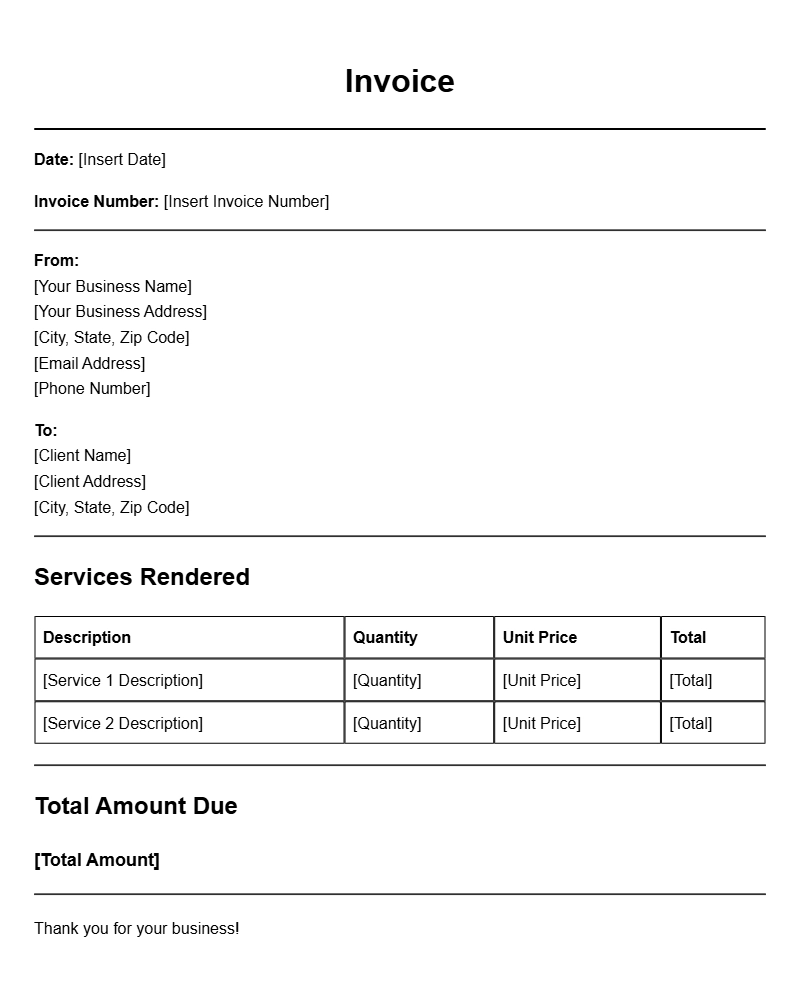
When you’re running a food truck, keeping track of your finances is just as important as serving delicious meals. One key part of managing your cash flow is using invoices to bill clients for your services. If you’re new to the food truck business or even if you’re a seasoned pro, having a reliable food truck owner invoice template can make the billing process smoother and more efficient.
WHAT IS A FOOD TRUCK OWNER INVOICE TEMPLATE?
A food truck owner invoice template is a pre-designed document that you can customize to bill your customers for food and services provided. It typically includes details about the transaction, such as the items sold, their prices, and payment terms. Using an invoice template saves time and ensures that you include all necessary information to get paid promptly.
WHEN IS IT USED?
You’ll need an invoice template whenever you cater an event, participate in a food festival, or provide meals for corporate functions. Essentially, any time you serve a customer or client outside of a traditional point-of-sale transaction, having an invoice helps keep your finances in check.
KEY COMPONENTS OF A FOOD TRUCK OWNER INVOICE
Understanding what to include in your invoice is essential. Here are the main components:
- Your Business Information: Include your food truck name, logo, address, and contact information.
- Client Information: List the name and address of the client you are invoicing.
- Invoice Number: Assign a unique number to each invoice for tracking.
- Date of Issue: The date when the invoice is created.
- Description of Services: A detailed list of what you provided, including quantities and prices.
- Total Amount Due: Clearly state the total amount that the client needs to pay.
- Payment Terms: Specify when payment is due and acceptable payment methods.
STEP-BY-STEP WRITING GUIDE
Creating your invoice from a template is straightforward. Follow these steps:
- Choose a Template: Find a food truck invoice template that suits your style. There are many free options available online.
- Fill in Your Business Information: Make sure your logo and contact details are up-to-date.
- Add Client Details: Input the name and address of the person or organization you’re invoicing.
- List the Services: Enter the items sold, including any additional fees for services like setup or travel.
- Calculate the Total: Make sure to add all costs clearly so there’s no confusion.
- Specify Payment Terms: Let your client know when the payment is due and how they can pay.
REALISTIC EXAMPLES/TEMPLATES
Here’s a simple example template snippet:
Your Food Truck Name
Your Address
Your Phone Number
Your Email
Invoice Number: 001
Date: [Insert Date]
Bill To:
Client Name
Client Address
Description Quantity Price Total
——————————————————–
Tacos 50 $2.00 $100.00
Beverages 30 $1.50 $45.00
Setup Fee 1 $50.00 $50.00
——————————————————–
Total Amount Due: $195.00
Payment Terms: Due within 30 days. Acceptable methods: Cash, Credit Card, PayPal.
COMMON MISTAKES TO AVOID
Here are a few pitfalls that can trip you up while invoicing:
- Not Including All Costs: Be sure to account for every item, including fees.
- Missing Payment Terms: Clear terms help avoid confusion and disputes.
- Incorrect Client Information: Double-check details to ensure accuracy.
TIPS FOR CUSTOMIZATION
Customizing your invoice template can help it stand out and reflect your brand:
- Use your brand colors and fonts to create a cohesive look.
- Include a personal note thanking the client for their business.
- Consider adding social media links or a QR code to encourage future orders.
Managing your invoices doesn’t have to be a headache. With a good food truck owner invoice template, you can streamline the billing process and focus on what you do best: serving great food. Ready to get started? Check out some resources on invoice templates for coffee shops or construction invoicing examples for more inspiration!
Template Variations & Sample Formats