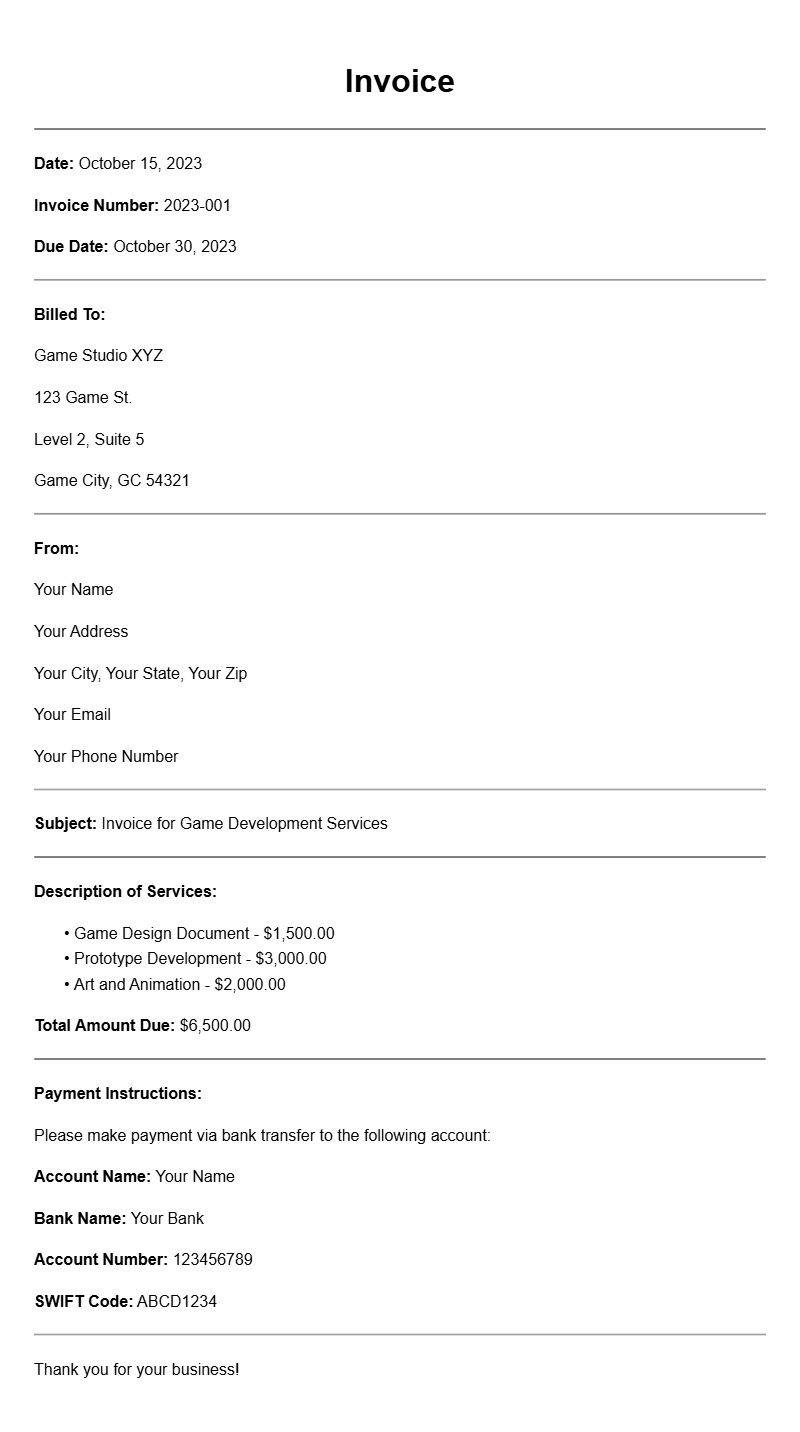
If you’re a game developer, handling invoices effectively is just as important as coding your next big release. A well-structured invoice not only helps you get paid but also establishes professionalism in your dealings with clients. This guide provides practical game developer invoice samples and insights on how to create one that works for you.
What is a Game Developer Invoice?
A game developer invoice is a document that details the services you’ve provided to a client, the associated costs, and payment terms. It serves as a formal request for payment and includes all necessary information for your client to process the payment smoothly.
When is it Used?
You’ll use a game developer invoice whenever you complete a project or reach a milestone in an ongoing project. Whether you’re freelancing, working on a contract basis, or developing games for a studio, invoices play a crucial role in ensuring you receive compensation for your work.
Key Components of a Game Developer Invoice
- Your Contact Information: Include your name, address, phone number, and email.
- Client’s Contact Information: Add the client’s name and contact details.
- Invoice Number: Assign a unique number to keep track of invoices.
- Invoice Date: The date when the invoice is issued.
- Payment Due Date: Clearly state when payment is expected.
- Description of Services: List the services provided, such as game design, coding, or graphics work.
- Hourly Rate or Project Fee: Specify your rates or total project cost.
- Payment Methods: Outline how clients can pay you (bank transfer, PayPal, etc.).
- Terms and Conditions: Include any relevant payment terms, such as late fees or discounts for early payment.
Step-by-Step Writing Guide
- Gather Information: Collect all necessary details about the project and client.
- Choose a Template: Start with a template that fits your style; feel free to adjust it as needed.
- Add Your Information: Fill in your details and the client’s information at the top of the invoice.
- Detail the Services: Clearly describe what you did for the client. Be specific about each task.
- Calculate Costs: List your rates and calculate the total amount due.
- Set Payment Terms: Make sure to include when you expect payment and how they can pay.
- Proofread: Double-check for any errors or missing information.
Realistic Examples/Templates
Here’s a simple template snippet you can start with:
Your Name
Your Address
Your Phone Number
Your Email
Client’s Name
Client’s Address
Invoice Number: 001
Invoice Date: [Date]
Payment Due: [Due Date]
Description of Services:
1. Game Design – $XXXX
2. Coding – $XXXX
3. Graphics Work – $XXXX
Total Amount Due: $XXXX
Payment Method: [e.g., Bank Transfer, PayPal]
Common Mistakes to Avoid
- Missing Information: Ensure all necessary details are included.
- Unclear Terms: Be explicit about payment terms to avoid confusion.
- Delays in Sending: Send invoices promptly after completing work.
Tips for Customization
Make your invoice stand out by customizing the design. You can use colors or logos that reflect your brand. Add a personal note thanking the client for their business, which can enhance your professional relationship.
Creating an effective game developer invoice is about clarity and professionalism. Use the samples and tips above to craft invoices that not only ensure you get paid but also make a lasting impression on your clients. For more specialized templates, check out various [invoice templates](https://www.example.com/marketing-summit-invoice-templates-invoice/) that cater to different industries.
Template Variations & Sample Formats