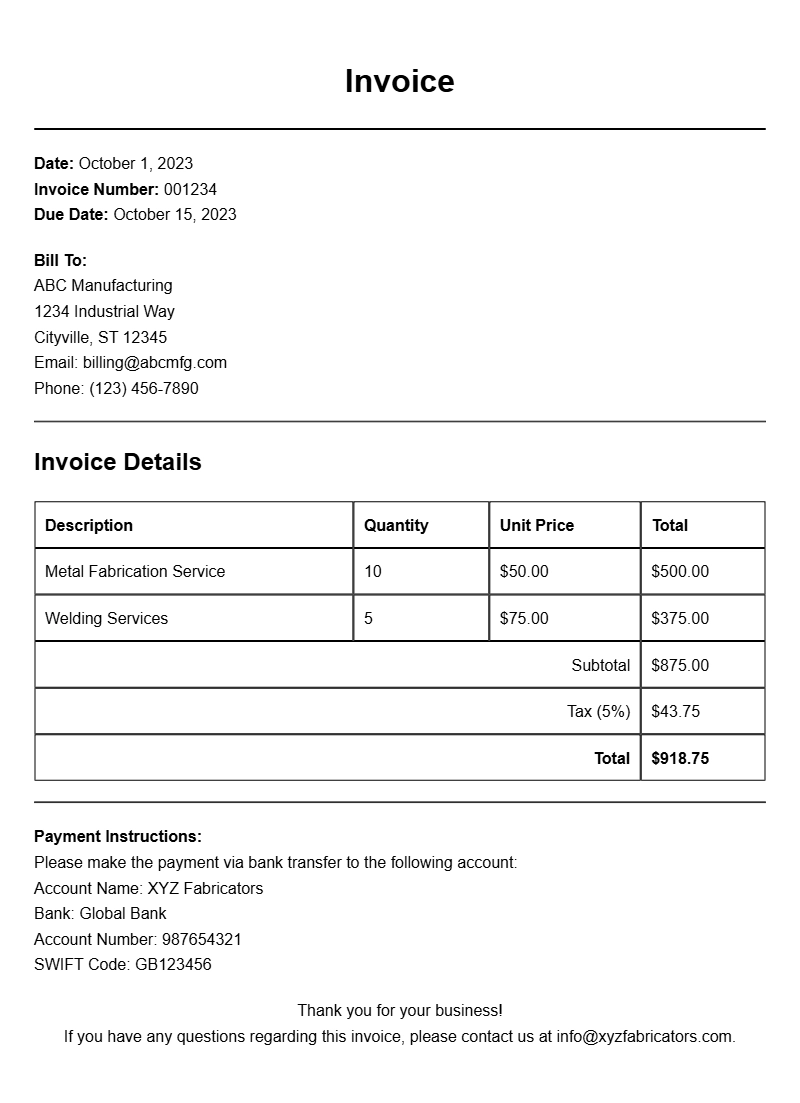
Creating invoices is an essential part of any metal fabrication business. Whether you’re a seasoned fabricator or just starting out, having a clear and professional invoice can streamline your billing process and keep your finances in order. This guide will walk you through the ins and outs of metal fabricator invoice samples, helping you craft invoices that get paid faster and reflect your brand’s professionalism.
What Is a Metal Fabricator Invoice?
A metal fabricator invoice is a document you send to clients requesting payment for your services. It typically outlines the materials used, labor costs, and any additional charges, providing a detailed account of what the client is paying for. This invoice serves not only as a bill but also as a record of the transaction for both you and your client.
When Is It Used?
You’ll use a metal fabricator invoice after completing a project or delivering services. It’s essential for ensuring you get paid for your work, whether you’re fabricating custom metal parts, structural components, or providing repair services. Proper invoicing helps maintain client relationships and ensures accurate financial records.
Key Components of a Metal Fabricator Invoice
A well-structured invoice should include the following key sections:
- Contact Information: Your business name, address, phone number, and email, along with the client’s details.
- Invoice Number: A unique identifier for tracking.
- Date of Issue: The date the invoice is generated.
- Payment Due Date: Clearly state when payment is expected.
- Itemized List of Services: Detailed descriptions of the services provided, including quantities and prices.
- Subtotal, Taxes, and Total Amount Due: Clearly present the financial breakdown.
- Payment Instructions: Specify how clients can pay (e.g., bank transfer, check).
Step-by-Step Writing Guide for Metal Fabricator Invoices
- Gather Information: Collect all details related to the job, including materials used and hours worked.
- Create a Template: Start with a basic layout that includes your logo and contact info.
- Fill in Client Details: Add the client’s name and address at the top of the invoice.
- Number the Invoice: Assign a unique invoice number for tracking purposes.
- List Services: Write a clear description of each service provided, including quantities and prices.
- Calculate Totals: Add up the subtotal, apply any taxes, and present the total amount due.
- Include Payment Terms: Specify how and when you expect to be paid.
- Review and Send: Double-check for any errors before emailing or mailing the invoice to your client.
Realistic Examples and Template Snippets
Here’s a simple template snippet you can customize:
Invoice #: 001234
Date: [Insert Date]
Due Date: [Insert Due Date]
From:
[Your Business Name]
[Your Address]
[Your Phone Number]
[Your Email]
To:
[Client’s Name]
[Client’s Address]
Description | Quantity | Unit Price | Total
———————————————————
Metal Cutting Service | 10 | $50 | $500
Welding Service | 5 | $75 | $375
———————————————————
Subtotal: $875
Tax (8%): $70
Total Amount Due: $945
Payment Instructions: Please make payment via bank transfer to [Your Bank Details].
Common Mistakes to Avoid
- Not Numbering Invoices: This can lead to confusion in tracking payments.
- Omitting Payment Terms: Always clarify when payments are due and how clients can pay.
- Neglecting to Proofread: Typos can undermine your professionalism. Review your invoices before sending.
Tips for Customization
Your invoices should reflect your brand. Here are a few ways to customize:
- Use your business logo and colors to create a professional look.
- Include a personal touch, like a thank-you note or a discount for future projects.
- Adjust the layout and fonts to match your brand’s style.
Creating effective metal fabricator invoices can simplify your billing process and enhance your professional image. With the right template and attention to detail, you can ensure your invoices are clear, concise, and effective in getting you paid. For more examples, check out our templates for recurring invoices, sound system setups, and firewood suppliers to help inspire your own designs.
Document Examples & Template Samples