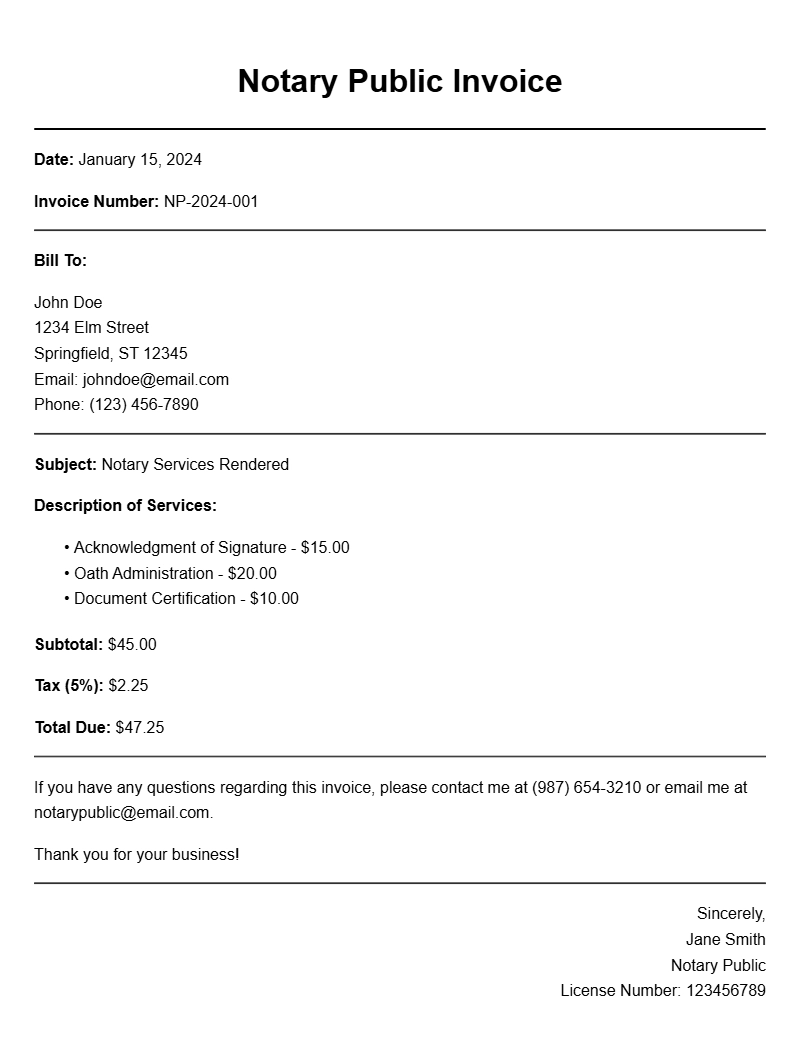
Creating a notary public invoice can seem daunting at first, but it’s a straightforward task once you understand the components involved. Whether you’re a seasoned notary or just getting started, having invoice samples on hand can streamline your billing process and ensure you get paid on time. This guide will walk you through what a notary public invoice is, when to use it, its key components, and how to craft one that meets your needs.
WHAT IS A NOTARY PUBLIC INVOICE?
A notary public invoice is a document that details the services provided by a notary and the fees charged for those services. It serves as a formal request for payment from clients who have utilized notarization services. This document not only helps you keep track of your income but also provides clients with a clear breakdown of what they are being charged.
WHEN IS IT USED?
You’ll use a notary public invoice anytime you provide notarization services, whether it’s for real estate transactions, legal documents, or other agreements requiring notarization. Sending an invoice promptly after the service ensures that your clients know the total amount due and the payment methods you accept.
KEY COMPONENTS OF A NOTARY PUBLIC INVOICE
- Contact Information: Include your name, business name (if applicable), address, phone number, and email.
- Client Information: The client’s name and contact details should be clearly listed.
- Invoice Number: Assign a unique number for easy tracking.
- Date of Service: Specify when the notarization occurred.
- Service Description: A brief description of the notarization services rendered.
- Fees: Clearly outline the charges for each service. This could include a flat fee for notarization and any additional charges for travel or document preparation.
- Total Amount Due: Sum up the fees and make sure it stands out.
- Payment Terms: Include details about when payment is due and accepted methods.
STEP-BY-STEP WRITING GUIDE
- Start with your contact information at the top.
- Include the client’s details just below yours.
- Assign an invoice number and date it.
- Describe the services provided in a clear, concise manner.
- List out the fees associated with each service.
- Calculate the total amount due and highlight it.
- State payment terms and methods.
REALISTIC EXAMPLES AND TEMPLATES
Here’s a basic template you can use:
Your Name
Your Address
City, State, Zip Code
Phone Number
Email Address
Date: [Insert Date]
Invoice #: [Insert Invoice Number]
Client Name
Client Address
City, State, Zip Code
Description of Services Provided:
– Notarization of [Document Type] – $[Amount]
– Travel Fee – $[Amount]
Total Amount Due: $[Total Amount]
Payment Terms: Payment due upon receipt. Accepted methods: Cash, Check, PayPal.
COMMON MISTAKES TO AVOID
- Not including all relevant contact information, which can delay payment.
- Failing to provide a detailed description of services, leaving clients confused about charges.
- Omitting payment terms, which can lead to misunderstandings about when payment is due.
TIPS FOR CUSTOMIZATION
Make your invoice stand out by adding your logo or using a specific color scheme that reflects your brand. You can also adjust the service descriptions and fees based on your location and the complexity of the notarization. Consider creating a digital version of your invoice for easy sharing and quicker payments.
Getting your notary public invoices right can greatly enhance your professionalism and your cash flow. Keep these components and tips in mind, and your invoices will not only look great but also serve their purpose effectively. For more invoice examples, you might find fun run invoice samples or divorce consultant invoice templates helpful as you craft your own.
General Document Template Collection