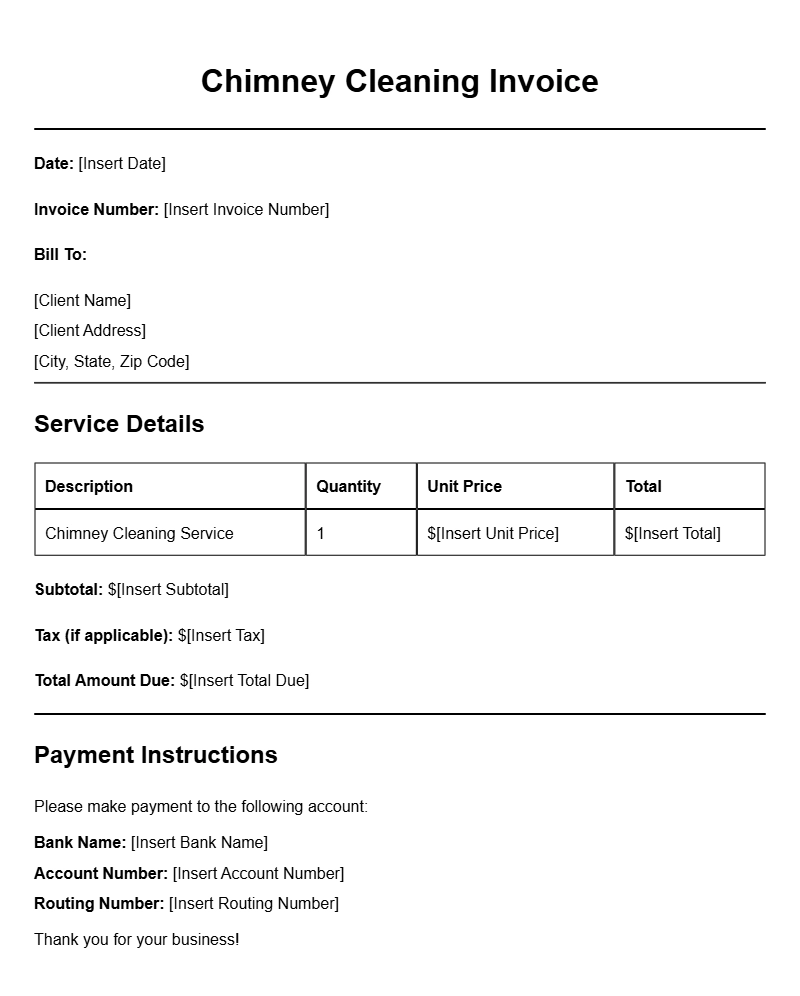
If you run a chimney cleaning business, having a reliable invoice template is essential for tracking your services and payments. A well-structured invoice not only helps you get paid on time but also presents a professional image to your clients. In this guide, we’ll break down what a chimney cleaning invoice template is, when to use it, and how to create one that meets your needs.
WHAT IS A CHIMNEY CLEANING INVOICE TEMPLATE?
A chimney cleaning invoice template is a pre-formatted document that outlines the services you provided to a client, along with the associated costs. It serves as a record of the transaction and is crucial for both your accounting and your client’s financial records. Instead of starting from scratch each time, using a template saves you time and ensures consistency.
WHEN TO USE A CHIMNEY CLEANING INVOICE TEMPLATE
You should use a chimney cleaning invoice template every time you complete a job. This includes one-time cleanings, regular maintenance, and any additional services like inspections or repairs. It’s important to present an invoice promptly after finishing the work to help maintain good cash flow and keep your accounts organized.
KEY COMPONENTS OF A CHIMNEY CLEANING INVOICE
Your invoice should contain several critical sections:
- Your Business Information: Include your business name, address, phone number, and email address.
- Client Information: Name and contact details of the client.
- Invoice Number: Unique identifier for each invoice.
- Date of Service: When the chimney cleaning was performed.
- Itemized List of Services: Detailed description of the services provided, including any additional work.
- Cost Breakdown: Clearly state the price for each service and the total amount due.
- Payment Terms: Specify when payment is due and acceptable payment methods.
STEP-BY-STEP WRITING GUIDE
- Choose a Template: Start with a basic template that you can customize. You can find examples online or create one using word processing software.
- Fill in Your Business Details: Input your business name, address, and contact information at the top of the invoice.
- Add Client Information: Just below your details, add the client’s name and contact information.
- Assign an Invoice Number: Keep track of your invoices with a unique number for easy reference.
- Date the Invoice: Include the date you’re sending the invoice and the date of service.
- List Services Provided: Write a brief description of each service. Be specific about what you did.
- Calculate the Total: Add up the costs and make sure the total is clear and easy to find.
- Include Payment Terms: State how and when the client should pay. Specify if there are any late fees.
REALISTIC EXAMPLES OF CHIMNEY CLEANING INVOICES
Here’s a simplified example of what your invoice might look like:
ABC Chimney Services
123 Main Street
Springfield, IL 62701
(555) 123-4567
info@abcchimney.com
Invoice Number: 001
Date: January 15, 2023
Bill To:
Jane Doe
456 Maple Avenue
Springfield, IL 62701
Services Provided:
- Chimney Cleaning – $150
- Inspection – $50
Total Amount Due: $200
Payment Terms: Payment is due within 30 days. Acceptable payment methods: cash, check, or credit card.
COMMON MISTAKES TO AVOID
- Omitting important details like your business information or invoice number.
- Failing to itemize services, which can lead to confusion about charges.
- Not keeping a copy for your records, which can be problematic for tracking payments.
TIPS FOR CUSTOMIZATION
Personalizing your invoice can help reinforce your brand. Consider these options:
- Add your logo at the top to enhance brand recognition.
- Use colors and fonts consistent with your branding.
- Include a brief message thanking the client for their business.
Creating a chimney cleaning invoice template doesn’t have to be complicated. A well-organized invoice communicates professionalism and helps ensure you get paid promptly. Start with a basic layout, customize it to fit your business, and you’ll streamline your billing process in no time. For more resources, check out other invoice templates like those for video editing, catering services, and auto repair.
Common Document Templates & Previews