Creating an invoice as a video editor can seem daunting, especially if you’re just starting out or trying to streamline your workflow. Having a solid video editor invoice template can save you time and ensure you get paid promptly. Let’s explore what these templates are, how to use them, and what to include to make your invoicing process smooth and efficient.
WHAT IS A VIDEO EDITOR INVOICE TEMPLATE?
A video editor invoice template is a pre-designed document that helps you bill clients for your video editing services. It includes all the necessary details about the work you’ve done, the amount owed, and payment instructions. Instead of starting from scratch for each client, you can fill in the specifics and send it off, making your billing process more efficient.
WHEN TO USE A VIDEO EDITOR INVOICE TEMPLATE
You should use a video editor invoice template whenever you complete a project for a client. This includes freelance gigs, contract work, or even side projects. Sending a professional invoice not only helps you get paid but also adds credibility to your business.
KEY COMPONENTS OF A VIDEO EDITOR INVOICE
Here are the essential sections to include in your invoice:
- Your Contact Information: Include your name, business name (if applicable), address, phone number, and email.
- Client’s Information: Add the client’s name, company name, and contact details.
- Invoice Number: Assign a unique number to each invoice for tracking purposes.
- Invoice Date: The date you issue the invoice.
- Due Date: Specify when the payment is due.
- Description of Services: Clearly outline the services provided, including the project name, hours worked, and rates.
- Total Amount Due: Clearly state the total cost, including any taxes or additional fees.
- Payment Instructions: Include how you want to be paid (e.g., bank transfer, PayPal) and any necessary account details.
STEP-BY-STEP GUIDE TO WRITING YOUR INVOICE
- Choose a Template: Start with a clean, professional-looking template that fits your style.
- Fill in Your Information: Add your contact information at the top of the invoice.
- Add Client Details: Input your client’s information to personalize the invoice.
- List Services Rendered: Describe the video editing work done, including details like project title and editing hours.
- Calculate Total: Sum up all charges, making sure to include any taxes.
- Set Payment Terms: State the payment method and due date clearly.
- Review Before Sending: Check for accuracy and make sure everything is clear.
REALISTIC EXAMPLES OF INVOICE TEMPLATES
Here’s a simple invoice structure you can adapt:
Your Name
Your Address
Your City, State, Zip
Your Email
Your Phone Number
[Client’s Name]
[Client’s Address]
[Client’s City, State, Zip]
Invoice Number: [#001]
Invoice Date: [MM/DD/YYYY]
Due Date: [MM/DD/YYYY]
Description of Services:
– Video Editing for [Project Name]: [X hours] @ [Rate per hour]
– Additional Services: [Description] @ [Rate]
Total Amount Due: $[Total]
Payment Instructions: Please make payment via [PayPal/Bank Transfer] to [Your Account Details].
COMMON MISTAKES TO AVOID
- Not numbering invoices, which makes tracking difficult.
- Failing to clearly outline services, leading to client confusion.
- Omitting payment methods or terms, which can delay payment.
TIPS FOR CUSTOMIZATION
Make your invoice stand out by customizing it with your branding. Add your logo, use a consistent color scheme, or choose a unique font that reflects your style. This not only enhances professionalism but also helps in brand recognition.
Creating a video editor invoice template doesn’t have to be a hassle. With the right components and a bit of customization, you can make the invoicing process straightforward and efficient. By ensuring clarity and professionalism, you’ll not only get paid faster but also establish a solid reputation within your industry.
If you’re interested in seeing how other professionals format their invoices, check out these print shop owner invoice samples, pressure washing invoice samples, or book fair invoice templates for inspiration.
Editable Document Format Examples
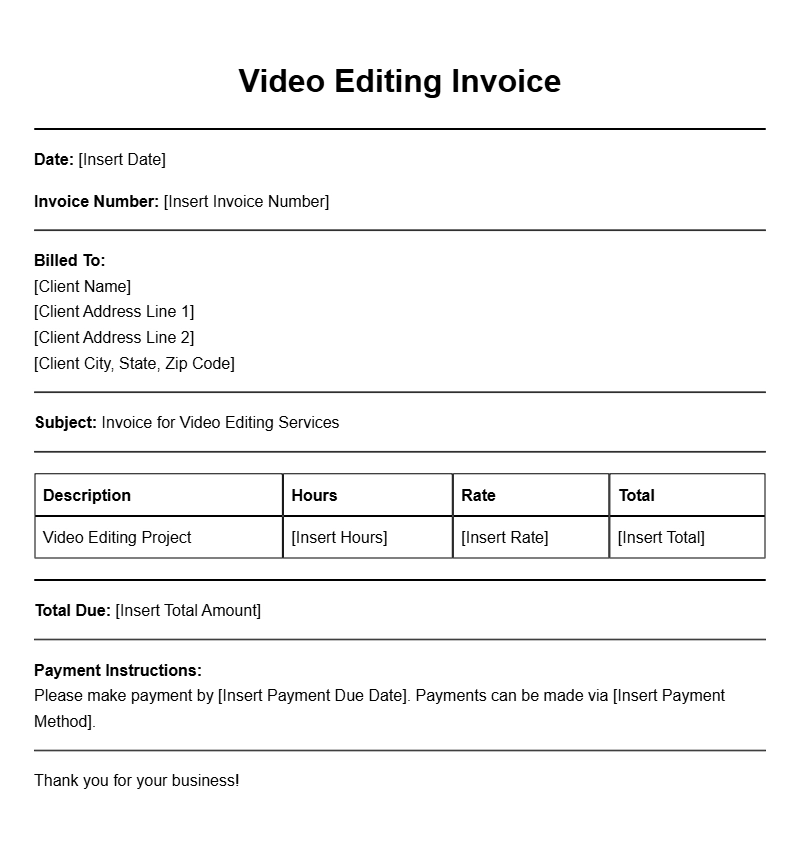
Basic Video Editor Invoice Template
Invoice Number: VE-001
Date: October 1, 2023
Bill To:
Client Name
Client Address
City, State, Zip
| Description | Hours | Rate | Total |
|---|---|---|---|
| Video Editing Services | 10 | $50 | $500 |
| Color Correction | 5 | $60 | $300 |
Total Due: $800
Please make payment by October 15, 2023.
Detailed Video Editing Services Invoice
Invoice #: VE-002
Date Issued: October 2, 2023
To:
Company Name
123 Business Rd.
Business City, State, Zip
| Service | Qty | Unit Price | Subtotal |
|---|---|---|---|
| Corporate Video Editing | 8 | $70 | $560 |
| Animation Integration | 4 | $75 | $300 |
Total Amount Due: $860
Payment is due within 30 days.
Freelance Video Editor Simple Invoice
Invoice ID: VE-003
Date: October 3, 2023
Client:
Jane Doe
456 Client St.
Client City, State, Zip
| Service Description | Time (hrs) | Price | Total |
|---|---|---|---|
| Video Editing | 12 | $40 | $480 |
| Sound Editing | 3 | $30 | $90 |
Grand Total: $570
Thank you for your business!
Professional Video Post-Production Invoice
Invoice #: VE-004
Date: October 4, 2023
Billed To:
XYZ Productions
789 Studio Ave.
Production City, State, Zip
| Editing Service | Hours | Cost per Hour | Amount |
|---|---|---|---|
| Editing for Short Film | 15 | $65 | $975 |
| Video Review Meetings | 2 | $50 | $100 |
Total Due: $1075
Payment terms: Net 30.
Custom Video Editing Invoice Template
Invoice ID: VE-005
Issue Date: October 5, 2023
To:
Creative Agency
321 Agency Rd.
Agency City, State, Zip
| Service | Hours | Rate | Subtotal |
|---|---|---|---|
| Video Editing | 10 | $55 | $550 |
| Graphic Overlays | 2 | $80 | $160 |
Total Amount: $710
Please process payment within 14 days.
Video Editing Invoice for Corporate Client
Invoice No: VE-006
Invoice Date: October 6, 2023
To:
Corporate Client
654 Corporate Blvd.
Corporate City, State, Zip
| Service Description | Hours | Hourly Rate | Total |
|---|---|---|---|
| Corporate Training Video | 20 | $75 | $1500 |
| Editing Consultation | 5 | $60 | $300 |
Total Due: $1800
Payment terms: Due upon receipt.
Video Editing Invoice for Event Highlights
Invoice Number: VE-007
Date: October 7, 2023
Client:
Event Organizer
987 Event St.
Event City, State, Zip
| Service | Qty | Rate | Amount |
|---|---|---|---|
| Event Highlight Reel | 1 | $1200 | $1200 |
| Social Media Clips | 3 | $150 | $450 |
Subtotal: $1650
Please make payment by October 21, 2023.
Final Video Editing Invoice for Client Project
Invoice #: VE-008
Date Issued: October 8, 2023
Billed To:
Client Name
111 Final Rd.
Final City, State, Zip
| Service | Time (hrs) | Rate | Total |
|---|---|---|---|
| Final Video Edits | 8 | $70 | $560 |
| Feedback Implementation | 2 | $50 | $100 |
Grand Total: $660
Payment is appreciated within 30 days.
Comprehensive Video Editing Invoice Example
Invoice ID: VE-009
Date: October 9, 2023
To:
Marketing Firm
222 Marketing Blvd.
Marketing City, State, Zip
| Description | Hours | Hourly Rate | Amount |
|---|---|---|---|
| Editing for Marketing Video | 15 | $65 | $975 |
| Revisions | 4 | $40 | $160 |
Total Amount Due: $1135
Please remit payment by October 23, 2023.