As a print shop owner, managing your invoices can feel overwhelming, especially if you’re not sure where to start. Having a solid invoice template not only keeps your finances organized but also reflects your professionalism to clients. This guide walks you through the essentials of creating effective invoice samples tailored specifically for print shops.
WHAT IS A PRINT SHOP INVOICE?
A print shop invoice is a document that outlines the services rendered, materials used, and costs associated with print jobs. It serves as a formal request for payment and includes vital information about your business and the client. With a well-structured invoice, you ensure clear communication regarding payment terms and job specifics.
WHEN IS IT USED?
Invoices are issued after a job is completed or at a milestone during long-term projects. If a client has requested printed materials like business cards, brochures, or custom designs, you’ll need to provide an invoice either at the completion of the job or at agreed-upon intervals.
KEY COMPONENTS OF A PRINT SHOP INVOICE
Your invoice should include the following key sections:
- Your Business Information: Include your business name, address, phone number, and email.
- Client Information: List the client’s name, address, and contact details.
- Invoice Number: Assign a unique number for tracking purposes.
- Invoice Date: The date when the invoice is issued.
- Due Date: Specify when payment is due.
- Itemized List of Services: Detail each service or product, including descriptions and quantities.
- Pricing: Clearly state the cost for each service and total charges.
- Payment Terms: Outline acceptable payment methods and any late fees or discounts for early payment.
STEP-BY-STEP WRITING GUIDE
To create your invoice, follow these steps:
- Start with your business information at the top.
- Next, add the client’s information below yours.
- Include the invoice number and date, making them easy to spot.
- List out each service or product clearly, adding a short description and quantity.
- Calculate the costs and present them in an organized manner.
- State your payment terms at the bottom of the invoice.
EXAMPLES AND TEMPLATES
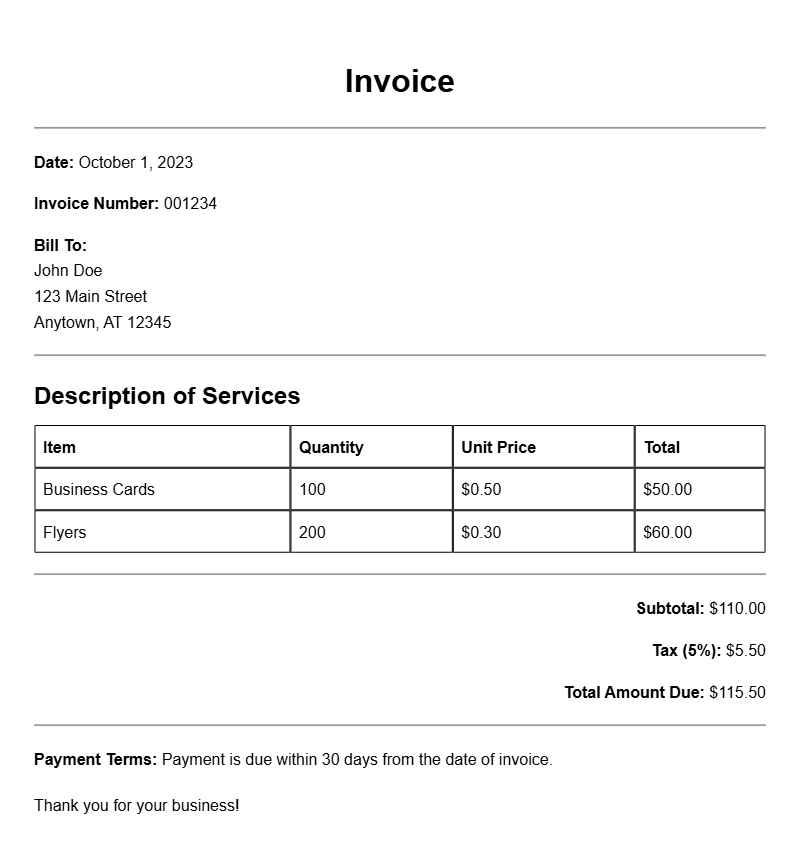
Here’s a simple example of what your invoice might look like:
Your Business Name
123 Print St, Print City, PC 12345
(123) 456-7890 | email@yourbusiness.com
Invoice To:
Client Name
456 Client Ave, Client City, CC 67890
Invoice #: 001
Date: March 1, 2023
Due Date: March 15, 2023
Description | Quantity | Price
Business Cards | 500 | $150.00
Brochures | 1000 | $300.00
Total Due: $450.00
Payment Terms: Please make payment by the due date. Late fees may apply.
COMMON MISTAKES TO AVOID
- Not including your business information—clients need to know who they are dealing with.
- Failing to clearly itemize services, which can lead to confusion.
- Omitting the due date, which can delay payments.
- Using complicated jargon that may confuse clients.
TIPS FOR CUSTOMIZATION
Personalizing your invoice can set you apart. Consider these tips:
- Add your logo for branding purposes.
- Use a consistent color scheme that matches your business identity.
- Incorporate a thank-you note or a special discount for return customers.
Creating a clear, professional invoice is vital for your print shop’s success. Use these guidelines to design invoices that not only convey important information but also enhance your relationship with clients. For more insights, check out other invoice samples like those for car washing, service calls, or balloon decoration.
Editable Document Format Examples