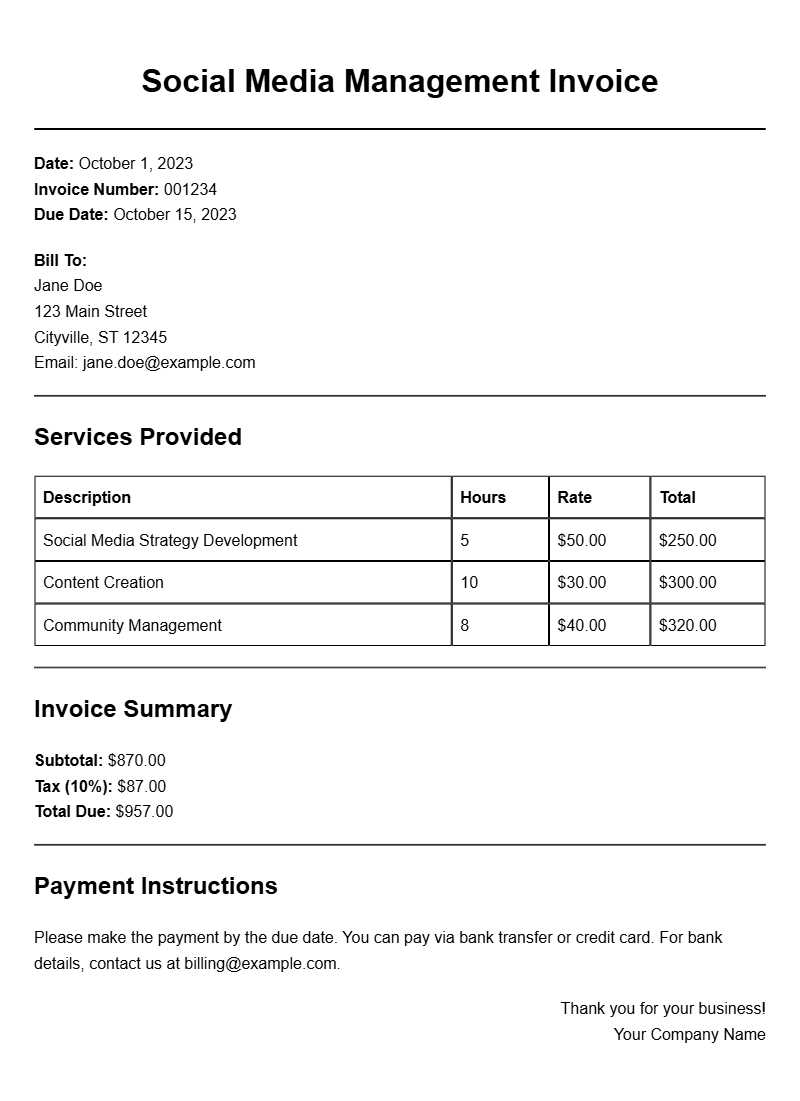
Managing social media accounts for clients is a rewarding venture, but it comes with its own set of administrative tasks. One of the essential tasks is invoicing. A well-structured social media management invoice template not only helps you get paid on time but also presents a professional image to your clients. Let’s explore how to create effective invoice templates tailored to your services.
WHAT IS A SOCIAL MEDIA MANAGEMENT INVOICE TEMPLATE?
A social media management invoice template is a pre-designed document that allows you to bill clients for your social media services. It outlines the services provided, the duration of work, and the total amount due. This template can be customized to reflect your brand and the specific services you offer, making it easier for clients to understand what they are paying for.
WHEN TO USE A SOCIAL MEDIA MANAGEMENT INVOICE?
Use this invoice type whenever you complete a project or reach a billing milestone. For example, if you manage a client’s social media accounts on a monthly basis, you can send them an invoice at the end of each month. Alternatively, if you’re working on a one-off campaign, issue an invoice once the campaign is completed.
KEY COMPONENTS OF A SOCIAL MEDIA MANAGEMENT INVOICE
- Your Business Information: Include your name, address, email, and phone number.
- Client Information: Clearly state the client’s name and contact details.
- Invoice Number: Assign a unique number for tracking purposes.
- Invoice Date: The date when the invoice is issued.
- Payment Due Date: Specify when the payment is expected.
- Services Provided: List all services rendered along with descriptions and rates.
- Total Amount Due: Clearly state the total amount owed, including any taxes or additional fees.
STEP-BY-STEP GUIDE TO WRITING A SOCIAL MEDIA MANAGEMENT INVOICE
- Choose a Template: Start with a basic layout that suits your style. You can find many free templates online.
- Add Your Information: Fill in your business details at the top of the invoice.
- Include Client Details: Make sure to accurately enter the client’s name and contact information.
- Detail Your Services: Be specific. For instance, if you created three posts, specify that under a “Social Media Content Creation” section.
- Calculate the Total: Sum up the costs for each service and make sure to check for any applicable taxes.
- Review for Accuracy: Before sending, double-check all details for accuracy.
EXAMPLES OF SOCIAL MEDIA MANAGEMENT INVOICE TEMPLATES
Here’s a simple example of what your invoice could look like:
[Your Business Name]
[Your Address]
[Your Email]
[Your Phone Number]
Invoice Number: 001
Invoice Date: [Date]
Due Date: [Due Date]
Bill To:
[Client Name]
[Client Address]
Description of Services:
1. Social Media Strategy Development – $200
2. Content Creation (3 posts) – $150
3. Monthly Account Management – $300
Total Amount Due: $650
COMMON MISTAKES TO AVOID
- Neglecting to Personalize: Always customize the invoice to reflect your brand and the client’s needs.
- Overlooking Details: Missing out on essential information can lead to payment delays.
- Not Following Up: If a payment is late, don’t hesitate to send a friendly reminder.
TIPS FOR CUSTOMIZATION
To make your invoice stand out, consider these tips:
- Use Your Branding: Incorporate your logo and brand colors.
- Add a Personal Touch: Include a thank-you note or a short message expressing your appreciation for their business.
- Offer Payment Options: List multiple payment methods to make it easy for clients to pay.
Creating a social media management invoice template that fits your needs doesn’t have to be complicated. By laying out your services clearly and professionally, you can ensure timely payments and maintain good client relationships. Start with a basic template and customize it to reflect your brand and the specifics of your services. For more examples of invoices in different fields, check out our samples for freelance writing, podcast editing, barista work, mural artistry, and voice acting.
Standard Format & Layout Reference