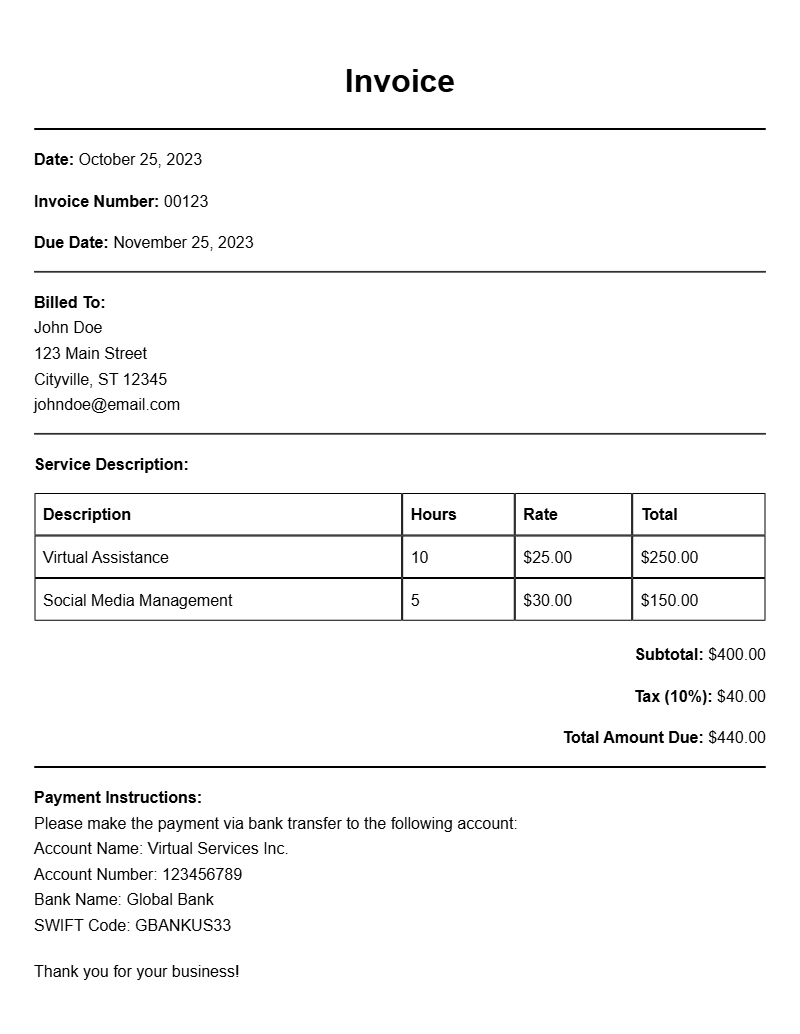
Creating a professional invoice is a vital part of running a successful virtual assistance business. It not only helps you get paid on time but also reflects your professionalism. If you’re unsure about how to structure your invoices, you’re not alone. Many virtual assistants look for invoice samples to kickstart their invoicing process. This guide will provide you with practical insights, examples, and a template to make your invoicing straightforward.
WHAT IS A VIRTUAL ASSISTANCE INVOICE?
A virtual assistance invoice is a document that outlines the services provided by a virtual assistant and requests payment from the client. It serves as a record of the work done and is crucial for both the assistant and the client for accounting purposes. A well-crafted invoice ensures clarity and professionalism, helping to maintain a good client relationship.
WHEN TO USE A VIRTUAL ASSISTANCE INVOICE
You should issue an invoice after completing the agreed-upon services or at regular intervals, depending on your contract with the client. For example, if you provide monthly services, sending an invoice at the end of each month would be appropriate. If you’re working on a project basis, send the invoice upon project completion.
KEY COMPONENTS OF A VIRTUAL ASSISTANCE INVOICE
When creating your invoice, include the following essential sections:
- Your Information: Name, address, and contact details.
- Client Information: Name and address of the client.
- Invoice Number: A unique identifier for tracking.
- Date of Issue: When the invoice is created.
- Due Date: When the payment is expected.
- Description of Services: Clear details of the services provided.
- Payment Terms: Specify payment methods and terms.
- Total Amount Due: The total cost of services rendered.
STEP-BY-STEP WRITING GUIDE
Follow these steps to craft your invoice:
- Start with your details at the top: Include your name, address, phone number, and email.
- Add the client’s information below yours.
- Include a unique invoice number and the invoice date.
- List the services you provided with a brief description, the hours worked, and the rate.
- Calculate the total amount due and mention the payment terms.
- End with your preferred payment method, like bank transfer or PayPal.
REALISTIC EXAMPLES AND TEMPLATE SNIPPETS
Here’s a simple invoice template you can use:
Your Name
Your Address
City, State, Zip Code
Email: your.email@example.com
Phone: (123) 456-7890
Client Name
Client Address
City, State, Zip Code
Invoice Number: 001
Date of Issue: [Insert Date]
Due Date: [Insert Due Date]
Description of Services
- Service 1: [Description] – [Hours] x [Rate] = [Amount]
- Service 2: [Description] – [Hours] x [Rate] = [Amount]
Total Amount Due: [Total Amount]
Payment Terms: Payment due within 30 days. Accepting payments via [Payment Methods].
COMMON MISTAKES TO AVOID
Here are a few pitfalls to watch out for:
- Not including an invoice number, which can cause confusion for tracking payments.
- Failing to specify payment terms, leading to delayed payments.
- Leaving out essential client details, which can affect communication.
TIPS FOR CUSTOMIZATION
Make your invoices stand out by personalizing them. Here are some ideas:
- Incorporate your brand colors and logo for a professional touch.
- Use clear and concise language to describe your services.
- Consider adding a note thanking your client for their business.
Creating a virtual assistance invoice doesn’t have to be daunting. By following this guide and using the provided examples, you can ensure your invoices are clear, professional, and effective. Remember, a well-structured invoice not only helps you get paid but also enhances your reputation as a reliable virtual assistant. For more specific invoice samples tailored to different professions, check out the bodyguard invoice samples, speech therapist invoice samples, concrete contractor invoice templates, property consultant invoice templates, and hair appointment invoice samples.
Common Document Templates & Previews