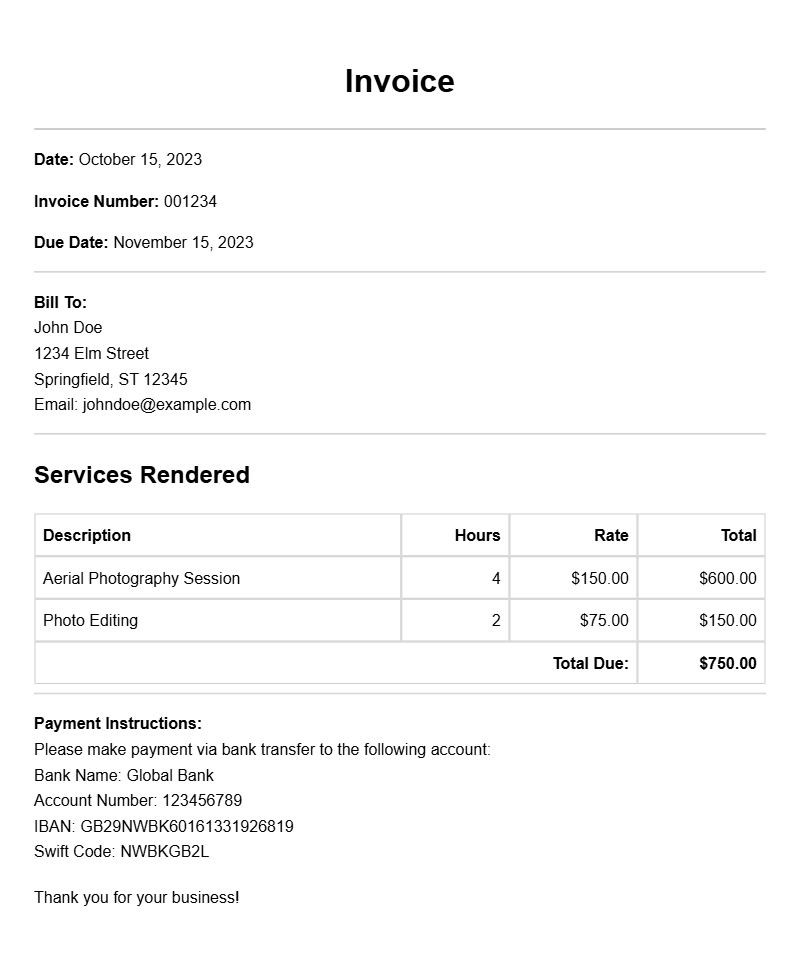
As a drone photographer, keeping your business organized and professional is essential. One key aspect of this is having a well-structured invoice. A clear and detailed invoice not only helps you get paid faster but also builds trust with your clients. If you’re looking for drone photographer invoice samples, this guide will provide you with practical insights and templates to create invoices that work for you.
WHAT IS A DRONE PHOTOGRAPHER INVOICE?
A drone photographer invoice is a document that outlines the services provided, the fees charged, and the payment terms for a drone photography project. This document acts as a formal request for payment and serves as a record for both you and your client.
WHEN IS IT USED?
You typically use an invoice after completing a photography job, such as a wedding, real estate shoot, or event coverage. Sending an invoice promptly after the job can help you maintain cash flow and keep your business running smoothly.
KEY COMPONENTS OF A DRONE PHOTOGRAPHER INVOICE
- Your Contact Information: Include your name, business name, phone number, email, and address.
- Client Information: List the client’s name, company, and contact details.
- Invoice Number: Assign a unique number for easy tracking.
- Service Description: Clearly describe the services provided, including any specifics like hours worked, number of photos delivered, or special requests.
- Pricing: Break down costs for each service, including any applicable taxes and discounts.
- Payment Terms: Specify when payment is due and acceptable payment methods.
- Due Date: Include a date for when the payment should be received.
STEP-BY-STEP WRITING GUIDE
- Choose a Template: Start with a simple template that suits your style. You can find editable templates online or create your own.
- Fill in Your Information: Add your contact details at the top, making it easy for your client to reach you.
- Add Client Information: Ensure you have the correct name and address for the client to avoid any confusion.
- List Services Provided: Be specific about what you did. For example, “Aerial photography for Smith Wedding on July 20, 2023.”
- Detail Pricing: Itemize your charges. If you charged for travel time, include that line item clearly.
- Set Payment Terms: Decide whether you want payment upon receipt or within a specific number of days.
- Review and Send: Double-check the invoice for accuracy and send it promptly.
REALISTIC EXAMPLES/TEMPLATES
Here’s a basic invoice template for a drone photographer:
[Your Name/Business Name]
[Your Address]
[Your Phone Number]
[Your Email]
Invoice Number: [#1234]
Date: [MM/DD/YYYY]
Bill To:
[Client Name]
[Client Company]
[Client Address]
Description of Services:
– Drone Photography – Wedding Coverage: $500
– Travel Fee: $50
– Editing Fee: $100
Subtotal: $650
Tax (if applicable): $0
Total: $650
Payment Terms: Due upon receipt
COMMON MISTAKES TO AVOID
- Missing Details: Ensure all necessary information is included to prevent delays in payment.
- Ambiguous Descriptions: Be clear about what services were provided to avoid disputes.
- Incorrect Pricing: Double-check your calculations to ensure accuracy.
TIPS FOR CUSTOMIZATION
- Use your branding colors and logo to make your invoice look professional.
- Consider adding a personal touch, like a thank-you note or a follow-up question about the client’s experience with your services.
- Adjust the layout to fit your style while keeping it easy to read.
Creating a professional invoice doesn’t have to be complicated. By following these guidelines and utilizing the provided templates, you can streamline your billing process. This not only makes it easier for you to get paid but also enhances your professionalism as a drone photographer. For additional invoice examples, check out resources for data processing invoices, casino night invoices, or comic artist invoices for inspiration.
Practical Document Examples