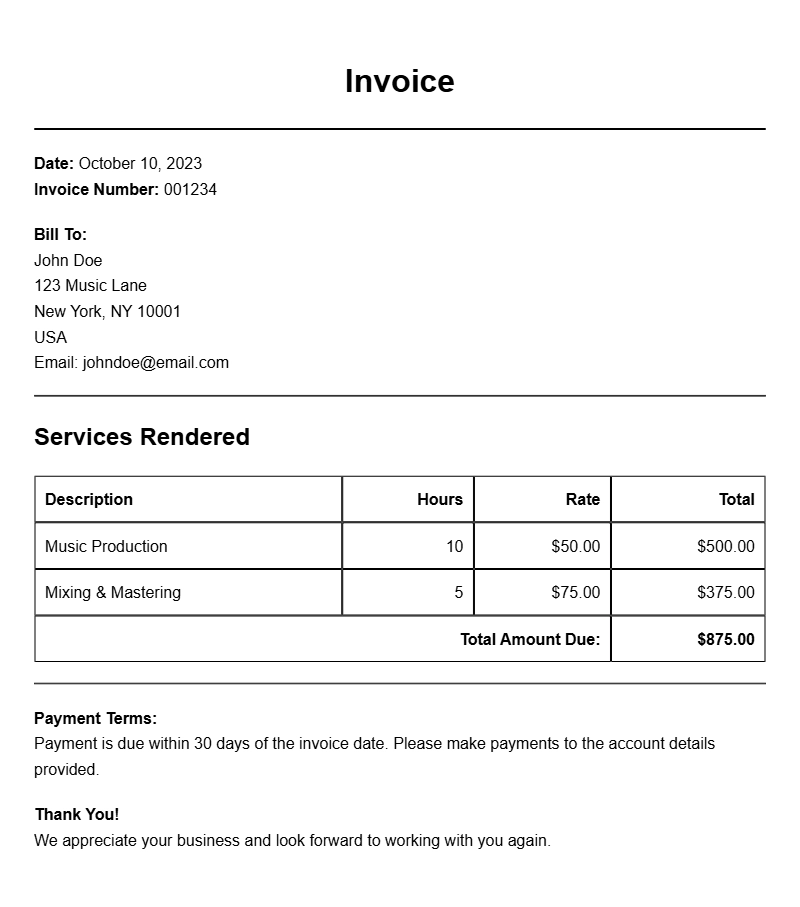
When you’re working as a music producer, keeping track of your finances is as important as your creative work. An essential part of managing those finances is sending out invoices. If you’re unsure where to start, this guide will provide you with practical insights and music producer invoice samples to help you create your own professional invoices.
Understanding the Music Producer Invoice
A music producer invoice is a document that outlines the services you’ve provided, the amount owed, and the payment terms. This document not only serves as a request for payment but also helps maintain a record of your transactions. Having a clear and structured invoice can streamline your payment process, making it easier for clients to understand what they’re paying for.
When to Use an Invoice
You’ll typically use an invoice after you’ve completed a project or delivered a service. Whether you’ve produced a track, mixed an album, or provided consultation services, an invoice is your formal way of asking for payment. It’s also a good practice to send an invoice even for smaller projects, as this establishes a professional standard in your business dealings.
Key Components of a Music Producer Invoice
A well-crafted invoice should include the following sections:
- Your Contact Information: Name, address, phone number, and email.
- Client’s Information: Name and contact details of the client.
- Invoice Number: A unique identifier for tracking purposes.
- Date of Issue: The date you’re sending the invoice.
- Payment Due Date: When you expect payment.
- Description of Services: Detailed breakdown of what you provided.
- Payment Amount: Total amount due.
- Payment Instructions: How clients can pay you, including accepted payment methods.
Step-by-Step Guide to Writing an Invoice
- Start with your contact information at the top.
- Include the client’s name and address below yours.
- Add a unique invoice number and the date.
- List the services provided with dates, descriptions, and rates.
- Clearly state the total amount due at the bottom.
- Include your payment details, specifying how the client can pay you.
Realistic Examples and Template Snippets
Here’s a simple invoice layout you can customize:
[Your Name]
[Your Address]
[City, State, Zip]
[Your Email]
[Your Phone]
[Client Name]
[Client Address]
[City, State, Zip]
Invoice #: 001
Date: [Issue Date]
Due Date: [Due Date]
Description of Services:
– Music Production Services for [Project Name]: $[Amount]
– Mixing and Mastering: $[Amount]
Total Amount Due: $[Total Amount]
Payment Instructions:
Please make payment via [Payment Method] to [Your Payment Details].
Common Mistakes to Avoid
When creating an invoice, keep these pitfalls in mind:
- Missing Details: Ensure all necessary information is present.
- Unclear Descriptions: Be specific about services to avoid confusion.
- Wrong Payment Terms: Clearly state when payment is due to avoid delays.
Tips for Customization
Your invoices should reflect your brand. Here are a few ways to personalize them:
- Add your logo and use your brand colors.
- Include a brief message or thank you note for a personal touch.
- Consider using invoicing software for added functionality and tracking.
Creating a professional invoice doesn’t have to be daunting. With these samples and guidelines, you can ensure that your invoices are clear, professional, and effective in getting you paid. For more templates and examples, check out resources like software developer invoices or beautician invoices.
Document Examples & Template Samples