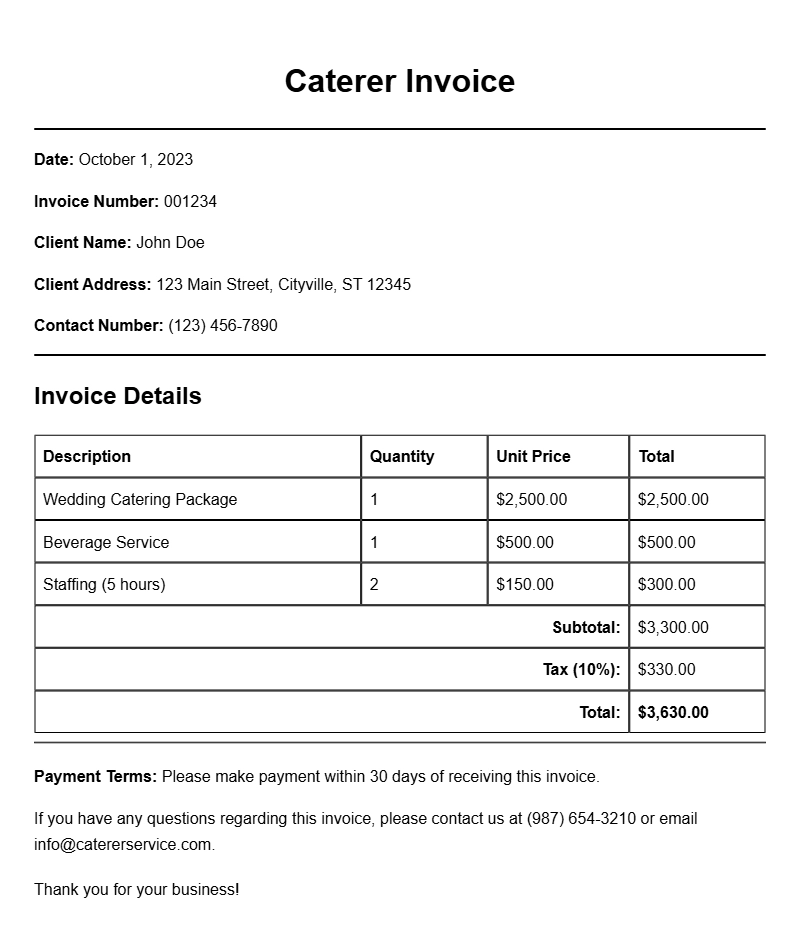
When running a catering business, having a clear and professional invoice can make all the difference. A well-structured invoice not only reflects your professionalism but also ensures you get paid on time. If you’re looking for caterer invoice samples to guide you through the process, you’ve come to the right place. This article provides practical insights into what your invoice should include, when to use it, and how to create one that meets your needs.
What is a Caterer Invoice?
A caterer invoice is a document that outlines the services you’ve provided to a client, along with the associated costs. It serves as a formal request for payment after you’ve completed a catering job. Whether you’re catering a wedding, corporate event, or private party, an invoice helps ensure both you and your client are on the same page regarding the services rendered and the fees charged.
When to Use a Caterer Invoice
Typically, you will send an invoice after you’ve completed a catering service. However, some caterers opt to require a deposit upfront, followed by a final invoice after the event. This helps cover initial costs and secures the booking. Use invoices for all types of services, including food preparation, delivery, and any additional services like staffing or equipment rental.
Key Components of a Caterer Invoice
- Your Business Information: Include your business name, address, phone number, and email at the top.
- Client Information: Add the client’s name and contact details.
- Invoice Number: Assign a unique number for tracking purposes.
- Date of Issue: The date when you are sending the invoice.
- Payment Due Date: Specify when the payment is expected.
- Itemized List of Services: Detail each service provided along with the corresponding costs.
- Subtotal, Taxes, and Total Amount Due: Clearly indicate the total sum, including any applicable taxes.
- Payment Instructions: Provide details on how clients can pay you (e.g., bank transfer, checks, online payments).
Step-by-Step Writing Guide
- Start with Your Information: Place your business name and contact details at the top.
- Add Client Details: Include the client’s name and contact information just below yours.
- Assign an Invoice Number: Create a unique number for easy reference.
- Date the Invoice: Note the date of issuance and the payment due date.
- List Services Provided: Break down each service with its respective cost. Be specific to avoid confusion.
- Calculate Totals: Clearly state the subtotal, applicable taxes, and final amount due.
- Provide Payment Details: Let clients know how they can pay you.
Realistic Examples and Templates
Below is a simple example of a caterer invoice template:
Caterer Invoice
Your Business Name
Your Address
Your Phone Number
Your Email
Client Name
Client Address
Client Phone Number
Client Email
Invoice #: 001
Date of Issue: January 1, 2023
Payment Due: January 15, 2023
Services Provided:
- Catering for Wedding – $2,000.00
- Event Setup – $300.00
- Staffing – $500.00
Subtotal: $2,800.00
Tax (5%): $140.00
Total Amount Due: $2,940.00
Payment Instructions:
Please make payment via bank transfer to [Bank Details].
Common Mistakes to Avoid
- Not including all services: Always itemize everything to prevent misunderstandings.
- Forgetting to include payment terms: Specify when payment is due and how it should be made.
- Leaving out your contact information: Ensure clients can easily reach you with questions.
Tips for Customization
Feel free to personalize your invoice template. You can add your logo for branding or adjust the layout to fit your style. Consider using invoicing software to automate certain aspects, like numbering and tax calculations, making the process smoother.
Creating a professional caterer invoice is essential for your business’s financial health. With the right components and a clear structure, you can ensure timely payments and foster good client relationships. For more invoicing examples, check out these electrical installation invoice samples, paralegal invoice templates, creator meetup invoice samples, charity event invoice templates, and event decorator invoice templates.
Sample Documents for Multiple Use Cases