Managing a community can be rewarding but also comes with its own set of challenges, especially when it comes to billing for your services. If you’re a community manager, having a clear and professional invoice template can simplify the payment process. This guide will walk you through everything you need to know about community manager invoice templates, so you can focus on what you do best: building and engaging your community.
WHAT IS A COMMUNITY MANAGER INVOICE TEMPLATE?
A community manager invoice template is a document that outlines the services you provide as a community manager and details the payment you expect for those services. This template serves as a structured way to communicate your fees and conditions to clients or employers, ensuring both parties are on the same page regarding payment expectations.
WHEN IS IT USED?
You’ll use this invoice template after completing a project or providing ongoing community management services. It’s typically sent at the end of a billing period or upon the completion of specific tasks, such as hosting an event, launching a campaign, or conducting a community audit.
KEY COMPONENTS OF A COMMUNITY MANAGER INVOICE
To create an effective invoice, include these essential sections:
- Your Information: Name, business name (if applicable), address, email, and phone number.
- Client Information: The name and contact details of the client or organization you’re invoicing.
- Invoice Number: A unique identifier for tracking purposes.
- Invoice Date: The date when the invoice is issued.
- Due Date: When payment is expected.
- Description of Services: A detailed breakdown of the services provided, including dates and any relevant metrics or outcomes.
- Payment Terms: Specify your payment methods, late fees, and other conditions.
- Total Amount Due: Clearly state the total charge for your services.
STEP-BY-STEP GUIDE TO WRITING YOUR INVOICE
- Choose a Template: Start with a professional-looking invoice template. You can find free templates online or create your own.
- Fill in Your Information: Include your name, address, and contact info at the top.
- Add Client Details: Make sure to accurately input your client’s name and contact details.
- Assign an Invoice Number: Use a systematic numbering format to keep track of your invoices.
- List Your Services: Write a clear description of the services rendered, including the dates and any specific metrics.
- State Your Payment Terms: Be clear about how and when you expect payment.
- Calculate the Total: Add up your fees and ensure accuracy.
- Review and Send: Double-check for errors before sending the invoice to your client.
REALISTIC EXAMPLE OF A COMMUNITY MANAGER INVOICE
Here’s a simple example to illustrate:
Your Name
Your Business Name
123 Your Street
Your City, State, Zip
Email: your@email.com
Phone: (123) 456-7890
Client Name
Client Business Name
456 Client Street
Client City, State, Zip
Invoice Number: 001
Invoice Date: January 1, 2023
Due Date: January 15, 2023
Description of Services:
– Community engagement for January 2023: $500
– Monthly report preparation: $200
Total Amount Due: $700
COMMON MISTAKES TO AVOID
- Not including all necessary information, which can lead to confusion.
- Failing to specify payment terms, which might cause delayed payments.
- Using unclear descriptions for services, making it hard for clients to understand what they are paying for.
TIPS FOR CUSTOMIZATION
Make your invoices stand out by personalizing them. Consider these tips:
- Use your brand colors and logo to create a professional look.
- Add a personal note to express gratitude for the client’s business.
- Adjust payment terms based on your relationship with the client or the nature of the project.
Creating a well-structured invoice can significantly ease your billing process. By using a community manager invoice template, you’ll save time and present yourself as a professional. If you’re interested in more specific examples, check out various invoice samples tailored for different professions. With the right tools and a clear template, you can ensure that managing your finances is as smooth as your community management work.
Common Document Templates & Previews
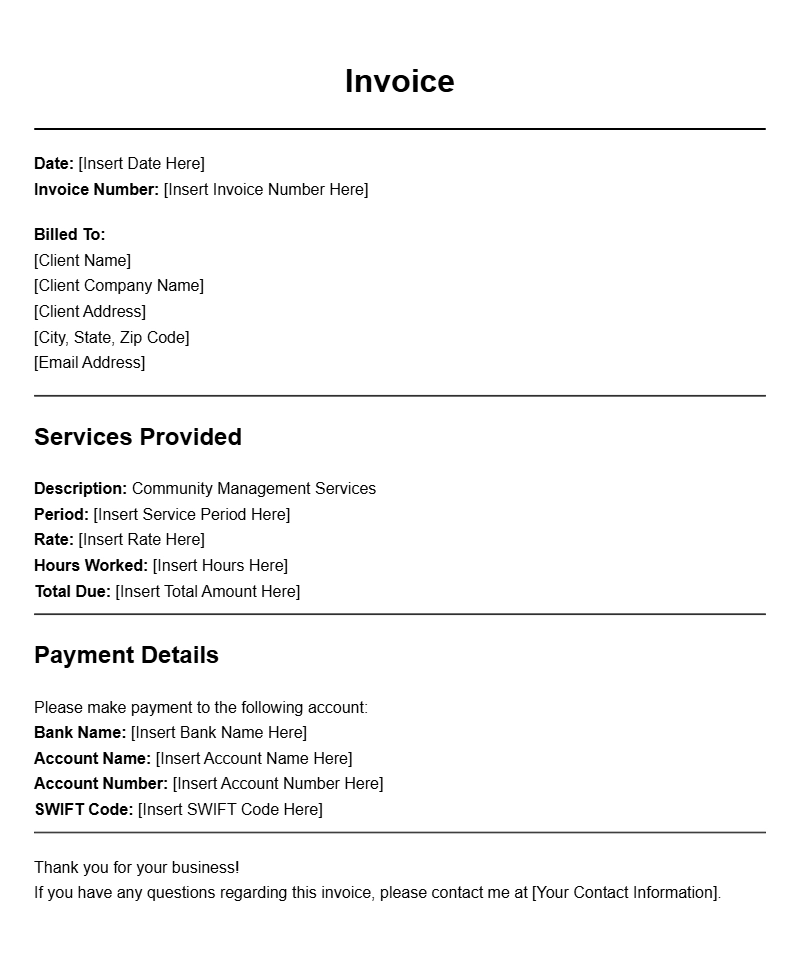
Basic Community Manager Invoice Template
Invoice Number: CM-001
Date: October 1, 2023
To:
Client Name
Client Address
City, State, Zip
From:
Your Name
Your Address
City, State, Zip
Services Rendered:
| Description | Hours | Rate | Total |
|---|---|---|---|
| Community Engagement | 10 | $30 | $300 |
| Event Coordination | 5 | $40 | $200 |
Total Due: $500
Please make the payment by: October 15, 2023
Detailed Community Management Invoice Example
Invoice ID: CM-002
Date of Issue: October 5, 2023
Bill To:
Client Company
Client Street Address
City, State, Zip
From:
Your Company Name
Your Street Address
City, State, Zip
Services Provided:
| Service | Quantity | Unit Price | Amount |
|---|---|---|---|
| Monthly Management Fee | 1 | $500 | $500 |
| Social Media Management | 10 | $50 | $500 |
| Newsletter Creation | 2 | $100 | $200 |
Total Amount Due: $1200
Payment is due by: October 20, 2023
Community Manager Services Invoice
Invoice Number: CM-003
Date Issued: October 10, 2023
To:
Client Name Here
Client Address
City, State, Zip
From:
Your Name
Your Address
City, State, Zip
Breakdown of Services:
| Task | Duration (Hours) | Hourly Rate | Subtotal |
|---|---|---|---|
| Community Outreach | 3 | $30 | $90 |
| Content Creation | 4 | $35 | $140 |
| Event Planning | 2 | $50 | $100 |
Total Amount: $330
Payment is appreciated by: October 25, 2023
Community Management Invoice with Payment Terms
Invoice #: CM-004
Date: October 15, 2023
Billed To:
Client’s Name
Client’s Address
City, State, Zip
From:
Your Name
Your Business Address
City, State, Zip
Services Rendered:
| Service Description | Rate | Hours | Total |
|---|---|---|---|
| Community Engagement Activities | $25 | 15 | $375 |
| Monthly Reporting | $50 | 1 | $50 |
Amount Due: $425
Payment Terms: Net 30 days. Please make payment by November 14, 2023.
Invoice for Community Engagement Services
Invoice ID: CM-005
Date: October 20, 2023
To:
Client Name
Client Address
City, State, Zip
From:
Your Name
Your Address
City, State, Zip
Services Provided:
| Description | Hours Worked | Rate | Total |
|---|---|---|---|
| Community Outreach Program | 12 | $45 | $540 |
| Event Planning and Coordination | 6 | $60 | $360 |
Total Amount Due: $900
Please remit payment by: November 5, 2023
Community Manager Invoice with Itemized List
Invoice #: CM-006
Date Issued: October 25, 2023
Bill To:
Client Name
Client Address
City, State, Zip
From:
Your Name
Your Address
City, State, Zip
Itemized Services:
| Item | Quantity | Unit Price | Total |
|---|---|---|---|
| Monthly Community Management | 1 | $600 | $600 |
| Social Media Interaction | 20 | $25 | $500 |
Total Due: $1100
Payment must be received by: November 10, 2023
Professional Community Manager Billing Statement
Invoice Number: CM-007
Date: October 30, 2023
To:
Client Name
Client Address
City, State, Zip
From:
Your Name
Your Address
City, State, Zip
Summary of Services:
| Service | Hours | Rate | Subtotal |
|---|---|---|---|
| Community Strategy Development | 5 | $50 | $250 |
| Project Management | 8 | $45 | $360 |
Total Amount Due: $610
Payment expected by: November 15, 2023
Community Manager Invoice for Services Rendered
Invoice #: CM-008
Date of Issue: November 1, 2023
To:
Client’s Name
Client’s Address
City, State, Zip
From:
Your Name
Your Address
City, State, Zip
Details of Services:
| Service Description | Hours | Cost per Hour | Total |
|---|---|---|---|
| Community Engagement Initiatives | 10 | $40 | $400 |
| Monthly Report Compilation | 2 | $50 | $100 |
Total Due: $500
Payment due by: November 30, 2023
Simple Community Manager Invoice Template
Invoice ID: CM-009
Date: November 5, 2023
Bill To:
Client Name
Client Address
City, State, Zip
From:
Your Name
Your Address
City, State, Zip
Services Rendered:
| Description | Hours | Rate | Amount |
|---|---|---|---|
| Community Event Management | 4 | $55 | $220 |
| Social Media Strategy | 6 | $40 | $240 |
Total Amount Due: $460
Please ensure payment by: November 20, 2023