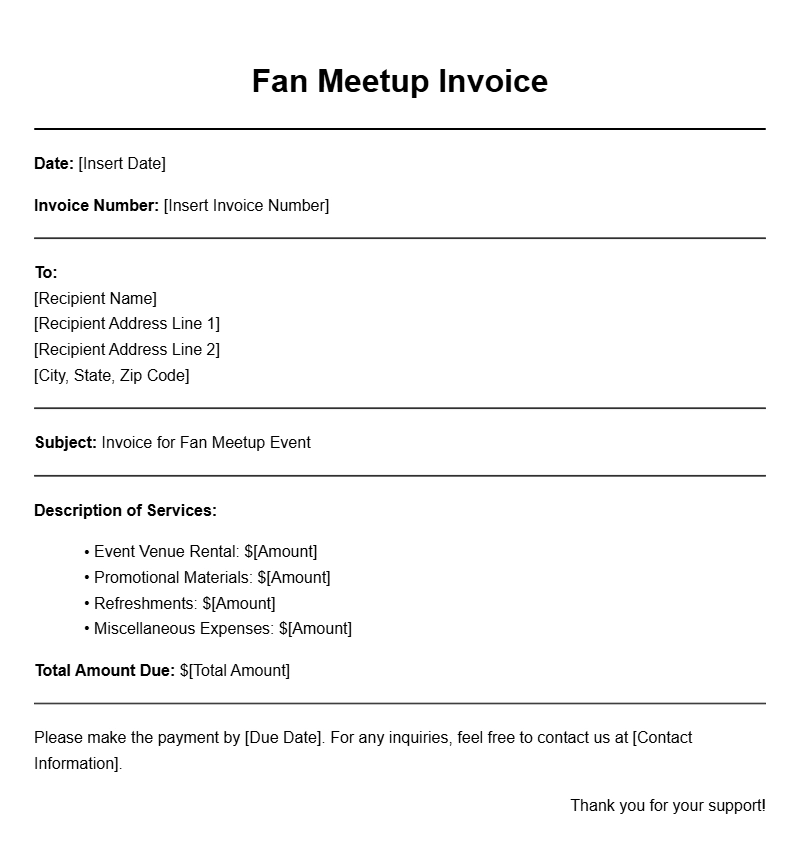
Fan meetups are exciting gatherings where enthusiasts come together to celebrate shared interests. Whether it’s a beloved TV show, a popular band, or a favorite video game, organizing these events often requires careful planning—and that includes managing finances. One critical aspect of this is keeping track of funds and expenses through well-crafted invoices. In this guide, you’ll discover everything you need to know about fan meetup invoice templates, helping you streamline the process of managing payments and ensuring clarity for all involved.
Understanding Fan Meetup Invoice Templates
A fan meetup invoice template is a pre-formatted document used to request payment for services or products related to the event. This could include venue rentals, merchandise sales, or even ticket sales for the meetup itself. Using a template helps ensure you capture all necessary details, making it easier for attendees to understand what they are paying for and why.
When to Use an Invoice Template
You’ll typically use an invoice template in these scenarios:
- Charging for tickets to the event.
- Collecting fees for merchandise like t-shirts or posters.
- Billing for services provided during the meetup, such as catering or entertainment.
Key Components of a Fan Meetup Invoice
To create a clear and effective invoice, make sure to include the following components:
- Your Contact Information: Include your name, email, and phone number.
- Invoice Number: A unique identifier for tracking purposes.
- Date of Issue: When the invoice is created.
- Due Date: When payment is expected.
- Itemized List of Services/Products: Clearly state what attendees are being charged for.
- Total Amount Due: The final sum to be paid.
Step-by-Step Guide to Writing Your Invoice
Creating an invoice doesn’t have to be complicated. Follow these steps:
- Choose a template that suits your needs. You can find many customizable options online.
- Fill in your contact details at the top of the invoice.
- Add a unique invoice number and the issue date.
- List the services or products being billed, with a brief description, quantity, and price for each.
- Calculate the total amount due and clearly indicate this at the bottom.
- Include payment methods accepted, such as PayPal, bank transfer, or cash.
Realistic Examples of Fan Meetup Invoices
Here’s a simple invoice template you can adapt:
Your Name
Your Email
Your Phone Number
Invoice Number: 001
Date of Issue: [Insert Date]
Due Date: [Insert Due Date]
Description Quantity Price Total
———————————————————
Event Ticket 10 $15.00 $150.00
Merchandise (T-Shirt) 5 $20.00 $100.00
Catering Service 1 $200.00 $200.00
———————————————————
Total Amount Due: $450.00
Payment Methods: PayPal, Bank Transfer
Common Mistakes to Avoid
When creating your invoice, steer clear of these pitfalls:
- Neglecting to include an invoice number, making it hard to track payments.
- Failing to itemize charges, which can lead to confusion.
- Not specifying payment methods can delay transactions.
Tips for Customization
To make your invoice stand out, consider these customization ideas:
- Add your logo or a themed design that reflects the event’s branding.
- Include a personal note thanking attendees for their support.
- Use color coding for different types of charges to enhance clarity.
Creating a fan meetup invoice template can simplify your organizing process and ensure that everything runs smoothly. By keeping track of your financial dealings with clarity and professionalism, you contribute to a positive experience for all attendees. Start customizing your template today, and don’t hesitate to check out related resources like event photography invoice samples or subscription box owner invoice samples for more ideas on effective invoicing.
Ready-to-Use Document Samples