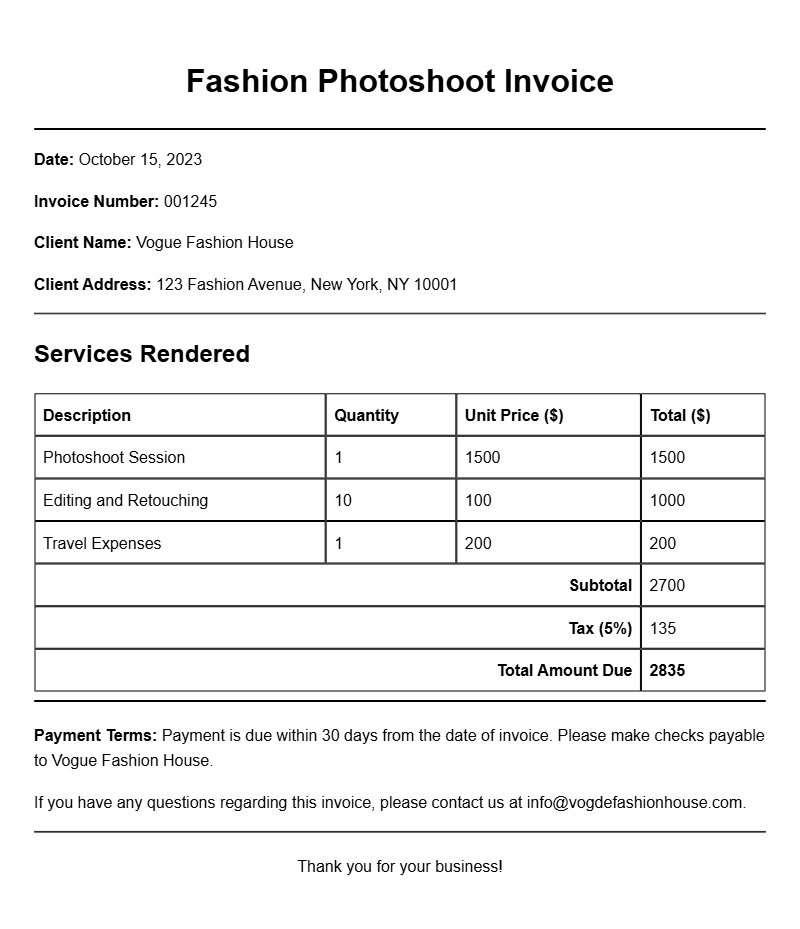
When you’re running a fashion photoshoot, whether as a photographer, stylist, or model, keeping track of your finances is essential. That’s where a well-crafted invoice comes in. If you’re looking for fashion photoshoot invoice samples, you’re probably trying to streamline your billing process, get paid on time, and maintain professionalism. In this guide, we’ll walk you through what a fashion photoshoot invoice is, when to use it, what to include, and even provide some examples to get you started.
Understanding the Fashion Photoshoot Invoice
A fashion photoshoot invoice is a document that outlines the services provided during a photoshoot and details the associated costs. This invoice serves as a formal request for payment, ensuring that all parties are clear about what has been delivered and what is owed. It’s not just a piece of paper; it’s a professional way to keep your business transactions organized and transparent.
When to Use an Invoice
Typically, you’ll use a fashion photoshoot invoice after completing a session. It’s important to send out invoices promptly to ensure timely payment. If you provide a detailed invoice right after the shoot—ideally within a few days—it keeps everything fresh in the client’s mind, which can help avoid any confusion later on.
Key Components of a Fashion Photoshoot Invoice
Here are the essential sections you should include in your invoice:
- Your Business Information: Include your name, business name, address, phone number, and email.
- Client Information: Add the client’s name, address, and contact details.
- Invoice Number: Assign a unique number to each invoice for tracking purposes.
- Date of Issue: Indicate when the invoice is created.
- Payment Due Date: Specify the date by which payment should be made.
- Description of Services: Detail the services provided, including the number of hours worked, location, and any additional services (like retouching).
- Payment Terms: Specify how you accept payments (e.g., bank transfer, PayPal) and any late fees that may apply.
- Total Amount Due: Clearly state the total cost, including any taxes or additional fees.
Step-by-Step Guide to Writing Your Invoice
- Start with your business details: Place your logo at the top, followed by your contact information.
- Add client details: Right below your information, include your client’s name and address.
- Create an invoice number: This helps both you and your client keep track of payments.
- List the services: Be specific about what was provided during the photoshoot. For example, “Full-day fashion shoot at Downtown Studio with 50 edited images.”
- Calculate the total: Make sure to include any applicable taxes or discounts.
- State payment terms: Be clear about how and when you’d like to be paid.
Realistic Examples and Editable Template Snippets
Here’s a simple snippet you can use as a template:
Your Business Name
123 Fashion Ave, City, State, ZIP
Email: your@email.com
Phone: (123) 456-7890
Invoice To:
Client Name
456 Client St, City, State, ZIP
Invoice Number: 001
Date: [Insert Date]
Due Date: [Insert Due Date]
Description of Services:
– Fashion photoshoot at Downtown Studio
– Duration: 8 hours
– Deliverables: 50 edited images
Total Amount Due: $800
Payment Terms: Payment due within 30 days via bank transfer.
Common Mistakes to Avoid
- Not including all necessary details, which can lead to confusion.
- Using vague descriptions for services, making it hard for clients to understand what they’re paying for.
- Failing to follow up on unpaid invoices, which can affect your cash flow.
Tips for Customization
Make your invoices stand out by personalizing them. Consider adding:
- Your branding elements, like colors and fonts.
- A thank-you note for a more personal touch.
- Links to your portfolio or social media for easy client reference.
A well-structured invoice not only simplifies the payment process but also reflects your professionalism. Check out some more templates if you’re looking for inspiration, like the ones for kindergarten graduations or event planning. Start creating your fashion photoshoot invoices today to keep your business running smoothly!
Standard Format & Layout Reference