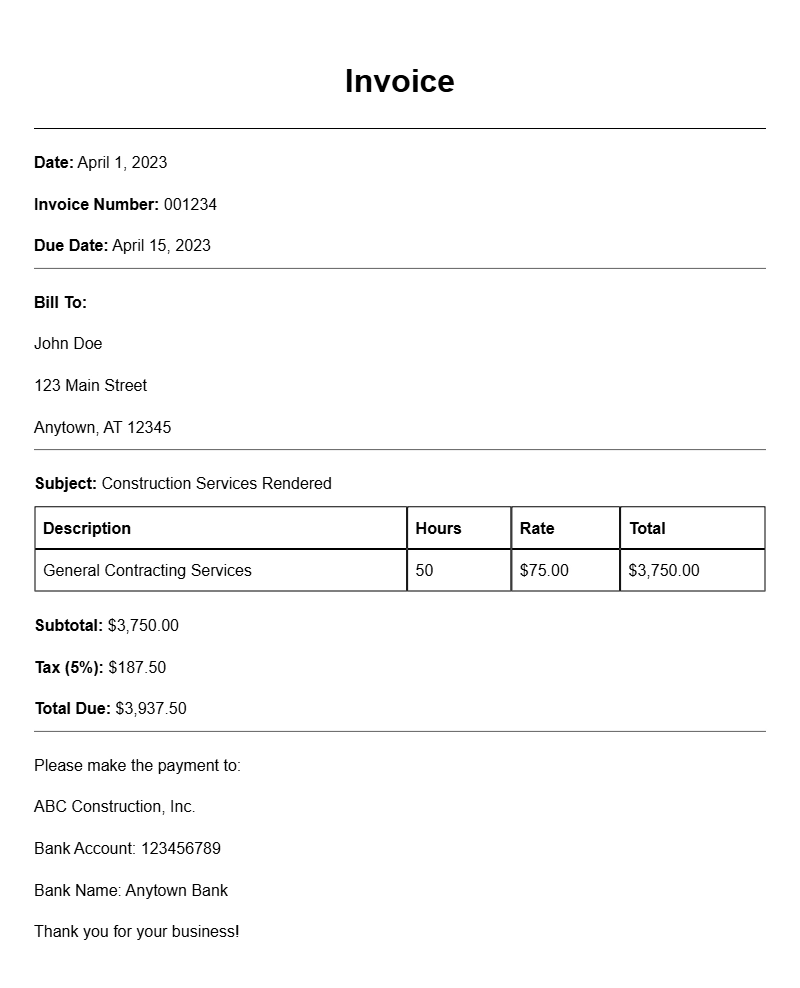
Creating a general contractor invoice can seem daunting, especially if you’re new to the construction business or managing projects. This essential document not only helps you get paid but also keeps your financial records organized. Let’s break down what a general contractor invoice is, when you’ll need one, and how to craft it effectively with examples and practical tips.
What is a General Contractor Invoice?
A general contractor invoice is a formal request for payment for services rendered in construction or renovation projects. It itemizes the work completed, materials used, and any additional expenses incurred. This document serves as proof of the services you provided and outlines the amount due from your client.
When is it Used?
You’ll typically use a general contractor invoice after completing a project or reaching a milestone within a larger project. It’s essential for ensuring that you receive compensation for your work and keeps your financial interactions transparent with clients.
Key Components of a General Contractor Invoice
To make your invoice clear and professional, include the following components:
- Your Business Information: Name, address, phone number, and email.
- Client Information: Name and address of the client.
- Invoice Number: A unique identifier for tracking.
- Date of Issue: The date you send the invoice.
- Payment Terms: Specify when payment is due, such as “Net 30.”
- Description of Services: A detailed list of services provided.
- Itemized Costs: Break down costs for materials, labor, and any other expenses.
- Total Amount Due: The final amount the client needs to pay.
Step-by-Step Writing Guide
- Header: Include your business name and logo at the top.
- Client Details: Add the client’s name and contact information underneath your header.
- Invoice Number and Date: Clearly state the invoice number and the date of issuance.
- List Services: Write a detailed description of the work done, including dates and any relevant project details.
- Calculate Costs: Itemize all costs, including labor and materials. Make sure to show calculations clearly.
- Payment Information: Provide details on how the client can make payments, including bank details if necessary.
- Review and Send: Double-check all information for accuracy before sending.
Realistic Examples/Templates
Here’s a simple example of what your invoice might look like:
Your Company Name
Your Address
City, State, Zip
Phone Number
Email Address
Invoice Number: 001
Date: [Insert Date]
Bill To:
Client Name
Client Address
City, State, Zip
Description of Services:
1. Kitchen Renovation – [Insert Dates]
Labor: $1,500
Materials: $750
Total: $2,250
Total Amount Due: $2,250
Payment Terms: Net 30
Payment Instructions: [Insert Payment Methods]
Common Mistakes to Avoid
- Vague Descriptions: Always provide clear descriptions of the services to avoid confusion.
- Missing Payment Information: Ensure clients know how and when to pay.
- Not Following Up: If payment is late, don’t hesitate to follow up politely.
Tips for Customization
Every business is unique. Customize your invoice to reflect your brand by using your company colors, fonts, and logo. Consider including a personal note thanking your client for their business. You might also want to create different templates for various types of projects, such as those for piano lessons or door installations.
By crafting a well-structured general contractor invoice, you not only streamline your billing process but also enhance your professional image with clients. Take the time to create an invoice that works for you, and watch how it improves your cash flow and client relationships.
General Document Template Collection