For high school students, earning recognition through certificates can boost resumes, college applications, or even motivate participation in school activities. But creating a professional-looking certificate from scratch might seem overwhelming, especially if you’re unfamiliar with graphic design or formatting. That’s where high school student certificate templates come in handy. They provide a ready-made framework that you can customize easily, saving time and ensuring your certificates look polished.
What Is a High School Student Certificate Template?
A certificate template is a pre-designed document that outlines the structure and visual layout of a certificate. It typically includes placeholders for the recipient’s name, the reason for the award, date, signatures, and any relevant logos or seals. Using a template means you don’t need to design from scratch; instead, you fill in the details to create a professional document.
When Do You Use a Certificate Template?
- Recognizing participation in clubs, competitions, or events
- Awarding achievement or excellence in academics or extracurriculars
- Providing proof of attendance or completion of a program
- Rewarding leadership or community service
For example, if your school hosts a debate competition, you might want to give participants certificates of participation. Instead of designing each certificate individually, a template simplifies the process and ensures consistency across all awards.
Key Components of a High School Student Certificate
- Title: Clearly states what the certificate is for, like “Certificate of Achievement” or “Participation Award.”
- Recipient’s Name: prominently displayed, often in larger or bold font.
- Details of the Award: Explanation of what the certificate recognizes, such as “For outstanding performance in the science fair.”
- Date: When the award is given.
- Signatures: Space for signatures of teachers, organizers, or principals.
- Logos or Seals: School logo or official seal to add authenticity.
Some templates might also include decorative borders or background patterns to make the certificate more visually appealing.
Step-by-Step Guide to Using a Certificate Template
- Choose a template: Find a template that matches the occasion—formal, fun, or creative. You can browse online resources or use software like Microsoft Word, Google Docs, or Canva.
- Download or open the template: Save the file to your device or open it directly if online.
- Customize the text: Replace placeholder text with specific details—recipient’s name, reason, date, signatures, etc.
- Add or adjust graphics: Insert your school logo or any relevant images. Resize or reposition elements as needed.
- Review and proofread: Double-check all information for accuracy and spelling.
- Print or save as PDF: For best quality, print on good paper or save as a PDF for digital distribution.
Examples and Editable Template Snippets
Here’s a simple example of what an editable certificate might include:
Certificate of Achievement
This is to certify that
[Recipient’s Name]
has successfully completed the high school science project competition held on [Date].
Many online platforms, like Canva or Microsoft Office templates, offer customizable examples, making it easy to adapt for your needs.
Common Mistakes to Avoid
- Using low-resolution images or logos, which can make the certificate look unprofessional.
- Overloading the design with too many fonts or graphics, reducing readability.
- Leaving placeholders or template instructions visible in the final version.
- Failing to double-check spelling, names, and dates.
Tips for Customizing Your Certificate Templates
- Choose a clean, easy-to-read font—avoid overly decorative styles.
- Maintain a consistent color scheme that matches your school or event theme.
- Use high-quality images and logos to enhance professionalism.
- Adjust spacing and alignment for a balanced look.
- Keep it simple—less clutter makes the key information stand out.
Looking for specific templates? You might find useful options in these areas: landscaper certificates, event organizer certificates, or debate club certificates. These examples can inspire your own design for academic or extracurricular awards.
Creating personalized certificates doesn’t need to be complicated. With the right template, a little customization, and attention to detail, you can produce professional-looking awards that students will appreciate and keep for years to come.
Common Document Templates & Previews
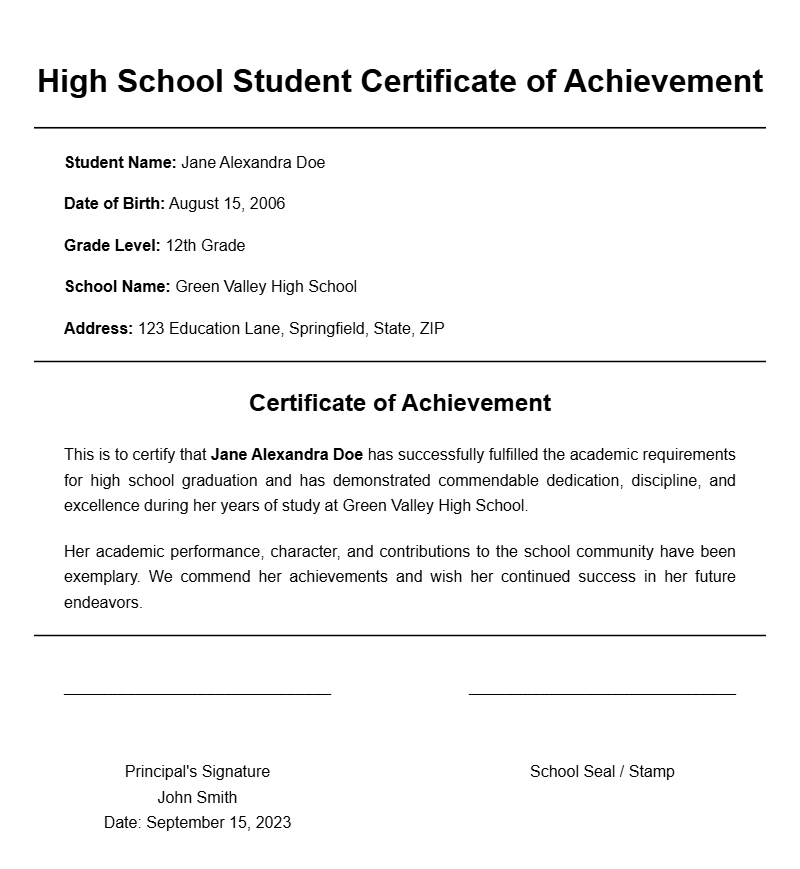
High School Achievement Certification
This certifies that [Student Name] has successfully completed the required coursework and demonstrated exemplary academic performance during the academic year [Year].
Issued on: [Date]
School Name: [School Name]
Principal: [Principal Name]
Participation Certificate for Academic Excellence
This is to acknowledge that [Student Name] has participated actively in the [Event/Program] held at [School Name] on [Date].
The student has exhibited outstanding dedication and commitment, earning recognition for academic excellence and leadership qualities.
Signature: ______________________
Date: ______________________
Certificate of Completion for High School Course
This certificate is awarded to [Student Name] in recognition of the successful completion of the [Course Name] at [School Name].
Throughout the course, the student demonstrated a strong grasp of the subject matter and active participation in class activities.
Issued on: [Date]
Signature of Instructor: [Instructor Name]
Honors Achievement Certificate
This is to certify that [Student Name] has achieved honors recognition for maintaining a grade point average of [GPA] or higher during the academic year [Year].
The student’s dedication and hard work have been commendable.
Presented on: [Date]
Principal: [Principal Name]
Certificate of Participation in Extracurricular Activities
This certificate certifies that [Student Name] has actively participated in [Activity/Club] at [School Name] from [Start Date] to [End Date].
The student has demonstrated leadership, teamwork, and commitment, contributing positively to the school community.
Signature: ______________________
Date: ______________________
Certificate of Outstanding Academic Performance
This is to recognize [Student Name] for outstanding academic achievements in the subject of [Subject] during the semester/year [Year].
The student consistently demonstrated dedication, critical thinking, and a passion for learning.
Issued on: [Date]
Signature: [Teacher/Principal]
Certificate of Leadership and Service
This certificate is awarded to [Student Name] in recognition of exemplary leadership and community service at [School Name].
The student has shown initiative, responsibility, and a commitment to making a positive impact within the school and local community.
Date of Award: [Date]
Authorized by: [Principal/Coordinator]
Certificate of Attendance
This certifies that [Student Name] has maintained perfect attendance at [School Name] from [Start Date] to [End Date].
The student’s punctuality and consistent presence contributed significantly to their academic progress and participation.
Signed by: [Teacher/Administrator]
Date: [Date]
Academic Excellence Award Certificate
This certificate is awarded to [Student Name] for demonstrating exceptional academic performance in [Subject or Program] during the academic year [Year].
The student’s dedication and intellectual curiosity have been truly commendable.
Presented on: [Date]
Signature: [School Official]
Certificate of Recognition for High School Student
This is to acknowledge that [Student Name] has met all the requirements for graduation from [School Name].
We commend the student for their perseverance, discipline, and commitment to academic success.
Date of Graduation: [Date]
Signature: [Principal Name]