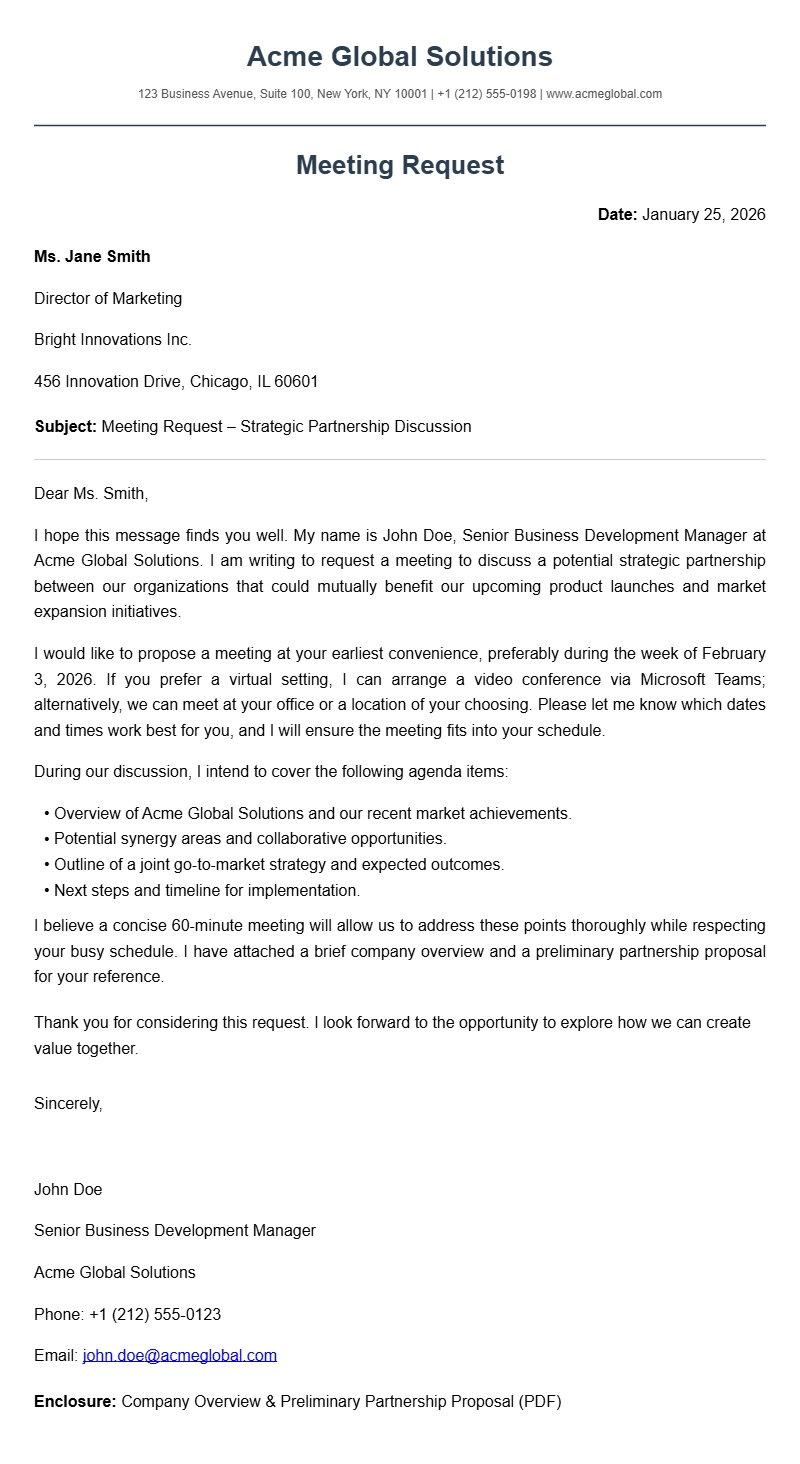
You’ve probably found yourself staring at a blank screen, wondering how to ask someone for a meeting without sounding too formal or too casual. Whether you’re reaching out to a client, a colleague, or a potential employer, a clear meeting request letter (or email) can make the difference between getting a quick yes and waiting forever for a reply. Below you’ll find practical templates, step‑by‑step guidance, and common pitfalls so you can craft a request that gets noticed.
What Is A Meeting Request Letter?
A meeting request letter is a short, polite message that asks the recipient to set aside time for a discussion. It can be sent as an email, a printed letter, or even a handwritten note, but the purpose stays the same: to secure a meeting slot and give the other person enough context to decide if they can accommodate you. If you need a broader set of request letters, we have a library of work‑from‑home request letter samples that follow the same structure.
When Do You Use A Meeting Request Letter?
People use these letters in many professional and personal scenarios, such as:
- Scheduling a client discovery call before a new project starts.
- Requesting a one‑on‑one with a manager to discuss performance goals.
- Arranging a school conference with a teacher or counselor.
- Setting up a job interview with a hiring manager.
- Organizing a team kick‑off meeting after a project is approved.
In academic settings, you might also ask a professor for office hours; that’s similar to the format used in our class participation letter samples.
Key Components Of A Meeting Request Letter
Every effective meeting request contains a handful of essential parts:
- Subject line (for email) – keep it concise and informative.
- Salutation – address the person by name when possible.
- Introduction – state who you are and why you’re writing.
- Purpose of the meeting – give a brief overview of the topic.
- Proposed date(s) and time(s) – offer a few options.
- Location or platform – specify in‑person, video call, or phone.
- Request for confirmation – ask them to confirm or suggest alternatives.
- Closing – thank them and sign off.
Step‑By‑Step Guide To Writing A Meeting Request Letter
Follow these steps to build a clear, polite request that encourages a response.
1. Open With a Friendly Greeting
Start with “Dear Ms. Patel,” or “Hi James,” depending on the formality of the relationship. If you’re unsure, lean toward a slightly more formal tone; you can always adjust later.
2. State Who You Are and Why You’re Reaching Out
Give a one‑sentence context: “I’m the project lead for the upcoming website redesign, and I’d like to discuss the timeline with you.” This immediately tells the reader what to expect.
3. Explain the Purpose in One or Two Sentences
Keep it short. For example, “We need to align on the scope and deliverables before the development phase begins.”
4. Suggest Specific Dates and Times
Offering two or three options reduces back‑and‑forth. Example: “I’m available Tuesday at 10 am, Wednesday at 2 pm, or Thursday at 11 am (all times in EST).”
5. Mention the Location or Platform
For a video call, include the tool (Zoom, Teams, Google Meet) and include a placeholder for the meeting link if you’ll send it later. For in‑person meetings, give a building or office address.
6. Ask for Confirmation and Provide Your Contact Details
End with a polite request: “Could you please let me know which time works best for you? You can reply to this email or call me at (555) 123‑4567.”
7. Close With a Simple Thank‑You
Finish with “Thank you for your time,” or “I appreciate your consideration,” followed by your name and signature (if it’s a printed letter).
Meeting Request Letter Sample Templates
Below are three ready‑to‑edit samples for different situations. Feel free to copy the text and change the placeholders to fit your needs.
Sample 1 – Client Discovery Call
Subject: Request for a 30‑minute discovery call
Dear Ms. Thompson,
I’m Alex Rivera, the new account manager at Brightwave Solutions. I’m reaching out to schedule a brief call to learn more about your upcoming product launch and how our services can support your goals.
I’m available Monday, March 10 at 9 am, Wednesday, March 12 at 3 pm, or Friday, March 14 at 11 am (EST). If none of those times work, please let me know a window that’s convenient for you, and I’ll do my best to accommodate.
The call can be held via Zoom or phone—whichever you prefer. Please confirm your preferred time and platform, and I’ll send a calendar invite with the meeting link.
Thank you for your time, and I look forward to speaking with you soon.
Best regards,
Alex Rivera
(555) 234‑5678
Sample 2 – Internal One‑On‑One With a Manager
Subject: Quick sync to discuss Q2 priorities
Hi James,
I’m Priya from the marketing team. I’d like to set up a short 20‑minute meeting to go over the Q2 campaign priorities and align on resource allocation.
Would either Tuesday at 10 am or Thursday at 2 pm work for you? The meeting can be in person at the main office, Conference Room B, or via Microsoft Teams if you’re remote.
Please let me know which slot you prefer, and I’ll send the invite right away. Thanks for making time in your schedule!
Best,
Priya Patel
Sample 3 – Job Interview Request
Subject: Interview opportunity – Marketing Coordinator position
Dear Mr. Lee,
Thank you for considering my application for the Marketing Coordinator role at Vertex Corp. I would love the opportunity to discuss my background and how it aligns with the team’s objectives.
I’m available for a 45‑minute interview on either Monday, April 7 at 11 am, Wednesday, April 9 at 2 pm, or Friday, April 11 at 10 am (PST). I can meet at your office, or if you prefer, we can conduct the interview over a video call.
Please confirm a convenient date and time, and I’ll send a calendar invitation with the details. I look forward to the chance to speak with you.
Sincerely,
Jordan Kim
(555) 345‑6789
Common Mistakes To Avoid
- Vague subject lines – “Meeting” or “Quick chat” don’t give the recipient enough information to prioritize the request.
- No proposed times – Leaving the schedule entirely up to the other person adds friction and delays replies.
- Too much detail – A full project brief in the opening paragraph can overwhelm the reader. Save the specifics for the meeting itself.
- Missing a call‑to‑action – Forgetting to ask for confirmation may lead to silence.
- Incorrect tone – Using overly casual language with a senior executive can seem unprofessional. Adjust the formality to match the relationship.
If you’re unsure about tone, compare your draft with the formal style shown in our termination confirmation letter templates to see where adjustments are needed.
Tips For Customizing Your Letter
- Personalize the opening line. Mention a recent interaction or shared interest to make the request feel less generic.
- Include a brief agenda. A bullet list of topics you plan to cover helps the recipient understand the meeting’s value.
- Add a deadline if relevant. If the meeting is time‑sensitive (“We need this decision by March 20”), state it clearly but kindly.
- Use the recipient’s preferred communication channel. Some people respond faster to texts or LinkedIn messages; adjust accordingly.
- Keep the signature consistent. Include your job title, company name, and contact info so the reader can verify your identity.
For more ideas on tailoring request letters, see our collection of permission letter templates that show how to adapt language for different audiences.
Quick Checklist Before You Send
- ✅ Subject line clearly mentions “meeting request” and the topic.
- ✅ Greeting uses the recipient’s name.
- ✅ Purpose is stated in one or two sentences.
- ✅ At least two date/time options are provided.
- ✅ Location or video platform is indicated.
- ✅ You’ve asked for confirmation and provided your contact info.
- ✅ Closing thanks the recipient and signs off.
- ✅ No spelling or grammatical errors.
If you’ve ticked all the boxes, you’re ready to hit send. A well‑crafted meeting request opens doors, and with these samples and tips you can approach any conversation with confidence. Good luck, and may your calendars fill up with productive meetings!
Ready-to-Use Document Samples