Managing invoices can feel overwhelming, especially if you’re juggling multiple clients and projects. Pay as you go invoice templates can simplify things by allowing you to bill clients for services as they’re rendered. These templates are especially handy for freelancers, contractors, and service providers who charge based on the work completed, rather than a flat fee. Let’s break down what these templates are, how to use them, and what to include.
WHAT IS A PAY AS YOU GO INVOICE TEMPLATE?
A pay as you go invoice template is a document that allows you to bill clients for services or products provided on an ongoing basis. It’s designed to reflect the specific work completed during a certain period, making it clear for both you and your client what they are being charged for. This type of invoice is particularly useful in industries like construction, consulting, and freelance work.
WHEN TO USE PAY AS YOU GO INVOICE TEMPLATES
Use these templates whenever you provide services that don’t have a set price or when the scope of work can change frequently. For instance, if you’re a web developer working on an ongoing project, you might send invoices after completing certain milestones. Similarly, a photographer might invoice after each session instead of waiting for the entire project to wrap up.
KEY COMPONENTS OF A PAY AS YOU GO INVOICE
- Your Business Information: Include your business name, address, phone number, and email.
- Client Information: Clearly state your client’s name and contact details.
- Invoice Number: Assign a unique number to each invoice for tracking purposes.
- Invoice Date: The date the invoice is issued.
- Payment Due Date: Specify when payment is expected.
- Description of Services: Detail the services provided, the dates they were rendered, and the amount charged for each.
- Total Amount Due: Clearly state the total amount the client owes.
- Payment Instructions: Include how the client can pay you (bank transfer, check, etc.).
STEP-BY-STEP WRITING GUIDE
- Gather Your Information: Start by collecting your business and client details.
- Choose a Template: Select a pay as you go invoice template that suits your style. You can find free templates online or create one in a word processing application.
- Fill in the Details: Input all necessary information, including the description of services and costs.
- Review for Accuracy: Double-check your numbers and client details to avoid mistakes.
- Send It Out: Email the invoice to your client or deliver it through your preferred method.
EXAMPLES OF PAY AS YOU GO INVOICE TEMPLATES
Here’s a simple example of how your invoice might look:
Your Business Name
Your Address
Your Phone Number
Your Email
Client Name
Client Address
Invoice Number: 001
Invoice Date: [Date]
Due Date: [Date]
Description of Services:
– Web Development Services (5 hours) – $500
– Graphic Design (2 hours) – $200
Total Amount Due: $700
Payment Instructions: Please make the payment via bank transfer to [Your Bank Details].
COMMON MISTAKES TO AVOID
- Being Vague: Always provide clear descriptions of services to avoid confusion.
- Skipping the Invoice Number: Each invoice should have a unique number for tracking.
- Not Following Up: If payment is late, don’t hesitate to send a polite reminder.
TIPS FOR CUSTOMIZATION
Feel free to tweak your template to match your brand aesthetic. Consider adding your logo and using colors that represent your business. You can also customize the payment terms based on your relationship with the client. For example, some clients might prefer a net 30 payment term, while others might be okay with a shorter timeframe.
By using pay as you go invoice templates, you can streamline your billing process, maintain professionalism, and ensure you’re compensated for your hard work. Don’t forget to check out additional resources like labor and materials invoice samples or weekly invoice templates to find the perfect fit for your business needs.
Ready-to-Use Document Samples
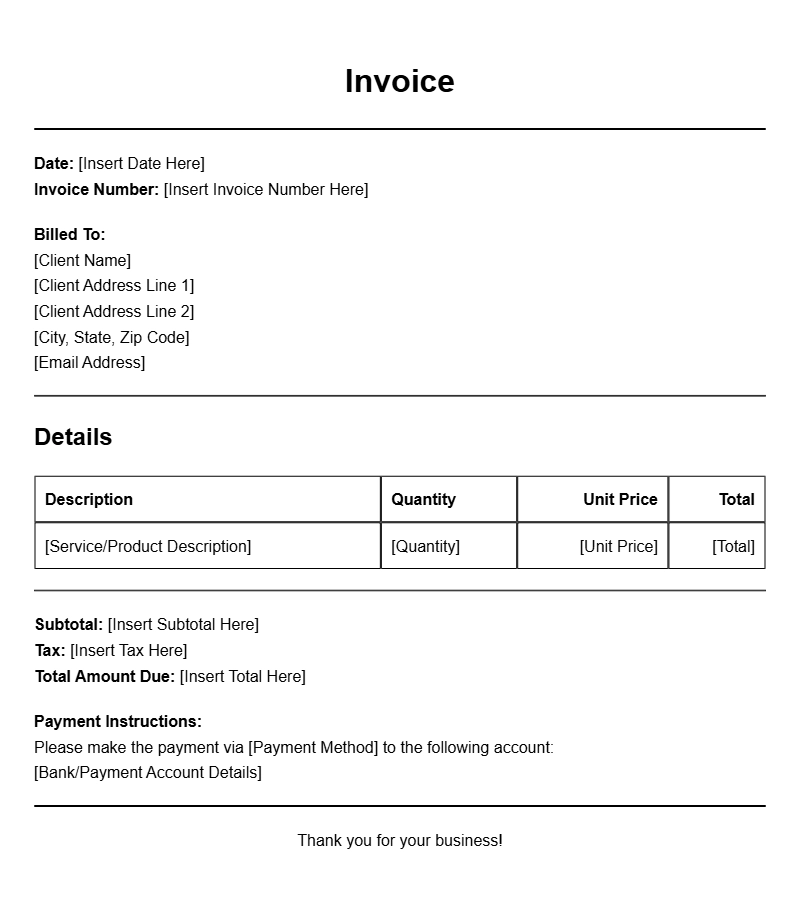
Basic Pay As You Go Invoice Template
This Pay As You Go Invoice Template is designed for freelancers and small businesses to bill clients incrementally based on services rendered.
Invoice Details:
| Item Description | Hours | Rate | Total |
|---|---|---|---|
| Web Development | 10 | $50 | $500 |
| Graphic Design | 5 | $40 | $200 |
| Total | $700 |
Payment Due By: [Insert Due Date]
Please make the payment via bank transfer or PayPal.
Monthly Pay As You Go Invoice
This template is ideal for businesses offering subscription-based services on a pay-as-you-go model, allowing clients to adjust their services monthly.
Invoice Summary:
| Service | Usage | Unit Price | Subtotal |
|---|---|---|---|
| Cloud Storage | 100 GB | $0.10 | $10.00 |
| Support Services | 5 hours | $30.00 | $150.00 |
| Total Due | $160.00 |
Payment Terms: Payment is due within 15 days.
Freelance Pay As You Go Invoice
Use this Pay As You Go Invoice for freelance projects where billing is based on completed tasks or hours worked.
Invoice Breakdown:
| Task | Hours Spent | Charge per Hour | Amount |
|---|---|---|---|
| Content Writing | 8 | $25 | $200 |
| SEO Optimization | 4 | $30 | $120 |
| Total | $320 |
Thank you for your business!
Service-Based Pay As You Go Invoice
This invoice template is suitable for service providers billing clients based on the services utilized throughout the month.
Service Charges:
| Service Type | Quantity | Cost per Unit | Total Cost |
|---|---|---|---|
| Consultation | 3 | $100 | $300 |
| Maintenance | 2 | $75 | $150 |
| Overall Total | $450 |
Payment Instructions: Please transfer funds to [Bank Details].
Pay As You Go Invoice for Events
Perfect for event planners, this invoice template allows billing based on services delivered for specific events.
Event Services Provided:
| Service | Quantity | Rate | Subtotal |
|---|---|---|---|
| Venue Rental | 1 | $2000 | $2000 |
| Catering | 50 | $30 | $1500 |
| Total Amount Due | $3500 |
Due Date: [Insert Due Date]
Pay As You Go Invoice for Home Services
This template is tailored for home service providers who charge based on individual tasks completed.
Services Rendered:
| Service Description | Hours Worked | Price per Hour | Amount |
|---|---|---|---|
| Lawn Mowing | 2 | $20 | $40 |
| House Cleaning | 3 | $25 | $75 |
| Total Due | $115 |
Payment Method: Accepting cash or bank transfer.
Pay As You Go Invoice for Consulting Services
This consulting invoice template allows professionals to bill clients based on consultation hours rendered.
Consultation Summary:
| Consultant | Hours | Hourly Rate | Total |
|---|---|---|---|
| John Doe | 10 | $150 | $1500 |
| Jane Smith | 5 | $200 | $1000 |
| Grand Total | $2500 |
Payment Terms: Due within 30 days of receipt.
Pay As You Go Invoice for Subscription Services
This invoice template is suitable for subscription-based services where clients are billed based on their usage.
Subscription Summary:
| Service | Usage | Rate | Total |
|---|---|---|---|
| Streaming Service | 1 Month | $10 | $10 |
| Online Course Access | 2 Courses | $50 | $100 |
| Total Invoice Amount | $110 |
Thank you for your continued support!
Pay As You Go Invoice for Rental Services
This invoice template is designed for rental services where clients can pay based on the duration of their rental.
Rental Charges:
| Item Rented | Days | Rate per Day | Total |
|---|---|---|---|
| Projector | 3 | $50 | $150 |
| Sound System | 2 | $75 | $150 |
| Total Due | $300 |
Due Date: Payment is due upon receipt of invoice.