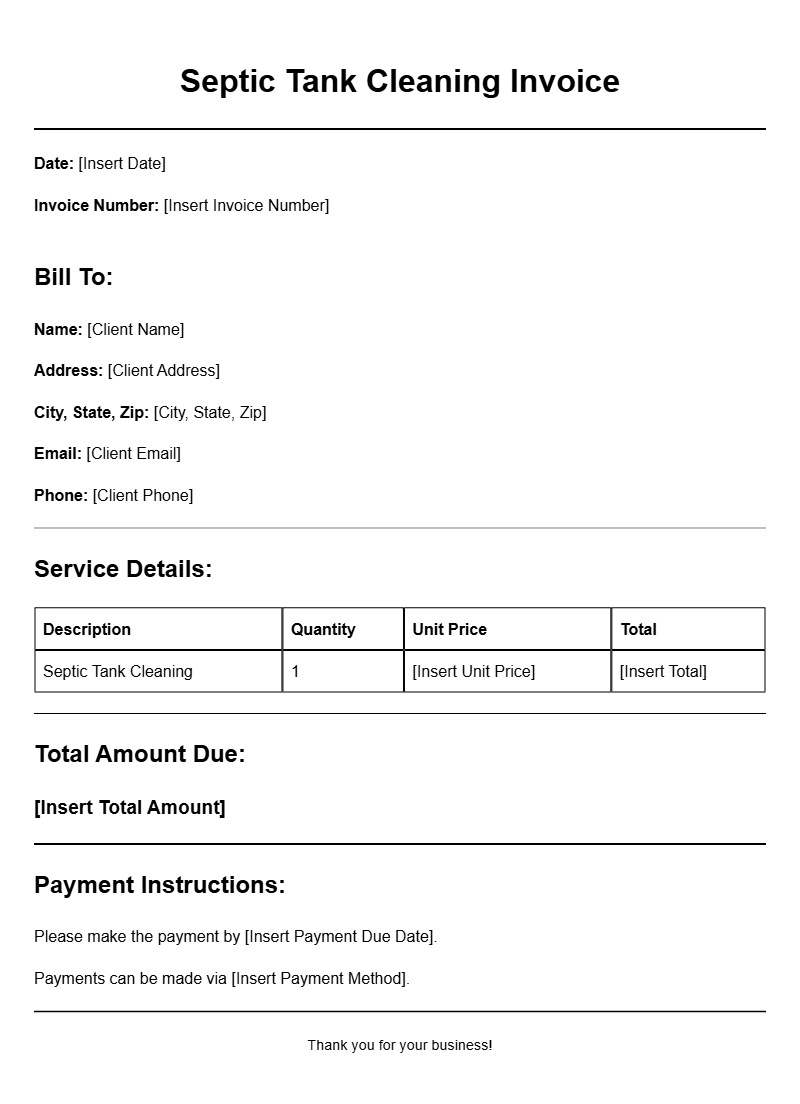
When it comes to septic system maintenance, keeping track of your services, costs, and customer information is essential. One effective way to do this is by using septic tank cleaning invoice templates. These templates not only make billing easier but also help maintain professional communication with your clients. Whether you’re a seasoned professional or just starting, having a reliable template can save you time and hassle.
WHAT IS A SEPTIC TANK CLEANING INVOICE TEMPLATE?
A septic tank cleaning invoice template is a pre-formatted document designed to itemize the services provided during a septic tank cleaning job. It includes details like service dates, costs, and customer information. Using this template ensures that you present your charges clearly, making it easier for clients to understand what they’re paying for.
WHEN IS IT USED?
This type of invoice is used after completing a septic tank cleaning service. Whether you’re a contractor working for multiple clients or a homeowner needing to keep records, these invoices help document the service performed and facilitate payment processes. They’re also useful for accounting purposes, ensuring all transactions are recorded accurately.
KEY COMPONENTS OF A SEPTIC TANK CLEANING INVOICE
When creating your invoice, include the following sections:
- Header: Your business name, logo, and contact information.
- Client Information: Name, address, phone number, and email of the customer.
- Invoice Number: A unique identifier for tracking.
- Date of Service: When the service was performed.
- Service Description: Details of the cleaning performed (e.g., tank pumping, inspection).
- Costs: Breakdown of charges (labor, materials, etc.).
- Total Amount Due: The total cost of the service.
- Payment Terms: Instructions on how and when to pay.
STEP-BY-STEP WRITING GUIDE
Creating your invoice can be straightforward. Here’s how to do it:
- Start with your business information at the top.
- Add your client’s details below yours.
- Include a unique invoice number and the date.
- Detail the services provided, ensuring clarity.
- List all charges, making sure to break them down as needed.
- Add up the total and highlight it to make it stand out.
- Include payment terms and any additional notes or instructions.
EXAMPLES OF SEPTIC TANK CLEANING INVOICE TEMPLATES
Here’s a simple example to illustrate:
Business Name: Clean Tanks Co.
Address: 123 Septic Lane, Clean City, CA 12345
Phone: (123) 456-7890
Email: info@cleantanksco.com
Client Name: John Doe
Client Address: 456 Home St., Home City, CA 54321
Invoice Number: 001234
Date of Service: 10/15/2023
Service Description:
– Septic tank pumping – $200
– Inspection service – $50
Total Amount Due: $250
Payment Terms: Due upon receipt. Please make checks payable to Clean Tanks Co.
COMMON MISTAKES TO AVOID
When crafting your invoice, steer clear of these pitfalls:
- Not including a unique invoice number, which can complicate tracking.
- Forgetting to specify payment terms, leading to confusion.
- Making errors in calculations, which can harm your credibility.
TIPS FOR CUSTOMIZATION
To make your template work for you:
- Use your brand colors and logo for a professional touch.
- Adjust the layout based on your needs—some prefer a more detailed breakdown, while others keep it simple.
- Include a personal note or a thank-you message for a touch of warmth.
By implementing a reliable septic tank cleaning invoice template, you’ll streamline your billing process and enhance your professional image. Remember to personalize it to fit your business and your clients. For more examples, check out templates for different services, like insurance agents or pool maintenance. Having a solid template can make all the difference in keeping your business organized and running smoothly.
Template Variations & Sample Formats