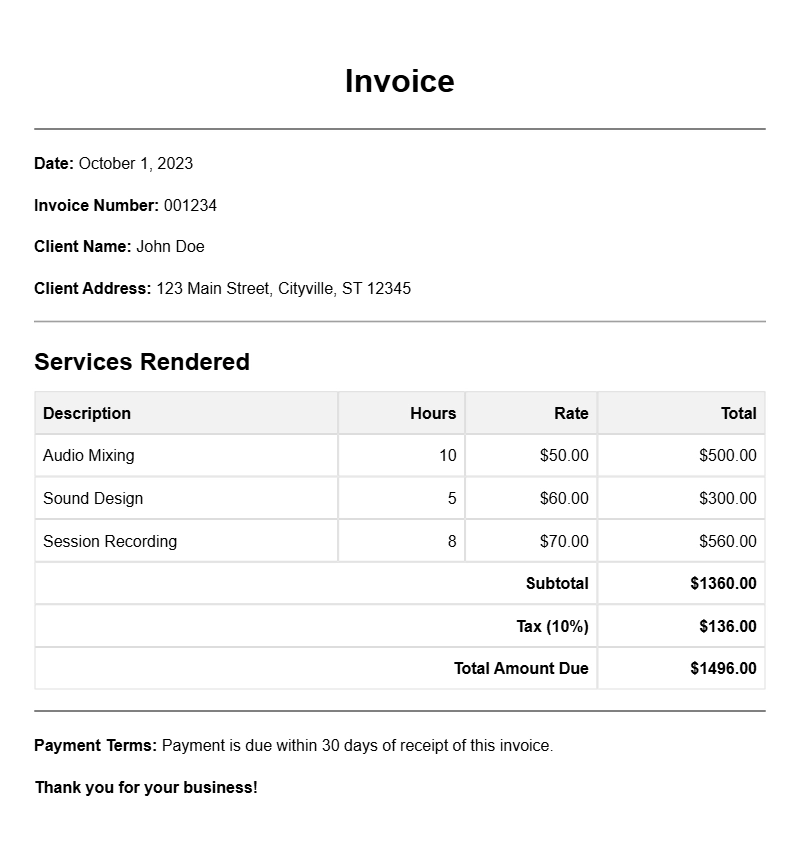
Creating an invoice as a sound engineer can be straightforward, yet it often leaves many professionals scratching their heads. Whether you’re just starting out or have years of experience, having a solid template at your disposal can make billing clients a breeze. Let’s explore practical ways to craft an effective sound engineer invoice that meets your needs.
WHAT IS A SOUND ENGINEER INVOICE?
A sound engineer invoice is a document that details the services you provided to a client, along with the associated costs. It’s your professional way of requesting payment for your work, whether it’s mixing tracks, recording sessions, or sound design for events. Having a clear invoice not only ensures you get paid but also helps maintain a professional image.
WHEN TO USE AN INVOICE
You should issue an invoice whenever you complete a service and are ready to request payment. This can be right after a recording session, once a project is finished, or at regular intervals for ongoing work. Timely invoicing helps keep your cash flow steady and your clients informed.
KEY COMPONENTS OF A SOUND ENGINEER INVOICE
- Your Contact Information: Include your name, business name, address, phone number, and email.
- Client Details: Add the client’s name and contact information.
- Invoice Number: Assign a unique number to each invoice for tracking purposes.
- Date: The date you issue the invoice and the due date for payment.
- Service Description: A detailed list of services rendered, including hours worked, rates, and any additional expenses.
- Total Amount Due: Clearly state the total amount owed.
STEP-BY-STEP WRITING GUIDE
- Choose a Template: Start with a basic template that you can customize. You can find various examples online that fit your style.
- Fill in Your Information: Input your details and those of your client at the top of the invoice.
- List Services: Under a “Services Provided” section, describe each service briefly. For example, “Mixing for Track XYZ – 4 hours at $50/hour.”
- Calculate Totals: Be sure to add up all the services and include any taxes if applicable.
- Add Payment Instructions: Specify how clients can pay you, such as via bank transfer, PayPal, or checks.
REALISTIC EXAMPLES/TEMPLATES
Here’s a simple example of what your invoice could look like:
Your Name
Your Business Name
Your Address
Your Email
Your Phone Number
Client Name
Client Address
Invoice Number: 001
Date: [Date]
Due Date: [Due Date]
Description of Services:
– Mixing for Track XYZ – 4 hours at $50/hour
– Recording Session – 2 hours at $75/hour
– Travel Expenses: $30
Total Amount Due: $350
COMMON MISTAKES TO AVOID
- Not including all necessary details, leading to confusion.
- Forgetting to double-check calculations, which can lead to payment issues.
- Using unclear language in service descriptions, which can confuse clients.
TIPS FOR CUSTOMIZATION
Make your invoice reflect your brand by using your logo and colors. Personalize the service descriptions to match your style and voice. If you have specific terms regarding payment (like late fees), include those in a clear, concise manner.
Creating a sound engineer invoice doesn’t have to be daunting. Armed with the right template and understanding of what to include, you can simplify your billing process. For more resources, check out these fundraising invoice templates or property maintenance invoice templates for additional inspiration. Happy invoicing!
Editable Document Format Examples