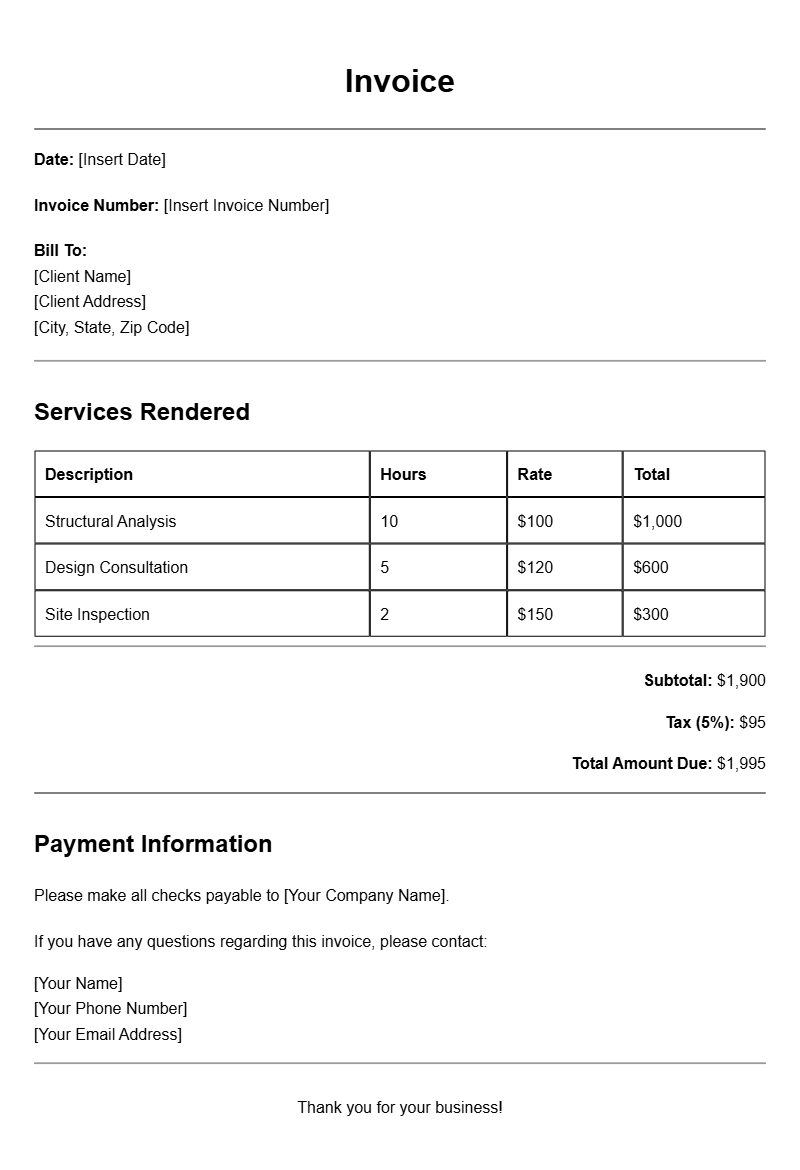
As a structural engineer, you know how crucial it is to keep your billing organized and professional. Whether you work freelance or within a firm, having an effective invoice template can streamline your billing process and ensure you get paid on time. Let’s explore what structural engineer invoice templates are, when to use them, their key components, and how to create one that suits your needs.
WHAT IS A STRUCTURAL ENGINEER INVOICE TEMPLATE?
A structural engineer invoice template is a pre-designed document that allows you to itemize services rendered, materials used, and other billable aspects of your projects. This template serves as a professional way to request payment from clients, ensuring that all required information is included and easy to understand.
WHEN IS IT USED?
You typically use an invoice template after completing a project or reaching a billing milestone. It’s essential whenever you need to request payment for your engineering services, whether you’re billing a large construction company or a private homeowner. Having a well-organized invoice can enhance your professionalism and improve your chances of prompt payment.
KEY COMPONENTS OF A STRUCTURAL ENGINEER INVOICE
- Your Business Information: Include your name, address, phone number, and email.
- Client Information: Add the client’s name and contact details.
- Invoice Number: Assign a unique number to each invoice for tracking purposes.
- Invoice Date: The date you issue the invoice.
- Payment Terms: Specify when payment is due (e.g., 30 days from the invoice date).
- Description of Services: Itemize the services provided, including hours worked and rates.
- Total Amount Due: Clearly state the total cost, including any applicable taxes.
STEP-BY-STEP WRITING GUIDE
- Gather Your Information: Collect all necessary details about your project and client.
- Choose a Template: Start with a pre-designed invoice template suitable for engineering services.
- Fill in Your Business Information: Ensure that your business details are accurate and prominently displayed.
- Input Client Information: Double-check the client’s contact information for accuracy.
- Detail Services Rendered: Provide a clear description of each service, including rates and hours worked.
- Calculate the Total: Add any taxes or additional fees to arrive at the final amount due.
- Set Payment Terms: Clearly state when you expect to be paid.
- Review and Send: Double-check for errors, then send the invoice via email or print it for mailing.
REALISTIC EXAMPLES/TEMPLATES
Here’s a simple template snippet you can adapt:
Your Name
Your Address
City, State, Zip
Phone Number
Email
Invoice Number: 001
Invoice Date: [Date]
Bill To:
Client Name
Client Address
City, State, Zip
Description of Services:
– Structural analysis for [Project Name] – 10 hours @ $100/hour
– Site visit and report preparation – 5 hours @ $100/hour
Subtotal: $1500
Tax (if applicable): $150
Total Amount Due: $1650
Payment Terms: Due within 30 days
COMMON MISTAKES TO AVOID
- Forgetting to include your business information.
- Inaccurate or missing client details, which can delay payment.
- Not itemizing services clearly, leading to confusion over charges.
- Failing to state payment terms, which can result in late payments.
TIPS FOR CUSTOMIZATION
Make your invoice reflect your brand. Use your business logo and consistent colors. Tailor the descriptions of services to match how you communicate with clients. Consider adding a personal note thanking your client for their business, which may help build long-term relationships.
Using the right structural engineer invoice template can make a significant difference in how you manage your billing process. With a clear and professional invoice, you can streamline your payments and keep your projects on track. Take the time to create or customize a template that works for you, and make billing one less thing to worry about.
If you’re interested in exploring more invoice styles, check out some great resources like photography session invoice templates, handyman invoice samples, or marketing consultant invoice samples.
Template Variations & Sample Formats