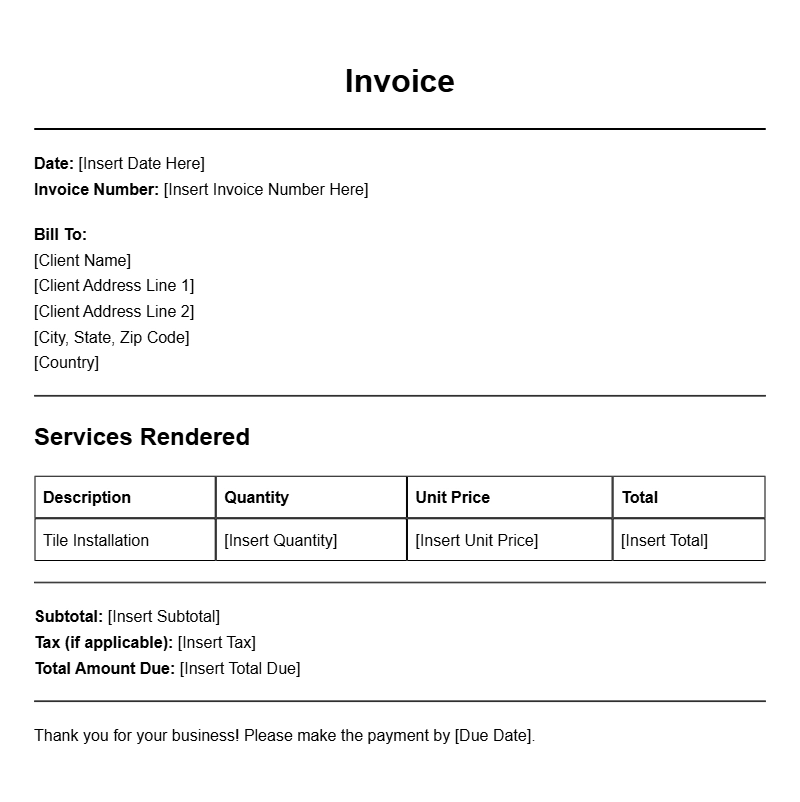
Whether you’re a seasoned tile installer or just starting out, having a reliable invoice template can make your billing process smoother and more professional. Tile installer invoice templates help you keep track of your services, materials, and payments, ensuring you get paid promptly and maintain a clear record of your work. Let’s explore what these templates are, when to use them, and how to create one that fits your needs.
WHAT IS A TILE INSTALLER INVOICE TEMPLATE?
A tile installer invoice template is a document you use to itemize the services you provide to clients, along with the materials used and their costs. It serves as a formal request for payment and outlines the details of the job, allowing both you and your client to stay on the same page regarding payment expectations.
WHEN IS IT USED?
You’ll typically use a tile installer invoice after completing a project or when you reach a predetermined milestone in a larger job. This could be at the end of a bathroom renovation, a kitchen backsplash installation, or any other tile work. It’s essential to provide an invoice as soon as the work is complete to ensure timely payment.
KEY COMPONENTS OF A TILE INSTALLER INVOICE
Understanding the main sections of an invoice can help you create a clear and effective document. A well-structured invoice usually includes:
- Your Contact Information: Include your name, business name, address, phone number, and email.
- Client Information: Add the client’s name, address, and contact details.
- Invoice Number: A unique identifier for tracking purposes.
- Invoice Date: The date the invoice is issued.
- Due Date: When the payment is expected.
- Detailed List of Services: Itemized description of the work performed, including labor and materials.
- Total Amount Due: The total cost of the services and materials, including any taxes.
- Payment Instructions: Information on how the client can pay you.
STEP-BY-STEP WRITING GUIDE
Creating your invoice can be straightforward if you follow these steps:
- Choose a Template: Start with a basic template that you can customize.
- Fill in Your Details: Add your contact information and any branding elements like a logo.
- Enter Client Information: Make sure to double-check the client’s details for accuracy.
- Add Invoice Number and Dates: Assign a unique invoice number and set the issue and due dates.
- List Services: Clearly describe each service provided, including quantities and rates.
- Calculate Total: Sum up the costs and ensure everything adds up correctly.
- Include Payment Instructions: Specify acceptable payment methods and any terms regarding late fees.
REALISTIC EXAMPLES OF TILE INSTALLER INVOICE TEMPLATES
Here’s a simple template snippet to get you started:
Your Company Name
Your Address
Your City, State, Zip
Your Phone Number
Your Email
Client’s Name
Client’s Address
Client’s City, State, Zip
Invoice #: 001
Invoice Date: [Date]
Due Date: [Due Date]
Description of Services:
– Tile Installation in Kitchen: 20 sq. ft. @ $5/sq. ft. = $100
– Grout and Materials: $50
Total Amount Due: $150
Payment Instructions: Please make payment via check or bank transfer.
COMMON MISTAKES TO AVOID
When creating your invoice, steer clear of these common pitfalls:
- Inaccurate Information: Double-check all numbers and client details to avoid confusion.
- Missing Payment Terms: Always include how and when you expect to be paid.
- Failure to Follow Up: If payment is late, don’t hesitate to send a reminder.
TIPS FOR CUSTOMIZATION
Personalizing your invoice can enhance your brand image. Consider these tips:
- Add your logo and use your business colors for a professional touch.
- Include a short thank-you note or a personal message to build rapport.
- Utilize software tools for easy customization and repeated use.
Having a well-crafted tile installer invoice template can streamline your billing process and improve your cash flow. Use the examples provided, customize them to fit your business needs, and don’t forget to keep track of your invoices for future reference. If you’re looking for more invoice samples, check out the various options available for construction managers or graphic designers to inspire your own templates.
Document Structure & Example Models