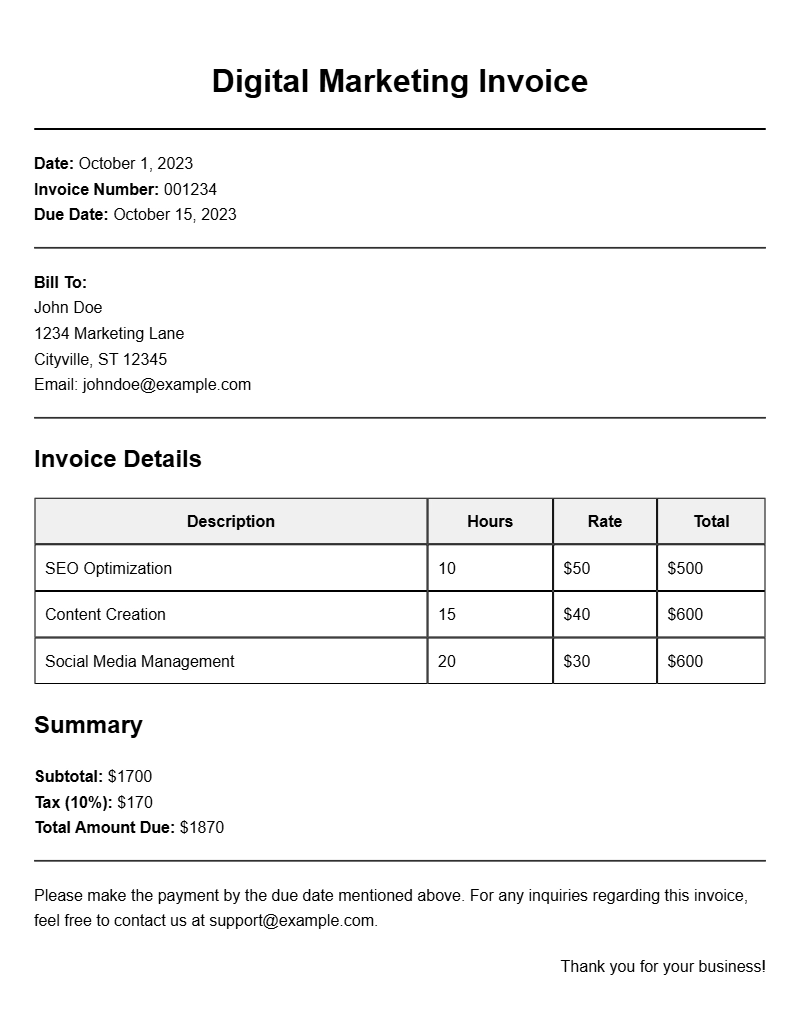
Creating an effective digital marketing invoice is essential for freelancers and agencies alike. It streamlines billing, provides clarity to clients, and ensures timely payments. If you’re looking for digital marketing invoice templates, you’re in the right place. This guide will walk you through what these templates are, when to use them, their key components, and even provide examples to get you started.
What is a Digital Marketing Invoice Template?
A digital marketing invoice template is a pre-formatted document that helps you bill your clients for services rendered in the realm of digital marketing. This could include social media management, SEO services, content creation, or PPC campaigns. These templates simplify the invoicing process, making it easier to track payments and maintain professionalism.
When to Use a Digital Marketing Invoice Template
Use these templates whenever you complete a project or deliver a service to a client. Whether you’re sending a monthly retainer invoice or billing for a one-off project, having a structured invoice format helps communicate professionalism and clarity. It’s especially useful if you work with multiple clients or have various services to bill for.
Key Components of a Digital Marketing Invoice
Effective invoices typically include the following sections:
- Your Contact Information: Name, address, phone number, and email.
- Client Information: The client’s name and contact details.
- Invoice Number: A unique identifier for tracking.
- Invoice Date: The date of issue.
- Due Date: When the payment is expected.
- Description of Services: Detailed list of services provided.
- Payment Terms: Specify payment methods and terms.
- Total Amount Due: Clearly state the total to be paid.
Step-by-Step Guide to Writing a Digital Marketing Invoice
- Choose a Template: Start with a simple digital marketing invoice template that suits your style.
- Add Your Information: Fill in your name, business name, and contact details at the top.
- Include Client Information: Input your client’s name and contact details right below yours.
- Assign an Invoice Number: This helps in tracking payments and makes your records tidy.
- Detail the Services Provided: Be specific about what you did. For instance, “SEO Optimization for Website XYZ” is clearer than just “SEO Services.”
- State Payment Terms: Mention acceptable payment methods. For example, “Payments accepted via PayPal or bank transfer.”
- Calculate the Total: Ensure all your services are accurately priced and summed up.
- Review and Send: Double-check for any errors before sending it off to your client.
Realistic Examples of Digital Marketing Invoice Templates
Here’s a simple snippet of what your invoice could look like:
[Your Business Name]
[Your Address]
[Your Email]
[Your Phone Number]
Invoice Number: [1234]
Invoice Date: [MM/DD/YYYY]
Due Date: [MM/DD/YYYY]
Bill To:
[Client Name]
[Client Address]
[Client Email]
Description of Services:
1. Social Media Management: $300
2. SEO Optimization: $200
3. Content Creation: $150
Total Amount Due: $650
Common Mistakes to Avoid
- Neglecting Details: Always include all necessary information. Missing details can delay payments.
- Not Following Up: If the payment is overdue, don’t hesitate to send a friendly reminder.
- Being Vague: Clearly describe your services to avoid misunderstandings.
Tips for Customization
Customize your invoice to reflect your brand. Use your brand colors and logo to make it visually appealing. You can also add a personal touch with a thank-you note or a discount for early payments. Adjust the layout to fit your needs but keep it professional and easy to read.
Creating a professional digital marketing invoice doesn’t have to be complicated. With the right templates and a clear structure, you can streamline your invoicing process and ensure you get paid on time. For more specific invoice templates tailored to different industries, check out resources like fence contractor invoices, equipment rental invoices, or advertising invoices.
Template Variations & Sample Formats