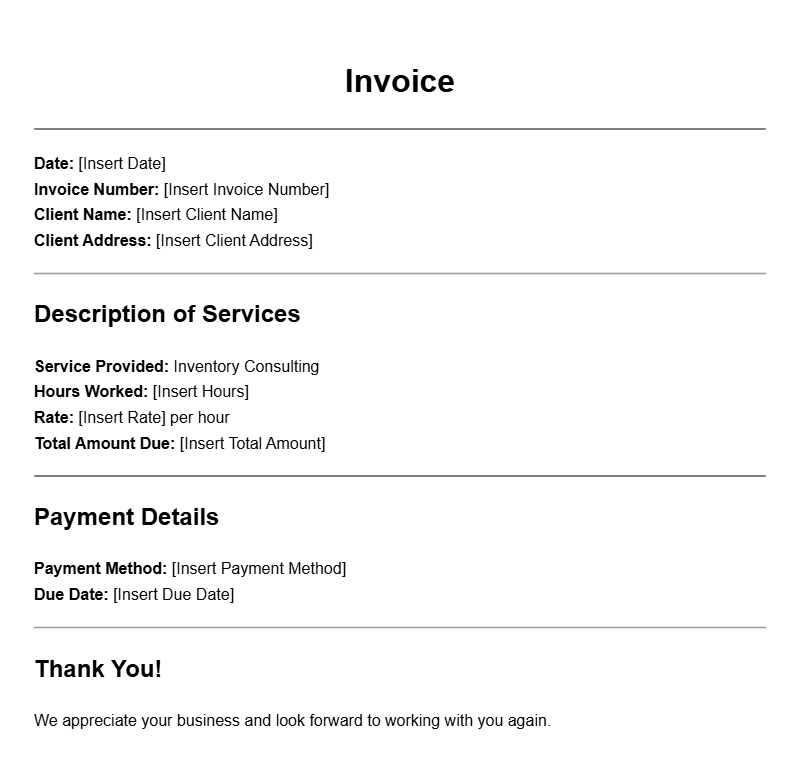
Creating an inventory consultant invoice template can save you time and ensure you get paid accurately for your services. Whether you’re a seasoned consultant or just starting out, having a reliable template can help you streamline your billing process. This guide will walk you through what an inventory consultant invoice is, when to use it, what to include, and how to customize it to fit your needs.
WHAT IS AN INVENTORY CONSULTANT INVOICE TEMPLATE?
An inventory consultant invoice template is a pre-designed document that allows you to detail your services and charges related to inventory management. It serves as a formal request for payment after you’ve provided consulting services, helping to keep your business transactions organized.
WHEN IS IT USED?
You typically use this invoice after completing a project or providing ongoing consulting services related to inventory management. For instance, if you helped a business streamline their stock levels or set up a new inventory system, you’d issue this invoice to get compensated for your expertise.
KEY COMPONENTS OF AN INVENTORY CONSULTANT INVOICE
Here are the essential parts you should include in your invoice template:
- Your contact information: Include your name, address, phone number, and email.
- Client’s information: Make sure to add your client’s name, address, and contact details.
- Invoice number: Assign a unique number to each invoice for tracking purposes.
- Invoice date: The date you issue the invoice.
- Due date: Specify when you expect payment to be made.
- Description of services: List the consulting services you provided, including details like hours worked and specific tasks completed.
- Payment details: Include your payment methods, such as bank transfer details or payment links.
- Total amount due: Clearly state the total charge at the bottom of the invoice.
STEP-BY-STEP WRITING GUIDE
To create your own invoice template, follow these steps:
- Choose a format: Decide whether to use a word processor, spreadsheet software, or an online invoicing tool.
- Add your details: Input your contact information at the top of the invoice.
- Insert client information: Below your details, add the client’s name and address.
- Include invoice specifics: Add the invoice number, date, and due date.
- Describe your services: Write a clear description of the consulting services provided, including any relevant dates and hours worked.
- Calculate totals: Sum up the charges and make sure to include any taxes if applicable.
- Review and send: Double-check all information for accuracy before sending the invoice.
REALISTIC EXAMPLES OF INVOICE TEMPLATES
Here’s a simple example of how your invoice might look:
Your Name
Your Address
Your City, State, Zip
Your Phone Number
Your Email
Client Name
Client Address
Client City, State, Zip
Invoice Number: 001
Invoice Date: [Date]
Due Date: [Due Date]
Description of Services
1. Inventory system setup – 10 hours @ $100/hour – $1000
2. Ongoing support – 5 hours @ $100/hour – $500
Total Amount Due: $1500
COMMON MISTAKES TO AVOID
When creating invoicing templates, here are some pitfalls to steer clear of:
- Not including a unique invoice number can lead to confusion.
- Forgetting to specify the due date may delay payment.
- Overlooking detailed service descriptions can make it harder for clients to understand what they’re paying for.
TIPS FOR CUSTOMIZATION
To make your invoice stand out and suit your brand:
- Incorporate your logo for a professional touch.
- Use colors and fonts that reflect your brand identity.
- Consider adding a personal note or thank-you message to your clients.
Having an effective inventory consultant invoice template can help you maintain professionalism while ensuring you get paid promptly for your services. Take the time to create one that works for you, and don’t hesitate to modify it as needed for different clients or projects.
If you’re looking for more specialized invoice templates, check out our resources for bodyguards, event planners, therapists, camera operators, and garage door technicians.
Document Examples & Template Samples