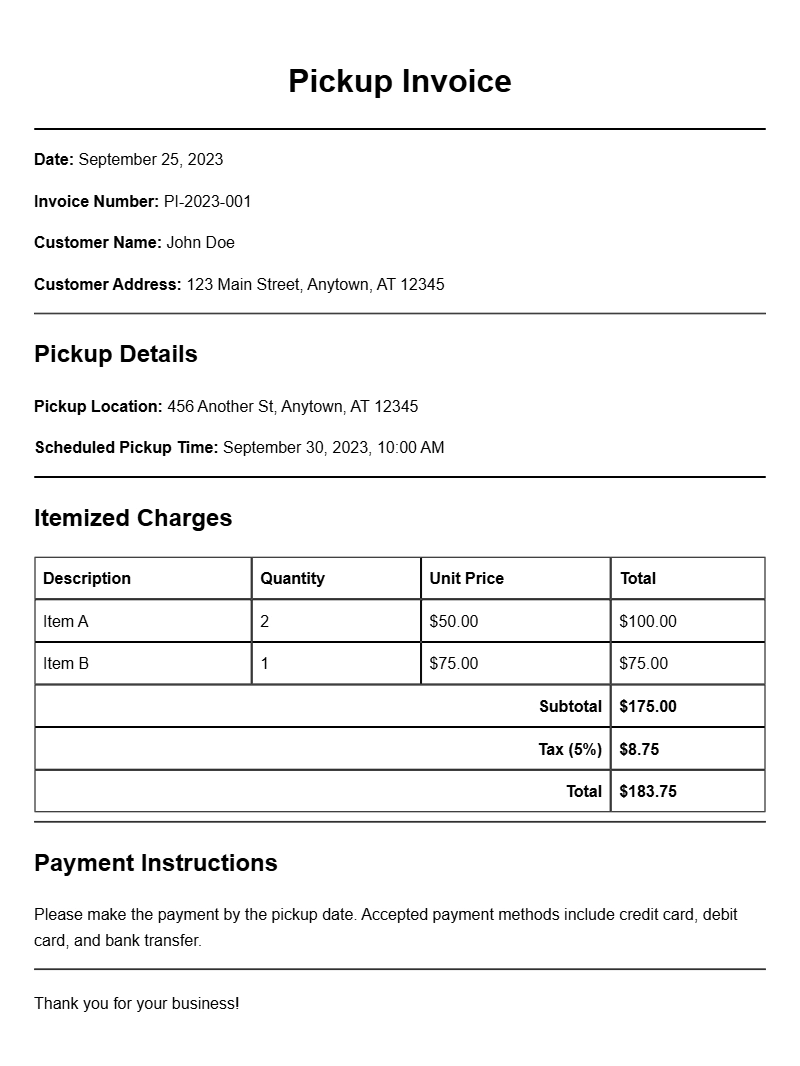
If you’re in a business that involves delivering goods or services, you may find yourself needing pickup invoice templates. These handy documents not only help you get paid but also serve as a record of the transaction for both you and your clients. Let’s explore what pickup invoice templates are, when to use them, and how to create one that meets your needs.
WHAT IS A PICKUP INVOICE TEMPLATE?
A pickup invoice template is a pre-designed document that outlines the details of a transaction where goods or services are picked up by the customer. Unlike traditional invoices, which may be delivered via mail or electronically, pickup invoices are typically used in scenarios where the customer is physically present to collect the item. This could include anything from a bakery where customers pick up cakes to a print shop where clients collect printed materials.
WHEN IS IT USED?
Pickup invoices come into play whenever a customer collects their order directly from your location. This might include:
- Food establishments like bakeries or restaurants
- Retail shops offering click-and-collect services
- Service providers like salons or repair shops
- Print shops where clients retrieve their printed work
KEY COMPONENTS OF A PICKUP INVOICE
To create an effective pickup invoice, make sure to include these essential components:
- Your business information: Name, address, and contact details.
- Customer details: Name and contact information of the customer.
- Invoice number: A unique identifier for tracking purposes.
- Date of issue: The date when the invoice is generated.
- Description of goods/services: Clear details about what is being picked up.
- Payment terms: Information on how and when payment should be made.
- Total amount due: The final amount the customer needs to pay.
STEP-BY-STEP GUIDE TO WRITING A PICKUP INVOICE
Creating a pickup invoice can be straightforward. Here’s a step-by-step guide:
- Choose a template: Start with an editable template that suits your business style.
- Fill in your business details: Include your logo, address, and contact information at the top.
- Add customer information: Enter the name and contact details of the customer receiving the order.
- Assign an invoice number: This helps in tracking all transactions.
- List items/services: Clearly describe what the customer is picking up, including quantities and prices.
- State payment terms: Specify how and when you expect payment.
- Calculate the total: Ensure the total amount is clear and easy to find.
- Review and save: Check for accuracy and save your invoice for your records.
EXAMPLES OF PICKUP INVOICE TEMPLATES
Here’s a simple example of what a pickup invoice might look like:
Your Business Name
Your Address
City, State, Zip Code
Phone Number
Email
Invoice Number: 001
Date of Issue: [Date]
Bill To:
Customer Name
Customer Address
City, State, Zip Code
Phone Number
Description Quantity Price Total
——————————————————–
Cake Order 1 $25.00 $25.00
Pickup Fee 1 $5.00 $5.00
——————————————————–
Total Amount Due: $30.00
COMMON MISTAKES TO AVOID
When creating pickup invoices, keep an eye out for these common pitfalls:
- Forgetting to include all necessary details, which can lead to confusion.
- Not providing clear payment terms, resulting in payment delays.
- Failing to number invoices, making tracking difficult.
TIPS FOR CUSTOMIZATION
Your pickup invoice should reflect your brand. Here are some customization tips:
- Use your brand colors and logo to make it professional.
- Adjust the layout to fit your business style—more or less detail as needed.
- Add a personal touch, like a thank-you note or a discount for future orders.
Creating a pickup invoice doesn’t have to be complicated. By using a template that fits your business and including all necessary details, you can streamline the process and ensure your customers are satisfied. If you’re looking for specific examples, you can check out various invoice samples tailored for different industries, such as print shops, podcast editing, cake decorating, and virtual assistance. Each template can give you a jumpstart on designing your own pickup invoice.
Standard Format & Layout Reference