Street festivals are vibrant events that bring communities together, showcasing local culture, food, and arts. Whether you’re a vendor selling handmade crafts, food, or entertainment, having a clear and professional invoice is essential for smooth transactions. This guide will help you understand street festival invoice templates so you can keep your business organized and efficient.
What is a Street Festival Invoice Template?
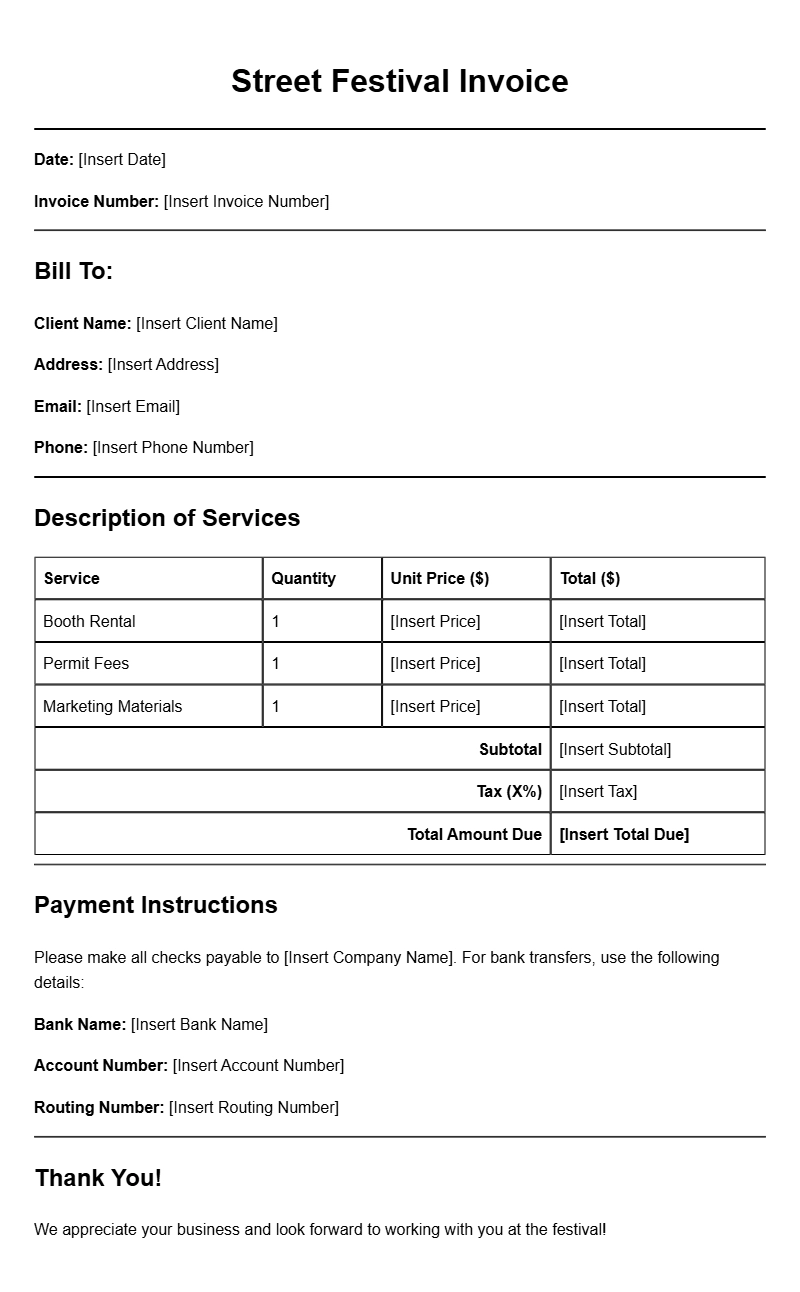
A street festival invoice template is a pre-designed document that helps vendors itemize their sales, request payments, and keep track of transactions during festivals. This template simplifies the billing process and ensures you don’t miss any important details when dealing with customers.
When is it Used?
Vendors typically use street festival invoices during and after the event. After making sales, you can hand over an invoice to customers or send it via email if they are purchasing larger items or services. This not only provides proof of purchase but also helps you maintain accurate records for your business.
Key Components of a Street Festival Invoice
- Your Business Information: Include your name, business name, address, phone number, and email.
- Customer’s Information: Space for the customer’s name, address, and contact info.
- Invoice Number: A unique identifier for each invoice to keep track of transactions.
- Date: The date of the transaction.
- Itemized List of Goods/Services: Detailed description of each item sold, including quantity and price.
- Total Amount Due: Clear total including any taxes or discounts.
- Payment Terms: Specify payment methods accepted and due dates.
Step-by-Step Writing Guide
Creating your invoice can be straightforward. Here’s a quick guide:
- Choose a Template: Start with a basic template that suits your style. You can find free templates online or customize one using software like Microsoft Word or Google Docs.
- Fill in Your Information: Add your business name, logo, and contact details at the top.
- Input Customer Details: Leave space for the customer’s information. This is especially important if you’re selling to larger organizations.
- Add Invoice Details: Assign a unique invoice number and include the date.
- List Products: Clearly describe each product or service, including quantities and prices.
- Calculate Total: Sum up the total amount due and include any taxes or discounts.
- Review and Save: Double-check all details for accuracy before saving or printing the invoice.
Realistic Examples/Templates
Here’s a simple snippet of what your invoice might look like:
Your Business Name
Your Address
Your Email
Your Phone Number
Invoice Number: 001
Date: [Insert Date]
Bill To:
Customer Name
Customer Address
Item Description Quantity Price
————————————————
Handmade Necklace 2 $30.00
Artisan Bread 1 $5.00
Total Amount Due: $65.00
Payment Terms: Due upon receipt
Common Mistakes to Avoid
- Leaving out your contact information can lead to payment delays.
- Not including an invoice number may create confusion when tracking sales.
- Failing to itemize products can lead to misunderstandings about what the customer is paying for.
Tips for Customization
Personalizing your invoice can make your business stand out. Consider these tips:
- Add Your Logo: A logo reinforces your brand identity.
- Use Colors: Incorporate colors that match your brand for a more polished look.
- Include a Thank You Note: A brief message can enhance customer relations.
Crafting an effective street festival invoice doesn’t have to be complicated. With these templates and tips, you can ensure your billing process is as lively and engaging as the festival itself. For more resources on invoice templates, check out our guides on kitchen designer invoices, craft instructor invoices, and auto repair invoices. Happy selling!
Standard Format & Layout Reference